
Flutter packages allows us to quickly build apps without having to develop everything from scratch.
Where can I get flutter packages ?
How can I add flutter packages to my project ?
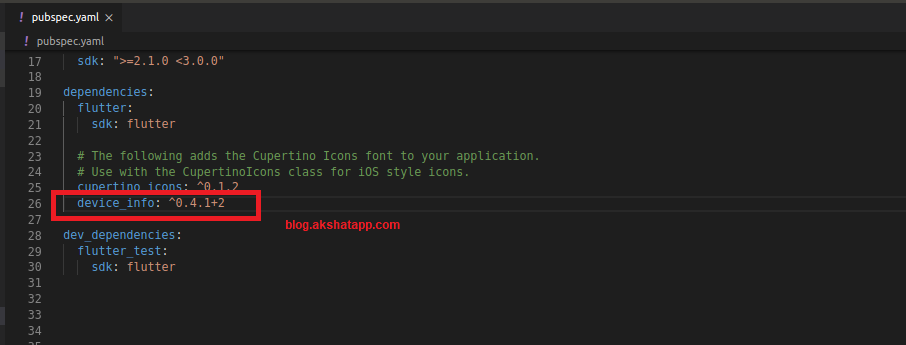
step 1 : Add package name to pubspec.yaml file
- Open pubspec.yaml file inside your project folder.
- Under dependencies section, add your flutter package name and version info as a subsection.
In this demo we will use device_info package
 |
|---|
| Using Flutter Package |
step 2 : install your flutter package
Run “flutter pub get” command to install your flutter package from the command line.
- Save the pubspec.yaml file and run “flutter pub get command” in terminal.
- If using Android Studio - Save the file and Click “packages get” in action ribbon
- If using VS Code : It automatically runs command on saving pubspec.yaml file.
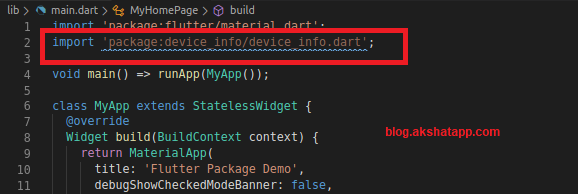
step 3 : Add import statement to your app/main dart code.
import 'package:device_info/device_info.dart';
 |
|---|
| Import Package Code |
step 4 : Stop and Restart your App
Hot Reload and Hot Restart only updates the Dart code. If your packages uses and/or brings some platform-specific code(Java/Kotlin for Android, Swift/Objective-C for iOS) then a full restart might be required to avoid common missing plugin errors.
Now, we can access all the classes, methods and properties of the package. Thus we can use the package functionality in our project.
Bonus Tip : Check the package “Readme Tab” and “Example Tab” to learn how to use the package.
Also refer package documentation to deeply understand the package code and get started with the flutter package.
Frequently Asked Questions
Share This Post

Join our newsletter!
Get the latest developer guides, tutorials, and tips delivered straight to your inbox.