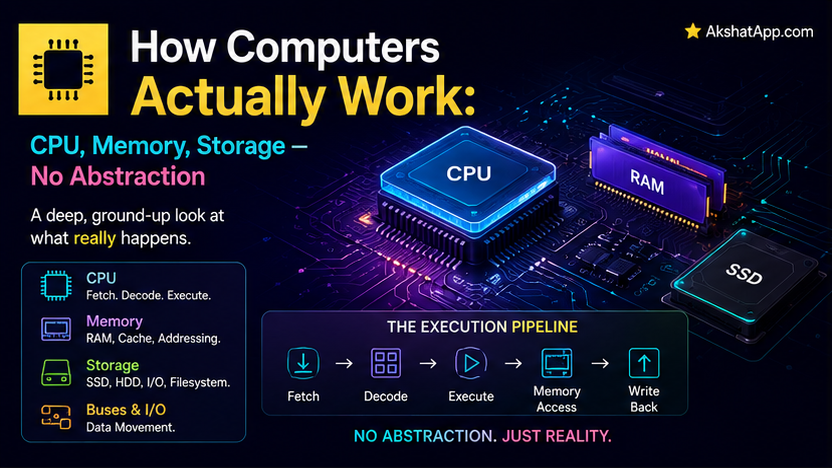
This blog’s Python and JavaScript series taught you to write x = 5 and trust that something, somewhere, makes it happen. That trust is well-placed — but “something, somewhere” is not magic, and understanding what it actually is explains a surprising number of things that otherwise feel like arbitrary rules: why a program crashes with an out-of-memory error, why an SSD upgrade makes almost everything feel faster, why “premature optimization” advice exists at all. This is the first post in a series that opens the black box entirely, starting with the three pieces of hardware every single line of code you have ever written ultimately depends on: the CPU, memory, and storage.
🔗 This is first post in the CS Fundamentals series. This series runs from raw hardware through algorithms, networking, and system design. Code examples use Python throughout, building on this blog’s Python Unlocked series while remaining readable to anyone with basic programming familiarity. Start here — every later post assumes this one.
The CPU: The Part That Actually Computes
The Central Processing Unit is the only component in your computer that actually executes instructions — every other part exists to feed it data or store what it produces. At its core, a CPU repeats one cycle, over and over, billions of times per second: fetch, decode, execute.
Fetch: Retrieve the next instruction from memory, at the address the CPU is currently pointing to.
Decode: Figure out what that instruction actually means — is it an addition, a comparison, a jump to a different part of the program?
Execute: Actually perform that operation, using tiny, extremely fast storage locations inside the CPU itself called registers.
# This single line of Python:
x = 5 + 3

# Ultimately becomes something conceptually like this at the CPU level:
# 1. FETCH an instruction meaning "load the value 5 into a register"
# 2. DECODE it, confirm it's a load instruction
# 3. EXECUTE it — the value 5 is now sitting in a register
# 4. FETCH the next instruction: "load the value 3 into another register"
# 5. DECODE, EXECUTE — 3 is now in a second register
# 6. FETCH: "add these two registers together"
# 7. DECODE, EXECUTE — the CPU's arithmetic unit computes 5 + 3
# 8. FETCH: "store this result in the memory location for x"
# 9. DECODE, EXECUTE — the result, 8, is written to memory
Every high-level operation you write — a function call, a loop, an object method — ultimately decomposes into an enormous number of these tiny fetch-decode-execute cycles. Clock speed, measured in gigahertz, is literally how many of these cycles a CPU can complete per second — a 4 GHz processor completes roughly 4 billion cycles every second, though modern CPUs also execute multiple instructions per cycle through techniques beyond this post’s scope.
Registers: The CPU’s Own Tiny, Blazing-Fast Storage
Registers are storage locations built directly into the CPU itself — a small number of them (often just a few dozen), each holding a single value, but accessed essentially instantaneously, orders of magnitude faster than even the fastest RAM. Every arithmetic operation, every comparison, ultimately happens using values that have been loaded into registers first — this is why the memory hierarchy, covered later in this post, matters so much for real-world performance.
Memory (RAM): Fast, But Forgets Everything
Random Access Memory holds the data and instructions your currently-running programs are actively using. Its defining characteristics: it is fast — dramatically faster to read from and write to than any persistent storage — and it is volatile, meaning its entire contents disappear the instant power is lost. This is precisely why closing a program without saving loses your unsaved work: it existed only in RAM.
tasks = []  # this list lives in RAM for as long as your program runs
tasks.append("Learn how computers work")
# The moment this Python process ends, this list — and everything in it — is gone,
# unless it was explicitly written somewhere persistent first
“Random access” in RAM’s name refers to a genuinely important property: any memory location can be accessed in roughly the same amount of time, regardless of where it physically sits in the memory chip — unlike, say, a cassette tape, where reaching the end requires physically winding through everything before it. This uniform access time is part of what makes RAM practical as general-purpose working memory for a running program.
Storage (SSD/HDD): Slower, But Permanent
Storage — a solid-state drive or, in older or specialized systems, a spinning hard disk drive — holds data persistently, surviving a power loss entirely. This is where your actual files, installed programs, and saved data live between sessions. The tradeoff for this permanence: storage is meaningfully slower to read from and write to than RAM — an SSD is roughly an order of magnitude slower than RAM for random access, and a traditional spinning HDD slower still, since it involves genuinely moving a physical read head across a spinning platter.
# Writing to storage — genuinely, measurably slower than working with an in-memory list
with open("tasks.json", "w") as f:
    f.write(str(tasks))  # this data now survives program restarts and power loss
The Memory Hierarchy: Speed vs. Capacity vs. Cost
This is the single most useful mental model this post can give you — nearly every performance characteristic you will encounter as a developer traces back to it directly.
FASTEST, SMALLEST, MOST EXPENSIVE (per byte)
    Registers        (a few dozen values, effectively instant)
    CPU Cache (L1/L2/L3)  (kilobytes to megabytes, extremely fast)
    RAM              (gigabytes, fast)
    SSD              (hundreds of GB to TB, moderate)
    HDD              (TB+, slow)
SLOWEST, LARGEST, CHEAPEST (per byte)
Every level of this hierarchy trades capacity and cost against speed. Registers are essentially free to access but hold almost nothing. Storage can hold enormous amounts of data cheaply but is dramatically slower to reach. CPU cache sits between registers and RAM specifically to soften this gap — a small amount of extremely fast memory, physically located on or near the CPU chip itself, that automatically holds copies of recently or frequently accessed data from RAM, so the CPU does not need to reach all the way to (comparatively slow) RAM every single time.
Why This Explains So Much Real-World Behavior
Why an SSD upgrade makes almost everything feel faster: Programs, operating systems, and files all live in storage until they are actively needed, at which point they are loaded into RAM. A faster storage device speeds up literally every operation that involves loading something from disk — which is most operations, especially at startup.
Why “keep frequently-accessed data in memory” is universal performance advice: Any data repeatedly re-read from storage instead of kept in RAM pays storage’s slower access cost every single time, unnecessarily — exactly the reasoning behind caching strategies covered throughout later posts in this series and this blog’s other technical content.
Why running out of RAM causes such a dramatic slowdown, not just an error: When a system runs low on RAM, operating systems often resort to using storage as a slow, overflow substitute for RAM (called “swap” or “paging”) — meaning operations that should be RAM-speed suddenly incur storage-speed costs, which can feel like a program grinding to a near-halt rather than simply running somewhat slower.
How a Program Actually Runs, End to End
1. Your program's code sits on STORAGE (a .py file, or compiled executable)
2. You run it — the operating system loads the necessary instructions into RAM
3. The CPU fetches instructions from RAM (via cache, when possible)
4. The CPU decodes and executes each instruction, using its registers
5. Results get written back to RAM
6. If you explicitly save data, it gets written back to STORAGE for permanence
This is the complete round trip every program makes, from Post #1’s very first print("Hello") in this blog’s Python series through the most complex application you will ever build — the hierarchy and cycle covered in this post apply identically at every scale.
Real-World Use Cases
Diagnosing “my program is unexpectedly slow”: Understanding the memory hierarchy is often the fastest path to a real diagnosis — is the program doing unnecessary storage I/O that could be cached in RAM? Is it working with a dataset too large to fit comfortably in available RAM, triggering slow swap usage?
Understanding cloud computing cost tradeoffs: Cloud providers price RAM, storage, and compute separately, directly reflecting this hierarchy’s real cost structure — understanding it helps make informed decisions about server sizing and architecture.
Making sense of “in-memory database” and caching technologies: Tools like Redis, covered elsewhere on this blog, exist specifically to exploit the RAM-versus-storage speed gap covered in this post, trading RAM’s volatility for dramatic speed gains on frequently-accessed data.
Common Misconceptions
⚠️ Misconception 1: “More RAM always makes a program faster” More RAM prevents the specific slowdown caused by running out of it (triggering slow swap usage) — it does not make CPU-bound computation itself faster, since that is limited by processing speed, not memory capacity, once you have enough RAM to avoid swapping.
⚠️ Misconception 2: “RAM and storage are basically the same thing, just different sizes” Covered throughout this post — they differ fundamentally in volatility (RAM forgets everything on power loss; storage does not) and speed, not just capacity, and this distinction shapes how software is designed to use each appropriately.
⚠️ Misconception 3: “A faster CPU clock speed always means a faster computer” Clock speed is one factor among several — the memory hierarchy covered in this post means a CPU can be sitting idle, waiting for data to arrive from slower RAM or storage, regardless of how fast it could theoretically execute instructions once that data actually arrives.
⚠️ Misconception 4: “Programs run directly on the hardware I’m typing code for” Modern software runs through several layers — an operating system, often a language runtime or interpreter — between your code and the raw hardware fetch-decode-execute cycle covered in this post; later posts in this series, particularly on operating systems and compilers, cover these intermediate layers directly.
Quick Reference
| Component | Speed | Capacity | Persists Through Power Loss? |
|---|---|---|---|
| CPU Registers | Fastest | A few dozen values | No |
| CPU Cache | Extremely fast | KB–MB | No |
| RAM | Fast | GB | No |
| SSD | Moderate | Hundreds of GB–TB | Yes |
| HDD | Slow | TB+ | Yes |
Fetch → Decode → Execute
(the CPU's fundamental, endlessly repeated cycle)
Exercises
Exercise 1 — Direct application
Write a short Python script that creates a list of one million numbers entirely in memory, and separately, one that writes those same numbers to a file on disk one at a time. Time both using Python’s time module, and note the magnitude of the difference.
Exercise 2 — Slight variation Research your own computer’s specific RAM capacity and storage type (SSD or HDD). Calculate roughly how many typical Python source files (a few KB each) could theoretically fit in RAM at once, versus in your available storage.
Exercise 3 — Real-world combination Explain, in your own words, why a program that processes a dataset larger than your computer’s available RAM tends to become dramatically — not just moderately — slower, connecting your answer directly to this post’s coverage of swap/paging.
Exercise 4 — Open-ended challenge Look up your own CPU’s clock speed and core count. Research what “multiple cores” actually means in terms of the fetch-decode-execute cycle covered in this post — does each core have its own registers, or share them?
FAQ
Q: Is this level of hardware detail actually relevant to writing software, or just interesting trivia? A: Genuinely relevant — performance problems, memory-related bugs, and infrastructure cost decisions all trace back to the concepts in this post more often than most developers initially assume, which is exactly why this series opens with hardware rather than treating it as optional background.
Q: Do I need to understand assembly language or machine code to understand this post’s content? A: No — this post deliberately stays at the conceptual level (fetch-decode-execute, the memory hierarchy) without requiring you to read or write actual machine instructions; that level of detail is a separate, much deeper specialization.
Q: Why do CPUs have multiple cores instead of just being faster? A: Physical and thermal limits make single-core clock speed increases increasingly difficult and expensive past a certain point — adding cores allows genuinely parallel execution of separate instruction streams instead, directly relevant to the concurrency concepts covered in this blog’s Python and JavaScript series.
Q: What’s the actual difference between cache and RAM if both just hold data temporarily? A: Purely speed and size — cache is smaller, faster, and physically closer to the CPU, automatically managed by the hardware to hold whatever data has recently been used or is predicted to be needed soon, while RAM is larger, slightly slower, and holds your program’s complete working data set.
Summary and Next Steps
You now understand the actual mechanism underneath every line of code you have ever written: the CPU’s endless fetch-decode-execute cycle, the RAM-versus-storage tradeoff between speed and permanence, and — most practically useful — the memory hierarchy that explains why so much performance advice in software development ultimately comes down to “keep frequently-needed things closer to the CPU.”
Your next step: Complete Exercise 1 — timing in-memory versus disk-based operations directly — since measuring the actual, concrete speed difference yourself is considerably more convincing than reading about it in the abstract.
Last updated: August 2026.
Share This Post

Join our newsletter!
Get the latest developer guides, tutorials, and tips delivered straight to your inbox.



