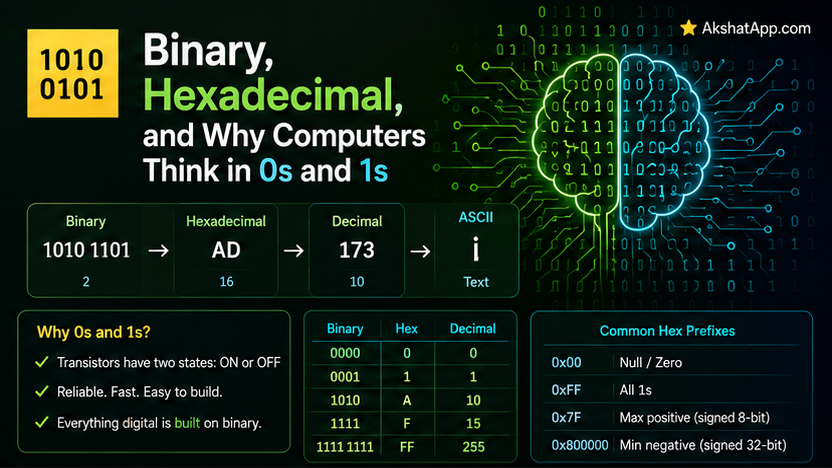
We covered what the CPU, RAM, and storage actually do — this post covers the language everything inside them is actually encoded in. Every value your program has ever worked with — the number 5, the string “hello”, an image, this very sentence — exists, at the hardware level, as nothing but electrical signals representing two states: on or off. Understanding binary is not academic trivia; it directly explains real, practical phenomena you will encounter as a developer, from integer overflow to hex color codes to why file sizes come in specific increments.
Why Binary Specifically: Reliability Over Everything Else
A computer’s hardware is fundamentally electrical — transistors that are either allowing current to flow or not. Building hardware that reliably distinguishes ten distinct voltage levels (for a base-10 system matching human counting) is dramatically more error-prone than building hardware that reliably distinguishes just two states: current flowing, or not. Binary was chosen for reliability, not mathematical elegance — two clearly distinguishable states are far less likely to be misread due to electrical noise or minor voltage fluctuation than ten closely-spaced ones would be.
Counting in Binary
Decimal (base 10) uses ten digits (0–9) and each position represents a power of 10. Binary (base 2) uses exactly two digits (0 and 1), and each position represents a power of 2.
Decimal:  347 = (3 × 100) + (4 × 10) + (7 × 1)
              = (3 × 10²) + (4 × 10¹) + (7 × 10⁰)

Binary:  1011 = (1 × 8) + (0 × 4) + (1 × 2) + (1 × 1)
              = (1 × 2³) + (0 × 2²) + (1 × 2¹) + (1 × 2⁰)
              = 8 + 0 + 2 + 1 = 11 in decimal
# Python converts between these directly
print(bin(11)) # '0b1011' — the 0b prefix marks it as a binary literal
print(int('1011', 2)) # 11 — parse a binary string back to a decimal integer
print(0b1011) # 11 — you can write binary literals directly in Python codeConverting Decimal to Binary
The standard method: repeatedly divide by 2, tracking the remainders, then read them bottom to top.
def decimal_to_binary(n: int) -> str:
    if n == 0:
        return "0"
    bits = []
    while n > 0:
        bits.append(str(n % 2))
        n = n // 2
    return "".join(reversed(bits))

print(decimal_to_binary(11))  # "1011"
Hexadecimal: Binary’s Compact Shorthand
Binary numbers get long and hard to read quickly — a single byte (8 bits) like 11010110 is already unwieldy, and real values are frequently many bytes long. Hexadecimal (base 16) exists specifically to make binary more human-readable, because of a genuinely convenient mathematical relationship: exactly 4 binary digits map to exactly 1 hexadecimal digit, with no remainder or awkward conversion.
Hex digits: 0 1 2 3 4 5 6 7 8 9 A B C D E F
            (A through F represent 10 through 15)

4-bit binary → 1 hex digit:
0000 = 0    0100 = 4    1000 = 8    1100 = C
0001 = 1    0101 = 5    1001 = 9    1101 = D
0010 = 2    0110 = 6    1010 = A    1110 = E
0011 = 3    0111 = 7    1011 = B    1111 = F
# The byte 11010110 in binary splits cleanly into two 4-bit groups: 1101 and 0110
# 1101 = D, 0110 = 6
# So the hex representation is D6 — vastly more compact and readable than 11010110
print(hex(0b11010110)) # '0xd6'
print(int('D6', 16)) # 214 — parse a hex string back to decimalThis is why hexadecimal appears constantly in programming contexts dealing directly with raw binary data — it is a genuinely more compact, more readable stand-in for binary, not an arbitrary alternative numbering system.
How Text Becomes Numbers: ASCII and Unicode
Computers only ever store numbers — text is simply numbers with an agreed-upon mapping to characters. ASCII, an early standard, mapped the numbers 0–127 to English letters, digits, and basic punctuation.
print(ord("A"))   # 65 — the ASCII/Unicode numeric value of the character "A"
print(chr(65))     # "A" — convert a numeric value back to its character

print(ord("a"))    # 97 — lowercase letters have different numeric values
print(bin(ord("A")))  # '0b1000001' — "A" in raw binary
ASCII’s 128 possible values could not represent the world’s full range of languages, symbols, and emoji — Unicode extends this same underlying idea (mapping characters to numbers) to cover an enormous range of characters across virtually every writing system, with UTF-8 being the most common encoding for actually storing those numbers as bytes.
print(ord("€"))    # 8364 — a Unicode character well beyond ASCII's 128-value range
print("héllo".encode("utf-8"))  # b'h\xc3\xa9llo' — the actual bytes UTF-8 uses to store this text
Bitwise Operations: Working Directly With Binary
Beyond number representation, several operators work directly on a value’s individual binary bits — genuinely useful in real code, not just theoretical.
a = 0b1100  # 12
b = 0b1010  # 10

print(bin(a & b))   # AND: '0b1000' — 1 only where BOTH bits are 1
print(bin(a | b))   # OR:  '0b1110' — 1 where EITHER bit is 1
print(bin(a ^ b))   # XOR: '0b0110' — 1 where the bits DIFFER
print(bin(a << 1))  # Left shift: '0b11000' — multiply by 2 (24)
print(bin(a >> 1))  # Right shift: '0b110' — integer divide by 2 (6)
Practical uses: bitwise flags (combining multiple boolean settings into a single integer, common in lower-level APIs and permission systems), fast multiplication/division by powers of two via shifting, and hash function implementations (relevant directly to Post #4’s hash tables) frequently use bitwise operations internally for performance.
Real-World Use Cases
Hex color codes: #FF5733 in CSS or design tools is literally three hexadecimal byte values — FF (red), 57 (green), 33 (blue) — each representing 0–255 in a compact, two-character form, a direct, everyday application of this post’s hex coverage.
Understanding integer overflow: A fixed-size integer type (common in many languages, and relevant to JavaScript’s number representation covered in this blog’s JavaScript series) can only represent a finite range of binary values — exceeding that range causes overflow, wrapping around unexpectedly, a real bug source directly explained by understanding binary representation.
Reading memory addresses and debugger output: Memory addresses, covered conceptually in Post #1, are almost universally displayed in hexadecimal in debuggers and low-level tools, specifically because of the compact readability covered in this post.
Network and file format debugging: Raw binary data — network packets, file headers — is frequently inspected and reasoned about in hexadecimal specifically because it is dramatically more readable than the equivalent raw binary.
Common Mistakes and Gotchas
⚠️ Mistake 1: Confusing a binary/hex literal’s prefix with its actual value
0b1011 and 0x1011 are genuinely different numbers — the 0b and 0x prefixes indicate binary and hexadecimal interpretation respectively, and 1011 means something entirely different depending on which base is intended.
⚠️ Mistake 2: Assuming ASCII covers all the text you’ll ever need to handle Covered above — real-world applications need Unicode’s much broader character coverage; assuming ASCII-only text is a genuine, common source of bugs when handling international text, emoji, or special symbols.
⚠️ Mistake 3: Forgetting that bitwise AND/OR are different from logical and/or
if 5 & 3:  # bitwise AND — this evaluates the bitwise result (1), which is truthy
    print("This runs, but maybe not for the reason you expected")
Bitwise operators work on individual bits and produce a number; logical operators (and, or, covered in this blog’s Python series) work on truthiness and produce a boolean — using one where you meant the other produces confusing, hard-to-spot bugs.
⚠️ Mistake 4: Manually converting between bases when a language’s built-in tools already do it correctly
Covered throughout this post — bin(), hex(), int(x, base) and similar built-ins handle base conversion reliably; manual conversion logic is worth understanding conceptually but rarely worth hand-rolling in real production code.
Quick Reference
# Conversions
bin(11)        # '0b1011'
hex(214)        # '0xd6'
int('1011', 2)   # 11 — binary string to decimal
int('D6', 16)     # 214 — hex string to decimal

# Text encoding
ord('A')        # 65
chr(65)          # 'A'
"text".encode("utf-8")  # bytes representation

# Bitwise operators
a & b    # AND
a | b     # OR
a ^ b      # XOR
a << n      # left shift (multiply by 2^n)
a >> n       # right shift (divide by 2^n)
Exercises
Exercise 1 — Direct application
Convert the decimal number 200 to both binary and hexadecimal by hand, then verify your answer using Python’s bin() and hex() functions.
Exercise 2 — Slight variation
Write a Python function hex_to_rgb(hex_color: str) -> tuple[int, int, int] that takes a hex color code like "#FF5733" and returns the individual red, green, and blue values as decimal integers.
Exercise 3 — Real-world combination Write a function using bitwise operations to check whether a given integer is even or odd, without using the modulo operator — think about which single bit determines this.
Exercise 4 — Open-ended challenge Research what happens when a fixed-size integer (commonly 32-bit) exceeds its maximum representable value in a language that has this limitation, and explain, using this post’s binary coverage, why the specific “wraps around to a negative number” behavior occurs.
FAQ
Q: Do I need to be able to convert between binary, decimal, and hex by hand fluently? A: Not for most day-to-day programming — built-in language functions handle conversion reliably. Understanding the underlying concept well enough to reason about overflow, encoding, and bitwise operations is the genuinely useful, transferable skill this post is building.
Q: Why does hexadecimal use letters A through F instead of just more digits? A: Because hexadecimal is base 16, it needs 16 distinct symbols per digit position — after using the familiar 0 through 9, the convention extends into the alphabet (A=10 through F=15) rather than inventing entirely new symbols.
Q: Is octal (base 8) still relevant, or is it purely historical? A: Octal sees far less use in 2026 than historically — it appears occasionally in specific contexts (Unix file permissions being a notable, still-current example) but hexadecimal has become the dominant human-readable representation of binary data in most modern contexts.
Q: Why did the “€” example earlier require Unicode instead of ASCII? A: The Euro sign’s numeric value (8364) far exceeds ASCII’s 0–127 range entirely — this is precisely why ASCII alone cannot represent the full range of real-world text, directly motivating Unicode’s much larger character set.
Summary and Next Steps
You now understand why computers use binary (electrical reliability, not mathematical preference), how to convert between binary, decimal, and hexadecimal, how text is fundamentally just numbers via ASCII and Unicode, and how bitwise operations work directly on individual bits — genuinely practical knowledge that explains hex color codes, integer overflow, and encoding-related bugs you will encounter in real development work.
Your next step: Complete Exercise 2 — the hex-to-RGB converter — since it combines this post’s hex coverage with a genuinely common real-world task (working with color values), the kind of practical application that cements a concept far more effectively than pure number-base drills alone.
Last updated: August 2026.
Share This Post

Join our newsletter!
Get the latest developer guides, tutorials, and tips delivered straight to your inbox.



