This blog’s JavaScript series covered fetch(url) in real depth — checking response.ok, handling JSON, managing timeouts — while treating the actual journey from “call this function” to “a server somewhere responds” entirely as a black box. This post opens that box completely: what a URL’s domain name actually resolves to, how your data reliably reaches a server thousands of miles away without arriving scrambled or incomplete, and precisely what HTTP — the protocol underneath every web request this blog has ever covered — actually looks like on the wire.
The Layered Model, Simplified but Accurate
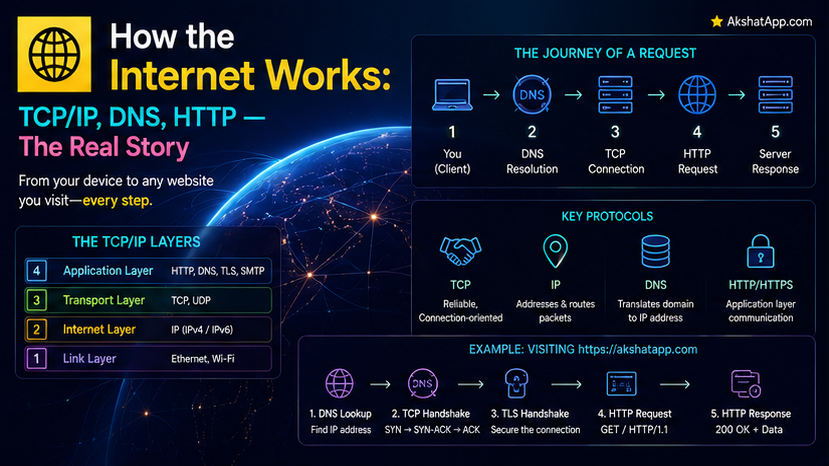
Real networking involves several formally distinct layers, but the following simplified model captures what matters practically:
DNS   — translates a human-readable domain name into a numeric IP address
IP    — routes individual packets of data across the network, best-effort
TCP   — guarantees those packets arrive complete, in order, and error-free
HTTP  — the actual application-level protocol websites and APIs use to communicate
Each layer builds directly on the one below it — HTTP does not need to worry about packets arriving out of order, because TCP already guarantees that; TCP does not need to worry about finding the destination computer, because IP already handles that. This is deliberate, valuable separation of concerns, directly analogous to the layered abstractions covered throughout this blog’s other series.
IP Addresses: The Internet’s Actual Addressing System
Every device connected to the internet has an IP address — a numeric identifier, the actual destination any data is routed to.
IPv4 example: 142.250.80.46      (four numbers, 0-255, separated by dots)
IPv6 example: 2607:f8b0:4004:c1b::66  (a much larger address space, increasingly common)
IPv4’s roughly 4.3 billion possible addresses, once seemingly enormous, have become genuinely insufficient for the number of internet-connected devices worldwide — IPv6 exists specifically to solve this, offering a dramatically larger address space, with adoption continuing to grow steadily.
DNS: Translating Names Into Addresses
Nobody types 142.250.80.46 into a browser — they type a domain name, and DNS (Domain Name System) is the distributed lookup system that translates it into the actual IP address needed for routing.
1. You type "example.com" into your browser
2. Your computer asks a DNS resolver: "what IP address is this?"
3. The resolver checks its cache first — exactly Post #1's memory hierarchy
   principle applied to network lookups: check somewhere fast before somewhere slow
4. If not cached, the resolver queries a chain of DNS servers, working from
   general (top-level domain servers) to specific (the domain's own DNS records)
5. The resolver returns the actual IP address
6. Your computer can now actually connect to that address
DNS caching, at multiple levels (your browser, your operating system, your internet provider), exists for precisely the reason Post #1 covered generally: repeatedly performing the full DNS lookup process for the same domain would be needlessly slow, so results are cached and reused for a period of time, dramatically speeding up subsequent visits to the same site.
TCP: Reliable, Ordered Delivery Over an Unreliable Network
The underlying network genuinely does not guarantee that data arrives at all, arrives once, or arrives in the order it was sent — individual packets can be lost, duplicated, or reordered as they traverse many different intermediate network hops. TCP (Transmission Control Protocol) exists specifically to provide reliability on top of this unreliable foundation.
The three-way handshake: before any actual data is sent, TCP establishes a connection through a specific exchange — the client sends a “synchronize” signal, the server responds with an acknowledgment plus its own synchronize signal, and the client sends a final acknowledgment back. Only after this three-step handshake completes does actual data transfer begin, ensuring both sides have confirmed the connection is genuinely ready.
Sequencing and retransmission: TCP numbers every piece of data it sends, allowing the receiving end to detect missing or out-of-order pieces and request retransmission of anything genuinely lost — this is precisely what “reliable” means in TCP’s name, and it is why a large file download reliably arrives byte-for-byte correct despite crossing an unreliable underlying network.
Why Not Just Skip This Overhead? UDP as the Alternative
UDP (User Datagram Protocol) deliberately skips TCP’s reliability guarantees entirely, in exchange for lower overhead and latency — genuinely appropriate for applications like live video streaming or online gaming, where a single dropped packet causing a brief glitch is preferable to the delay TCP’s guaranteed-delivery retransmission would introduce. This is a direct, real-world tradeoff between reliability and speed, worth recognizing as a deliberate engineering choice rather than TCP being universally “better.”
HTTP: The Actual Protocol Websites and APIs Use
HTTP (HyperText Transfer Protocol) is the application-level protocol running on top of the reliable TCP connection covered above — the actual format of a web request and response.
GET /api/tasks HTTP/1.1
Host: example.com
Accept: application/json
HTTP/1.1 200 OK
Content-Type: application/json
Content-Length: 142
{"tasks": [{"description": "Learn networking", "completed": false}]}This is precisely what a fetch() call in this blog’s JavaScript series, or a requests.get() call in this blog’s Python series, actually sends and receives underneath the convenient function call — a plain-text request specifying a method (GET), a path, and headers, met with a plain-text response specifying a status code (200), headers, and a body.
Status codes, revisited with their actual origin explained: 200 OK, 404 Not Found, 500 Internal Server Error — extensively covered in this blog’s Python and JavaScript API content — are not an arbitrary convention invented by a specific framework; they are defined directly in the HTTP protocol specification itself, which is exactly why every language’s HTTP library, regardless of vendor, reports and interprets them identically.
The Complete Journey: Typing a URL and Pressing Enter
1. You type "example.com" and press Enter
2. DNS resolves "example.com" to an IP address (this post's DNS section)
3. TCP establishes a reliable connection to that IP address, via the three-way handshake
4. Your browser sends an HTTP GET request over that established TCP connection
5. The server processes the request and sends back an HTTP response
6. TCP guarantees that response arrives complete and in order
7. Your browser parses the HTML/CSS/JavaScript in the response and renders the page
Every single request this blog’s other series has ever made — every fetch(), every requests.get(), every browser page load — follows precisely this sequence, previously treated as instantaneous magic, now fully explained.
Real-World Use Cases
Debugging “why is my API call failing”: Understanding this post’s layered model helps correctly diagnose where a problem actually lives — a DNS failure, a connection timeout (TCP-level), or an HTTP-level error (a 404 or 500) each point to genuinely different causes and fixes.
Choosing TCP vs. UDP for a real application: Covered directly above — this is a genuine, consequential engineering decision for anyone building real-time or latency-sensitive applications.
Understanding CDN and caching strategies: DNS caching and HTTP-level caching (covered further in later, more advanced networking content) both directly build on the “check somewhere fast before somewhere slow” principle established back in Post #1.
Making sense of HTTPS: The “S” adds an encryption layer on top of everything covered in this post — full coverage in Post #16’s dedicated cryptography content, directly building on the plain-HTTP foundation established here.
Common Mistakes and Gotchas
⚠️ Mistake 1: Assuming a failed request always means the server is down A failure can occur at the DNS layer (can’t resolve the domain), the TCP layer (can’t establish a connection), or the HTTP layer (connected fine, but the server returned an error status) — each requires different diagnosis, and conflating them wastes debugging time.
⚠️ Mistake 2: Not understanding why “the site loaded slowly the first time but was instant the second time” Directly explained by this post’s DNS and general caching coverage — the second visit benefited from cached DNS resolution and potentially cached HTTP responses, exactly the memory-hierarchy-style speedup principle from Post #1 applied to networking.
⚠️ Mistake 3: Assuming UDP is simply “worse” than TCP Covered directly above — UDP is a deliberate, appropriate engineering tradeoff for specific use cases (streaming, gaming) where TCP’s reliability guarantees would introduce unacceptable latency; neither protocol is universally superior.
⚠️ Mistake 4: Confusing an HTTP status code with a network-level connection failure
A 500 Internal Server Error means the connection succeeded completely and the server actively responded with an error — genuinely different from a connection timeout, where no response was received at all; this distinction directly matters for correct error handling, covered extensively in this blog’s Python and JavaScript API content.
Quick Reference
DNS: domain name → IP address (cached at multiple levels for speed)
IP: routes individual packets, best-effort, no reliability guarantee
TCP: adds reliability on top of IP — handshake, sequencing, retransmission
UDP: skips TCP's reliability for lower latency — streaming, gaming
HTTP: the application-level protocol for web requests/responses
GET /path HTTP/1.1 → 200 OK
Host: example.com Content-Type: application/json
(response body)Exercises
Exercise 1 — Direct application
Using your operating system’s command line, run nslookup (or dig) against a domain of your choice, and identify the actual IP address DNS resolves it to.
Exercise 2 — Slight variation Using your browser’s developer tools (Network tab), load a webpage and identify the actual HTTP status code, headers, and approximate timing breakdown (DNS lookup time vs. connection time vs. actual data transfer time) for the main page request.
Exercise 3 — Real-world combination
Revisit a fetch() or requests example from this blog’s earlier Python or JavaScript content, and annotate it with comments identifying exactly which part of this post’s layered model (DNS, TCP, HTTP) each aspect of the request/response cycle corresponds to.
Exercise 4 — Open-ended challenge Research one real-world application that deliberately uses UDP instead of TCP, and explain — using this post’s tradeoff coverage — specifically why that application’s requirements favor UDP’s lower latency over TCP’s guaranteed reliability.
FAQ
Q: Is HTTPS a completely different protocol from HTTP, or an extension of it? A: HTTPS is HTTP running over an additional encryption layer (TLS) — the request/response structure covered in this post remains identical; Post #16’s cryptography coverage explains exactly what that added encryption layer does and how it works.
Q: Why does DNS sometimes seem to “not update” immediately after a website changes its server? A: Directly explained by this post’s DNS caching coverage — cached DNS records have a specified expiration time (TTL), and various caches at different levels (your browser, your ISP) may continue serving the old, cached answer until that expiration passes.
Q: Do all internet communications use TCP? A: No — covered directly above, UDP is a genuine, widely-used alternative for latency-sensitive applications; TCP is the dominant choice specifically for HTTP and most traditional web/API traffic, where reliability matters more than minimizing latency.
Q: What actually happens if a packet gets lost during a TCP-based request?
A: TCP’s sequencing (covered in this post) detects the gap and automatically triggers retransmission of the missing packet — this happens transparently, below the level any application code (including every fetch() call in this blog’s other series) ever needs to be aware of.
Summary and Next Steps
You now understand the complete journey underneath every web request this blog has ever covered: DNS translating a domain name into an IP address (with caching, exactly as Post #1 predicted, at multiple levels), TCP providing reliable, ordered delivery over an inherently unreliable network via its three-way handshake and sequencing, and HTTP as the actual, plain-text application protocol carrying the requests and responses this blog’s Python and JavaScript series worked with directly.
Your next step: Complete Exercise 2 — inspecting a real page load’s actual network timing in your browser’s developer tools — since seeing the genuine, measured breakdown between DNS lookup, connection establishment, and data transfer makes this post’s layered model concrete rather than theoretical.
Last updated: August 2026.
Share This Post

Join our newsletter!
Get the latest developer guides, tutorials, and tips delivered straight to your inbox.



