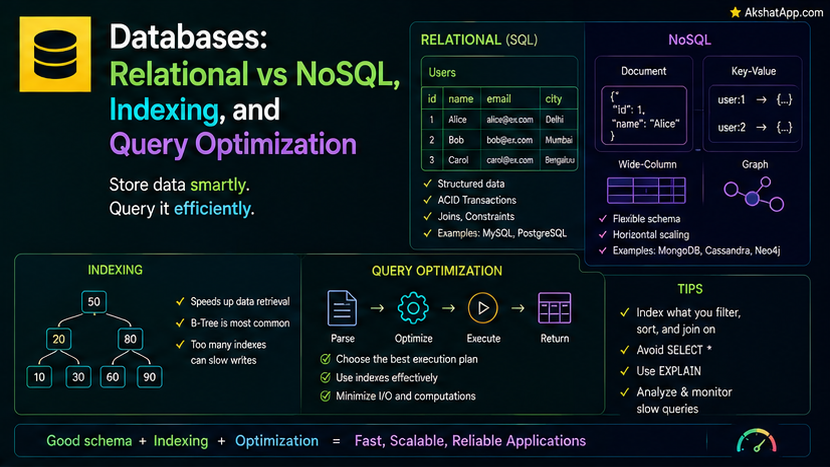
Post #4 covered hash tables achieving O(1) average-case lookup. Post #5 covered binary search trees achieving O(log n) search with sorted-order traversal. Both posts flagged, without full explanation, that these exact structures underlie database indexing — this is the post that makes that connection completely concrete. A database index is not a database-specific invention; it is one of this series’ own foundational data structures, applied directly to the problem of finding rows fast.
Relational Databases: Tables, Rows, and Structured Relationships
A relational database organizes data into tables — rows of records, each with a fixed set of named columns — with relationships between tables expressed through shared identifier values (a “foreign key” in one table referencing a “primary key” in another).
users table:
| id | name  | email             |
|----|-------|-------------------|
| 1  | Alex  | alex@example.com  |
| 2  | Sam   | sam@example.com   |

tasks table:
| id | description        | user_id | completed |
|----|--------------------| --------|-----------|
| 1  | Learn databases     | 1       | false     |
| 2  | Write a query       | 1       | true      |
| 3  | Review PRs          | 2       | false     |
tasks.user_id referencing users.id is precisely how a relational database expresses “this task belongs to this user” — a structured, enforceable relationship, with the database itself capable of guaranteeing that a task can never reference a user_id that doesn’t actually exist. Querying relational data uses SQL (Structured Query Language) — genuinely worth its own dedicated, in-depth coverage beyond this post’s scope, with a basic query looking like:
SELECT description FROM tasks WHERE user_id = 1 AND completed = false;NoSQL Databases: Different Structures for Different Needs
“NoSQL” is a broad umbrella covering several genuinely distinct alternative approaches, each solving a specific limitation of the rigid, table-based relational model for particular use cases.
Document stores (MongoDB and similar) store flexible, JSON-like documents rather than fixed-column rows — genuinely useful when different records naturally have different, evolving shapes, avoiding the rigid schema relational tables require.
# A document store record — directly resembles the Python/JSON objects
# used throughout this blog's Python and JavaScript series
{
    "description": "Learn databases",
    "completed": False,
    "tags": ["cs-fundamentals", "learning"],  # some tasks might have tags, others might not
}
Key-value stores (Redis and similar) are, structurally, precisely Post #4’s hash table, exposed directly as a database — extremely fast lookups by an exact key, minimal additional structure, genuinely useful for caching (directly connecting to Post #1’s memory hierarchy — an in-memory key-value store trades RAM’s volatility for dramatic speed) and simple, high-throughput lookup patterns.
Graph databases (Neo4j and similar) directly store and query Post #6’s graph structure — nodes and edges — genuinely useful when the relationships themselves between data are the primary thing being queried (deep social network connections, recommendation traversal) rather than the individual records.
The practical decision: relational databases excel at structured data with genuine, enforced relationships and complex, multi-table queries; NoSQL alternatives excel at specific access patterns (flexible schemas, ultra-fast key lookups, relationship-heavy queries) that the relational model handles less naturally.
Indexing: This Series’ Data Structures, Applied Directly
Without an index, finding a specific row requires checking every single row — exactly Post #9’s linear search, O(n), genuinely impractical for a table with millions of rows.
B-Tree Indexes: Post #5’s Trees, in Production
The most common relational database index type is a B-tree — a genuinely direct relative of Post #5’s binary search tree, extended so each node can hold multiple values and have more than two children (optimized specifically for the memory-hierarchy realities from Post #1, since a B-tree node is typically sized to match a single disk read, minimizing the number of slow storage accesses needed to traverse it).
CREATE INDEX idx_user_id ON tasks(user_id);This single command builds a tree-like structure over the user_id column, exactly the ordering property Post #5 covered for BSTs — the database can now locate all tasks for a given user_id in roughly O(log n) time, instead of scanning every row, and — a direct bonus from the BST’s inherent ordering — can also efficiently answer range queries (“all tasks for users with id between 100 and 200”), something a pure hash-based index fundamentally cannot do, exactly as Post #5 and Post #9 established.
Hash Indexes: Post #4’s Hash Tables, in Production
Some databases also offer hash indexes — directly, literally Post #4’s hash table, applied to a database column — offering genuinely faster O(1) average-case lookup for exact-match queries specifically, at the direct cost of Post #5’s ordering and range-query capability, since a hash table deliberately scatters keys for speed rather than preserving any sorted relationship between them.
The choice between B-tree and hash indexes is precisely the choice covered in Post #9’s comparison table — B-tree when you need sorted-order traversal or range queries, hash when you need only exact-match lookups and want the fastest possible average case.
Why Indexes Speed Up Reads But Slow Down Writes
An index is additional, maintained structure alongside the actual data — every time a row is inserted, updated, or deleted, every index on that table must also be updated to remain accurate, directly adding write-time cost in exchange for the dramatic read-time improvement covered above. This is a genuine, real engineering tradeoff, not a flaw: a table with many indexes optimized for fast reads will genuinely have slower write performance, and choosing which columns to index requires weighing your application’s actual read-versus-write balance.
-- Every index added here makes SELECT queries filtering on that column faster,
-- and every INSERT/UPDATE/DELETE on this table correspondingly slower
CREATE INDEX idx_user_id ON tasks(user_id);
CREATE INDEX idx_completed ON tasks(completed);
Query Optimization: How a Database Decides What to Actually Do
When a query runs, the database’s query optimizer examines the available indexes, estimates the relative cost of different possible execution strategies, and chooses the approach it predicts will be fastest — genuinely applying the same Big O reasoning covered throughout this series, automatically, on your behalf, every time a query runs.
EXPLAIN SELECT description FROM tasks WHERE user_id = 1;Most relational databases provide an EXPLAIN command (or equivalent) revealing exactly which strategy the optimizer chose — whether it used the idx_user_id index covered above (fast, roughly O(log n)) or fell back to scanning every row (slow, O(n)) — genuinely useful, practical diagnostic information directly connecting a real production query’s actual performance back to this series’ Big O foundations from Post #7.
Real-World Use Cases
Choosing relational for genuinely structured, related data: User accounts, orders, and their relationships — data with a clear, stable schema and genuine cross-table relationships — are the classic, well-suited relational database use case.
Choosing a key-value store for caching: Directly connecting to Post #1’s memory hierarchy — an in-memory key-value store like Redis is a genuine, common application of trading RAM’s volatility for dramatic speed on frequently-accessed data.
Choosing a document store for flexible, evolving data shapes: Content management systems, user-generated content with varying fields, and similar naturally-flexible-schema data are well-suited to document stores.
Adding indexes deliberately, not reflexively: Given the write-cost tradeoff covered in this post, indexing every column “just in case” is a genuine anti-pattern — indexes should be added specifically for columns your application actually filters or sorts on frequently.
Common Mistakes and Gotchas
⚠️ Mistake 1: Adding an index to every column reflexively Covered directly above — this genuinely degrades write performance for little corresponding read benefit on columns rarely used in filtering or sorting.
⚠️ Mistake 2: Assuming a query is automatically using an available index
An index existing does not guarantee the query optimizer will actually use it for a specific query — checking with EXPLAIN, as covered above, is the reliable way to confirm rather than assume.
⚠️ Mistake 3: Choosing NoSQL purely because it sounds more modern, without a genuine access-pattern reason NoSQL’s genuine advantages (covered throughout this post) are specific to particular access patterns — flexible schemas, ultra-fast key lookups, relationship-heavy traversal — not a universal upgrade over relational databases for every use case.
⚠️ Mistake 4: Forgetting that a hash index cannot support range queries Directly connecting to Post #4 and Post #9 — a query filtering on “greater than” or “between” a hash-indexed column cannot benefit from that index at all, exactly the same fundamental limitation covered for hash tables generally throughout this series.
Quick Reference
| Database Type | Best For | Direct Connection to This Series |
|---|---|---|
| Relational | Structured, related data, complex queries | B-tree indexes = Post #5’s trees |
| Key-value | Ultra-fast caching, simple lookups | Directly Post #4’s hash table |
| Document | Flexible, evolving data shapes | — |
| Graph | Relationship-heavy queries | Directly Post #6’s graph structure |
-- B-tree index (default in most databases) — ordered, supports range queries
CREATE INDEX idx_column ON table(column);

-- Check what strategy the query optimizer actually chose
EXPLAIN SELECT ... FROM table WHERE column = value;
Exercises
Exercise 1 — Direct application
Using any relational database you have access to (or a hosted playground), create a small table, run a query with EXPLAIN before adding an index, add an appropriate index, and run EXPLAIN again — comparing the reported strategy before and after.
Exercise 2 — Slight variation Write out, in plain language, which database type (relational, key-value, document, or graph) you would choose for each of the following, with a one-sentence justification: an e-commerce order history, a session-token cache, a content management system’s flexible article fields, and a “people you may know” social feature.
Exercise 3 — Real-world combination Explain, in your own words, why a database index on a column that stores unique, randomly-generated values (like a UUID) provides less range-query benefit than one on a naturally sortable column (like a date), connecting your answer directly to Post #5’s BST ordering coverage.
Exercise 4 — Open-ended challenge Research the specific default index type used by a relational database of your choice (PostgreSQL, MySQL, or similar), and confirm whether it defaults to a B-tree, directly connecting your finding back to this post’s coverage.
FAQ
Q: Do I need to choose between relational and NoSQL for an entire application, or can I use both? A: Using both together — a relational database for structured, related core data, and a key-value store for caching, for instance — is a genuinely common, practical real-world architecture, not an either-or decision required across an entire system.
Q: Is SQL itself covered in this series? A: SQL as a query language deserves dedicated, in-depth coverage beyond this post’s scope — this post focuses specifically on the underlying data structures and concepts (indexing, query optimization) that make databases fast, which apply regardless of the specific query language used to interact with them.
Q: Why do some databases support both B-tree and hash indexes on the same column? A: Because, exactly as covered in this post, they serve genuinely different query patterns — a table frequently queried both by exact match and by range might benefit from both index types simultaneously, at the cost of additional write-time overhead for maintaining both.
Q: How much slower are writes with many indexes, in practice? A: This varies considerably by database system and specific workload — the important takeaway from this post is the qualitative tradeoff (more indexes, faster reads, slower writes) rather than a specific universal number; measuring your own specific application’s actual behavior, exactly the Post #17-style discipline covered elsewhere in this series’ programming-language content, is the reliable way to know for certain.
Summary and Next Steps
You now understand database indexing not as a database-specific black box, but as a direct, concrete application of this series’ own foundational data structures — B-tree indexes are Post #5’s binary search trees, engineered for disk-based storage; hash indexes are Post #4’s hash tables, applied directly to a database column. The read-versus-write tradeoff indexing introduces, and the query optimizer’s role in choosing an execution strategy, both connect directly back to the Big O reasoning established in Post #7.
Your next step: Complete Exercise 1 — running EXPLAIN before and after adding a real index — since watching a query optimizer’s chosen strategy visibly change, in a real database, from a full scan to an index-based lookup is the clearest possible confirmation that everything covered in this post is genuinely, practically true, not abstract theory.
Last updated: August 2026.
Share This Post

Join our newsletter!
Get the latest developer guides, tutorials, and tips delivered straight to your inbox.



