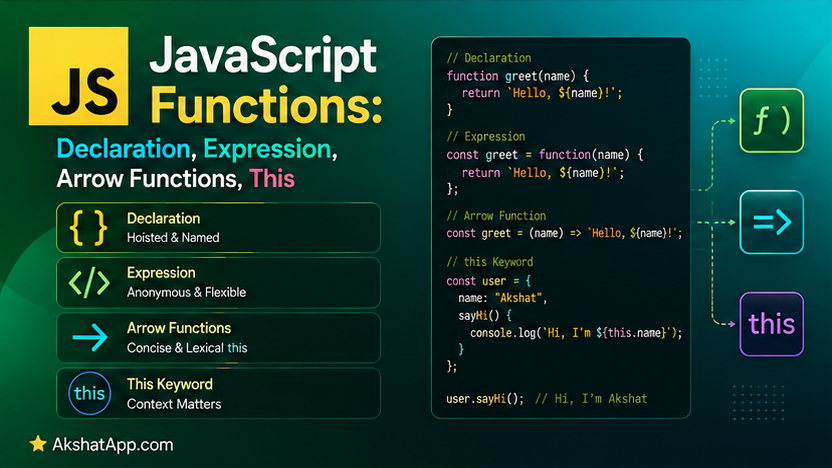
Post #1’s task tracker used one kind of function — a function declaration — for everything. JavaScript actually has four distinct ways to write a function, and they are not interchangeable stylistic choices: they differ in whether they get hoisted, and — far more consequentially — in how they handle the this keyword, which is responsible for more confused Stack Overflow questions than perhaps any other single feature in the language.
This post covers every function syntax precisely, and then tackles this directly and completely — not as a list of memorized rules to apply by pattern-matching, but as one consistent underlying principle (this is determined by how a function is called, not where it is defined) that, once genuinely understood, resolves every confusing case at once. By the end, the task tracker becomes a proper object with methods, and you will understand exactly why extracting one of those methods and calling it standalone breaks in a very specific, very common way.
Function Declarations: Hoisted, Available Everywhere in Scope
function greet(name) {
    return `Hello, ${name}`;
}
This is what Post #1 used throughout. A distinctive property: function declarations are hoisted — JavaScript moves the entire function definition to the top of its containing scope before any code actually runs, meaning you can call it before the line where it appears in your source file:
console.log(greet("Alex")); // "Hello, Alex" — works, even though greet is defined below
function greet(name) {
    return `Hello, ${name}`;
}
Function Expressions: Not Hoisted the Same Way
const greet = function (name) {
    return `Hello, ${name}`;
};
This assigns an unnamed (“anonymous”) function to a const variable. Unlike a function declaration, this is not hoisted with its definition intact — the variable greet is hoisted (as covered for let/const generally in Post #2), but its value is not assigned until execution actually reaches that line:
console.log(greet("Alex")); // TypeError: Cannot access 'greet' before initialization
const greet = function (name) {
    return `Hello, ${name}`;
};
The practical guidance: function declarations and function expressions both remain common in real code. This series generally prefers function expressions with const for consistency with the “declare with const by default” habit from Post #2, reaching for function declarations specifically when hoisting is genuinely useful (defining helper functions used earlier in a file than where they are declared, for organizational clarity).
Arrow Functions: Concise Syntax, No Own this
const greet = (name) => {
    return `Hello, ${name}`;
};

// Implicit return — a single expression body doesn't need braces or "return"
const greetShort = (name) => `Hello, ${name}`;

// Single parameter — parentheses are optional
const square = x => x * x;

// No parameters — empty parentheses are required
const sayHi = () => "Hi!";

// Multiple statements need braces AND an explicit return
const process = (value) => {
    const doubled = value * 2;
    return doubled + 1;
};
Arrow functions, introduced in ES6, are more than shorthand syntax — they have a genuinely different relationship with the this keyword than every other function form, covered in full detail below. This distinction is not cosmetic; it determines where arrow functions are the right tool and where they actively cause bugs.
Default Parameters and Rest Parameters
function greet(name = "friend") {
    return `Hello, ${name}`;
}
greet();          // "Hello, friend"
greet("Alex");      // "Hello, Alex"
Default parameter values, exactly analogous to the concept in this blog’s Python series, provide a fallback when an argument is omitted (or explicitly passed as undefined).
function sum(...numbers) {
    return numbers.reduce((total, n) => total + n, 0);
}
sum(1, 2, 3);        // 6
sum(1, 2, 3, 4, 5);   // 15
The ...numbers rest parameter collects any number of arguments into a genuine array — directly analogous to Python’s *args, using JavaScript’s own spread/rest syntax, covered further in Post #4.
The this Keyword: One Rule, Explained Precisely
Nearly every confusing this example you will ever encounter resolves to one underlying principle: this is determined by how a function is called, not by where it is defined — with exactly one deliberate exception, arrow functions, covered next.
this Inside a Regular Method
const task = {
    description: "Learn JS",
    completed: false,
    markComplete: function () {
        this.completed = true;
        console.log(`${this.description} is now complete`);
    },
};

task.markComplete(); // "Learn JS is now complete"
Because markComplete was called as a method on task — the syntax task.markComplete() — this inside the function refers to task. This is the rule: whatever appears immediately to the left of the dot at the call site becomes this inside the function during that call.
⚠️ The Classic this-Losing-Context Bug
const markCompleteFn = task.markComplete;
markCompleteFn(); // TypeError: Cannot read properties of undefined (reading 'completed')
markCompleteFn now holds a reference to the function itself, completely disconnected from task. Calling markCompleteFn() directly — with nothing to the left of a dot — means this inside the function is no longer task. In strict mode (the default inside ES6 modules and classes), this becomes undefined entirely, producing exactly the error shown. This is not a rare edge case — it is one of the most common real JavaScript bugs, and it happens every time an object method is passed elsewhere as a plain function reference:
setTimeout(task.markComplete, 1000); // Same bug — this is lost the moment it's passed as a reference
button.addEventListener("click", task.markComplete); // Same bug, in a browser context
Arrow Functions: No Own this, Inherited From Enclosing Scope
Arrow functions deliberately do not have their own this at all. Instead, they use whatever this was in the scope where the arrow function was defined — not where or how it is later called.
const task = {
    description: "Learn JS",
    markComplete: () => {
        this.completed = true; // BROKEN differently — 'this' here is NOT task!
    },
};
This is a genuinely common mistake: using an arrow function as an object method does not fix the this problem — it changes it. Since the arrow function has no own this, it looks outward to whatever this was in the surrounding scope at definition time (in this case, likely the module’s top level, where this is undefined or unrelated to task entirely). Arrow functions should generally not be used as direct object methods for exactly this reason.
Where Arrow Functions Genuinely Solve the Problem
Arrow functions become the correct fix specifically when used inside a regular method, as a callback, where you want to preserve the outer method’s this:
class TaskManager {
    constructor() {
        this.tasks = [];
    }

    loadTasks() {
        fetchTasksFromAPI().then(function (data) {
            this.tasks = data; // BROKEN — regular function has its OWN this, unrelated to TaskManager
        });
    }

    loadTasksFixed() {
        fetchTasksFromAPI().then((data) => {
            this.tasks = data; // WORKS — arrow function inherits 'this' from loadTasksFixed's scope
        });
    }
}
Inside loadTasksFixed, this correctly refers to the TaskManager instance (covered fully once Post #7 introduces classes). The arrow function passed to .then() has no this of its own, so it “sees through” to loadTasksFixed’s own this — which is exactly the TaskManager instance you want. This is the single most common, genuinely correct use of arrow functions with respect to this: as callbacks nested inside a method, not as the method itself.
call, apply, and bind: Explicitly Controlling this
For situations where you need to pass a method elsewhere but cannot use an arrow function (or need to set this to something other than the original object entirely), JavaScript provides three explicit tools:
const task = { description: "Learn JS" };

function announce() {
    console.log(`Task: ${this.description}`);
}

announce.call(task);              // "Task: Learn JS" — calls immediately, this = task
announce.apply(task, []);          // identical to call, but takes arguments as an array

const boundAnnounce = announce.bind(task);
boundAnnounce();                     // "Task: Learn JS" — works even called standalone, later
bind() is the most commonly used of the three in modern code — rather than calling the function immediately, it returns a new function with this permanently locked to the given value, safe to pass around, store, or call later without losing context:
setTimeout(task.markComplete.bind(task), 1000); // fixed — this is preservedRefactoring the Task Tracker Into an Object With Methods
Post #1’s version used standalone functions operating on a separate tasks array. Here it is refactored into a single object, using the method-shorthand syntax (methodName() { }, equivalent to methodName: function() { }):
const taskManager = {
    tasks: [],

    addTask(description) {
        this.tasks.push({ description, completed: false });
        console.log(`Added: "${description}"`);
    },

    completeTask(index) {
        if (index < 0 || index >= this.tasks.length) {
            console.log("Invalid task number.");
            return;
        }
        this.tasks[index].completed = true;
        console.log(`Completed: "${this.tasks[index].description}"`);
    },

    listTasks() {
        console.log("\n=== Your Tasks ===");
        if (this.tasks.length === 0) {
            console.log("No tasks yet!");
            return;
        }
        this.tasks.forEach((task, index) => {
            const status = task.completed ? "✓" : " ";
            console.log(`[${status}] ${index + 1}. ${task.description}`);
        });
    },
};

taskManager.addTask("Learn JavaScript functions");
taskManager.addTask("Understand this");
taskManager.completeTask(0);
taskManager.listTasks();
Every method correctly uses this.tasks because every call in this example — taskManager.addTask(...), taskManager.completeTask(...), taskManager.listTasks() — follows the object.method() pattern that makes this resolve correctly. Try extracting one, exactly as demonstrated earlier in this post, and it breaks the identical way:
const addTaskDirectly = taskManager.addTask;
addTaskDirectly("This will fail"); // TypeError: Cannot read properties of undefined (reading 'push')
This is not a contrived example — it is the exact bug this entire section has been explaining, now demonstrated directly against your own running project.
Real-World Use Cases
Event handlers and callbacks: Any time a method is passed to setTimeout, addEventListener, or as a callback to another function, the this-losing-context bug is a live risk — bind() or a wrapping arrow function are the standard fixes, covered throughout this post.
API response handling: The TaskManager.loadTasksFixed pattern — an arrow function callback inside a regular method, preserving this — is one of the most common patterns in real asynchronous JavaScript, covered fully once Post #9 addresses Promises and async/await.
Choosing between function declarations and expressions: Function declarations’ hoisting is genuinely useful for organizing helper functions logically within a file regardless of their physical order; function expressions with const better match the “declare before use” discipline most other modern languages, including this blog’s Python series, encourage by default.
Common Mistakes and Gotchas
⚠️ Mistake 1: Passing an object method as a callback without preserving this
Covered at length above — the single most consequential this-related mistake in real JavaScript code. Always ask: will this function be called as object.method(), or will it be extracted and called standalone? If the latter, bind() or an arrow function wrapper is required.
⚠️ Mistake 2: Using an arrow function as a direct object method
const obj = {
    value: 42,
    getValue: () => this.value, // BROKEN — arrow function has no own 'this'
};
Arrow functions solve this problems specifically as nested callbacks inside regular methods — not as the methods themselves.
⚠️ Mistake 3: Confusing hoisting behavior between declarations and expressions
Calling a function expression before its declaration line produces a ReferenceError about accessing a variable before initialization — a different, more informative error than “not defined,” but confusing if you expected function-declaration-style hoisting.
⚠️ Mistake 4: Forgetting that default parameters are evaluated at call time, not definition time
function addItem(item, list = []) {
    list.push(item);
    return list;
}
Unlike the mutable-default-argument trap covered in this blog’s Python series (where a default value is created once, at definition time), JavaScript’s default parameters are evaluated fresh, on every call — this specific bug does not exist in JavaScript the way it does in Python, though it is worth understanding precisely why the two languages differ here rather than assuming the behavior transfers.
⚠️ Mistake 5: Overusing bind() when an arrow function callback would be simpler
Both solve the this-preservation problem; bind() is more explicit and necessary in some cases (particularly outside of class methods), while an arrow function callback, as shown in loadTasksFixed, is often simpler and more idiomatic when the situation allows it.
Performance Note
Arrow functions and regular functions have essentially identical execution performance in modern JavaScript engines — the choice between them should be driven entirely by the this-binding behavior and syntax conciseness covered in this post, never by a performance assumption. bind() does carry a small, one-time cost (creating a new bound function object) compared to calling a function directly — negligible for typical use (an event handler set up once), worth being aware of specifically if bind() were called repeatedly inside a hot loop, a genuinely uncommon pattern in real code.
Quick Reference
// Function declaration — hoisted
function greet(name) { return `Hello, ${name}`; }

// Function expression — not hoisted with its value
const greet = function (name) { return `Hello, ${name}`; };

// Arrow function — concise, no own 'this'
const greet = (name) => `Hello, ${name}`;

// Default parameters
function greet(name = "friend") { ... }

// Rest parameters
function sum(...numbers) { return numbers.reduce((a, b) => a + b, 0); }

// Object method shorthand
const obj = {
    method() { return this.value; }  // regular function — has its own 'this'
};

// this rule: determined by how a function is CALLED
obj.method();              // this = obj
const fn = obj.method;
fn();                        // this = undefined (context lost!)

// Explicit this control
fn.call(obj);
fn.apply(obj, []);
const bound = fn.bind(obj);   // returns a new function, this permanently set
Exercises
Exercise 1 — Direct application
Write a function multiply as a function declaration, then rewrite it as a function expression, then rewrite it again as an arrow function — confirm all three produce identical results when called normally.
Exercise 2 — Slight variation
Add a removeTask(index) method to taskManager, using the object method shorthand syntax and this.tasks, matching the pattern of the other methods in this post.
Exercise 3 — Real-world combination
Deliberately extract taskManager.completeTask into a standalone variable and pass it to setTimeout to run after 1000ms, reproducing the this-losing-context bug directly. Then fix it using .bind(taskManager), and confirm it works correctly.
Exercise 4 — Open-ended challenge
Rewrite taskManager’s listTasks method so that the forEach callback is an arrow function referencing this.tasks for a status message before the list (e.g., "You have ${this.tasks.length} tasks") — and explain, in a comment, why an arrow function is the correct choice here specifically, referencing the loadTasksFixed pattern from this post.
FAQ
Q: Should I always use arrow functions since they’re more concise?
A: No — concision is a secondary concern next to correct this behavior. Use arrow functions for callbacks where you want to inherit the surrounding this (or where this is irrelevant entirely, like simple array transformations). Use regular functions for object methods and anywhere this should refer to the calling context.
Q: Why doesn’t JavaScript just make this behave more predictably, like self in Python?
A: This reflects a genuine, debated design decision from JavaScript’s original creation — this was designed to be dynamically determined by call-site, which offers flexibility (the same function can behave differently depending on how it’s invoked) at the cost of exactly the confusion this post addresses. Arrow functions, added in ES6, were partly a direct response to how often this dynamic behavior caused real bugs.
Q: What’s the actual difference between call and apply?
A: Purely how arguments are passed — call(thisValue, arg1, arg2) takes arguments individually; apply(thisValue, [arg1, arg2]) takes them as a single array. bind is generally more useful than either for modern code, since it returns a reusable function rather than immediately invoking one.
Q: Do class methods (covered in Post #7) have the same this problems?
A: Yes, identically — a class method is still just a function attached to an object (the class instance), and extracting it as a standalone reference loses this in exactly the same way covered throughout this post. This is directly relevant once Post #7 introduces classes and revisits this exact issue in that context.
Summary and Next Steps
You can now write functions using every JavaScript syntax form, understand precisely when each gets hoisted, and — most importantly — understand this as one consistent rule (determined by call-site, not definition-site) rather than a list of confusing special cases. The task tracker is now a proper object with methods, and you have seen, directly and concretely, both how the this-losing-context bug happens and how bind() fixes it.
Your next step: Complete Exercise 3 — deliberately breaking and then fixing completeTask with setTimeout — since experiencing this bug firsthand, in code you understand completely, builds far more durable intuition than reading about it in the abstract.
Code tested with Node.js 22 LTS. Last updated: July 2026.
Share This Post

Join our newsletter!
Get the latest developer guides, tutorials, and tips delivered straight to your inbox.



