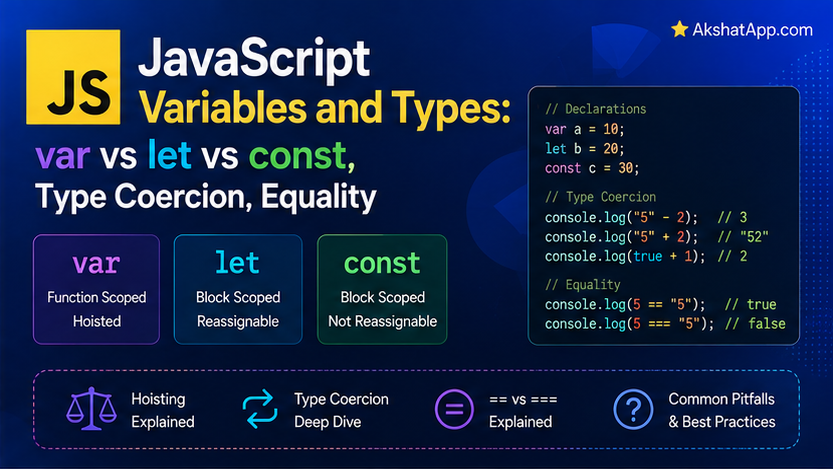
Post #1’s task tracker used const for every declaration without explaining why, or what the alternatives even are. That silence ends here — because the choice between var, let, and const is not a stylistic preference in JavaScript. It determines whether a loop behaves the way you expect it to, and getting it wrong produces one of the most notorious bug categories in the entire language’s history.
This post also covers something JavaScript does that most other mainstream languages simply do not: aggressive, automatic type coercion. "5" + 3 produces "53". [] + [] produces an empty string. NaN === NaN is false. These are not bugs in the language — they are consistent, learnable rules, and understanding them precisely is what separates writing JavaScript that works by accident from writing JavaScript that works because you know exactly what it will do.
var, let, and const: Three Ways to Declare a Variable
JavaScript has three keywords for declaring a variable, and only two of them belong in code you write today.
var x = 1;    // the original, function-scoped declaration — avoid in new code
let y = 2;    // block-scoped, reassignable
const z = 3;   // block-scoped, cannot be reassigned
The Critical Difference: Scope
var is function-scoped — it exists throughout the entire function it was declared in, regardless of which block (if, for, or otherwise) it was actually declared inside. let and const are block-scoped — they exist only within the specific { } block where they were declared, exactly matching the intuitive expectation.
function demonstrateVar() {
    if (true) {
        var message = "I leak out of the block";
    }
    console.log(message); // "I leak out of the block" — var ignored the if-block entirely
}

function demonstrateLet() {
    if (true) {
        let message = "I stay in the block";
    }
    console.log(message); // ReferenceError: message is not defined
}var’s function-scoping means a variable declared inside an if block, a for loop, or any other block is still fully accessible outside that block, anywhere else in the same function — behavior that surprises anyone coming from block-scoped languages, and behavior that directly causes the classic loop bug covered next.
The Classic var-in-a-Loop Bug
This is the single most important reason let replaced var as the default:
// The bug
for (var i = 0; i < 3; i++) {
    setTimeout(() => console.log(i), 100);
}
// Prints: 3 3 3 — not 0, 1, 2!
Because var is function-scoped, there is only one i for the entire loop — all three setTimeout callbacks share the exact same variable, and by the time any of them actually runs (100 milliseconds later), the loop has already finished, and i holds its final value, 3.
// The fix
for (let i = 0; i < 3; i++) {
    setTimeout(() => console.log(i), 100);
}
// Prints: 0 1 2 — correct
let is block-scoped, meaning each iteration of the loop gets its own fresh i — a genuinely different variable each time through, rather than one variable shared across every iteration. This single change is why virtually every modern JavaScript style guide and linter flags var as something to avoid entirely in new code.
const: The Default Choice
const MAX_TASKS = 100;
MAX_TASKS = 200; // TypeError: Assignment to constant variable.
const prevents the variable binding from being reassigned — it does not freeze the value itself. This distinction matters enormously and is worth internalizing precisely:
const tasks = [];
tasks.push("Learn JavaScript"); // perfectly fine — the array's contents can change
tasks = ["something else"];      // TypeError — the binding itself cannot be reassigned
Post #1’s const tasks = [] works exactly because of this: the array itself remains fully mutable (you can push, pop, and modify its contents freely) — only reassigning tasks to point at a completely different array is forbidden. The practical rule this series follows: use const by default for everything. Use let specifically when you know a variable’s value genuinely needs to be reassigned later (like a loop counter). Never use var in new code.
Primitive Types
JavaScript has seven primitive types — values that are not objects and have no methods of their own (though JavaScript temporarily “boxes” them to allow method-like syntax, covered briefly below).
const age = 29;              // number — JavaScript has only ONE number type
const name = "Alex";           // string
const isActive = true;          // boolean
let notYetSet;                   // undefined — declared, never assigned
const empty = null;               // null — deliberate absence of a value
const id = Symbol("unique");       // symbol — guaranteed-unique identifier (ES6+)
const huge = 9007199254740993n;     // bigint — for numbers beyond safe integer range (ES2020+)
number: JavaScript Has Only One
Unlike languages with separate integer and floating-point types, JavaScript represents every number — whole or decimal — as a single number type, internally a 64-bit floating point value (the same IEEE 754 format covered in this blog’s Python series, with the exact same precision quirks).
console.log(0.1 + 0.2); // 0.30000000000000004 — the identical floating-point issue
console.log(10 / 3);      // 3.3333333333333335
console.log(5 % 2);        // 1 — modulo works as expected
Because there is no separate integer type, 10 / 3 always produces a decimal result — there is no // floor-division operator the way some other languages have. Use Math.floor(10 / 3) when you specifically need the integer portion.
undefined vs. null: Two Kinds of “Nothing”
JavaScript, distinctively, has two separate values representing absence, and the difference is worth being precise about:
let notSet;
console.log(notSet); // undefined — JavaScript's own way of saying "no value has been assigned yet"

const deliberatelyEmpty = null;
console.log(deliberatelyEmpty); // null — YOUR code's way of saying "this is intentionally empty"
undefined is what JavaScript itself uses when something has not been given a value — an uninitialized variable, a missing function argument, a property that does not exist on an object. null is what your own code uses deliberately, to explicitly represent “no value” as a meaningful choice. This distinction is a convention, not strictly enforced by the language, but following it consistently makes code considerably easier to reason about — reserve null for values you set intentionally, and let undefined remain JavaScript’s own signal for “nothing here yet.”
typeof: Checking a Value’s Type
typeof 42;              // "number"
typeof "hello";           // "string"
typeof true;                // "boolean"
typeof undefined;             // "undefined"
typeof Symbol();                // "symbol"
typeof 10n;                       // "bigint"
typeof function () {};              // "function"
typeof {};                            // "object"
typeof [];                              // "object" — arrays are a kind of object!
typeof null;                              // "object" — famously wrong, kept for compatibility
⚠️ The typeof null Bug
typeof null returning "object" is a genuine, acknowledged bug from JavaScript’s very first implementation in 1995 — null was represented internally in a way that happened to share a type tag with objects, and by the time anyone noticed, enough code depended on the existing (wrong) behavior that fixing it would have broken the web. It has remained this way ever since, purely for backwards compatibility. When you genuinely need to check for null specifically, compare directly: value === null, never typeof value === "object" alone, since that would also match every actual object and array.
Type Coercion: JavaScript’s Most Distinctive Behavior
JavaScript is weakly typed in a specific, important sense different from Python’s “strongly typed” behavior covered elsewhere on this blog: JavaScript actively attempts to convert between types automatically in many situations, rather than raising an error the way Python does for mismatched types.
"5" + 3;      // "53" — the + operator, with a string operand, coerces toward concatenation
"5" - 3;       // 2 — the - operator has no string meaning, so it coerces toward subtraction
"5" * "2";      // 10 — both coerce toward numbers
5 + true;        // 6 — true coerces to 1
5 + false;        // 5 — false coerces to 0
"5" + true;         // "5true" — string wins again
The pattern, stated precisely: + prefers string concatenation whenever either operand is a string; every other arithmetic operator (-, *, /) has no string-specific meaning, so it always coerces both operands toward numbers instead.
The Famous Weird Cases
[] + [];        // "" — both arrays coerce to empty strings, then concatenate
[] + {};          // "[object Object]" — array coerces to "", object coerces to its string form
{} + [];            // 0 (in a statement context) — the {} is parsed as an empty block, not an object!
[1, 2] + [3, 4];      // "1,23,4" — arrays coerce to comma-joined strings, then concatenate
These are not worth memorizing individually — they are worth understanding as consequences of the same two rules already covered: + prefers strings when either side is not already a number, and JavaScript will convert arrays and objects to some string representation to make that concatenation possible. The genuinely important, practical lesson is not “know every weird case” — it is “never rely on implicit coercion happening correctly,” covered directly in the next section.
Explicit Conversion: The Reliable Alternative
Number("42");        // 42
Number("42px");        // NaN — cannot parse, "Not a Number"
String(42);               // "42"
Boolean(0);                 // false
Boolean("");                  // false
Boolean("0");                    // true! — a non-empty string is truthy, regardless of content

parseInt("42px");                   // 42 — parseInt stops at the first non-numeric character
parseFloat("3.14 meters");             // 3.14
Exactly as this blog’s Python series taught for bool("False") being True, Boolean("0") in JavaScript is true — a non-empty string is truthy regardless of what text it contains. Explicit conversion functions (Number(), String(), Boolean()) make your intent clear and predictable; relying on implicit coercion to happen “the way you meant” is where genuine bugs live.
Equality: == vs === — The Single Most Important Rule in This Post
"5" == 5;     // true — loose equality coerces types before comparing
"5" === 5;      // false — strict equality checks type AND value, no coercion

0 == false;      // true — loose equality coerces
0 === false;       // false — different types

null == undefined;    // true — a special case, these two loosely equal each other
null === undefined;      // false — different types

NaN == NaN;                // false
NaN === NaN;                  // false — NaN is never equal to itself, under either operator!
== (loose equality) coerces both operands toward a common type before comparing — exactly the same coercion rules covered above, applied to comparison. === (strict equality) never coerces — it compares type and value together, and returns false immediately if the types differ, regardless of whether the values might be “equivalent” after conversion.
The rule this entire series follows, without exception: always use === and !==. Never use == or !=, except in the one specific, well-known idiom value == null (which deliberately catches both null and undefined in one check, relying on that specific special case above) — and even that idiom is worth writing explicitly (value === null || value === undefined) until you are genuinely comfortable with exactly why it works.
NaN Requires Special Handling
const result = Number("not a number");
console.log(result === NaN); // false — this NEVER works, for any value compared to NaN
console.log(Number.isNaN(result)); // true — the correct way to check
NaN is the only value in JavaScript that is never equal to itself, under either == or === — a deliberate feature of the IEEE 754 floating-point standard, not a JavaScript-specific quirk. Number.isNaN() is the correct, reliable way to check whether a value is NaN; direct comparison with === will never work for this specific case, no matter how tempting it looks.
Real-World Use Cases
Preventing accidental reassignment: const by default catches an entire category of bugs where a variable’s value is accidentally overwritten somewhere unexpected in a large function — the error surfaces immediately, at the exact line attempting the reassignment, rather than manifesting as a confusing wrong value much later.
Loop-based asynchronous operations: The var-in-a-loop bug covered in this post is not a contrived teaching example — it is a genuine, common real-world bug pattern anywhere a loop schedules multiple asynchronous operations (network requests, timers, event handlers), covered further once Post #9 introduces asynchronous JavaScript properly.
API response validation: When working with data from external sources (Post #11’s Fetch API coverage), values often arrive as strings even when they represent numbers or booleans — explicit conversion (Number(), Boolean()) rather than relying on implicit coercion is the reliable way to handle this correctly.
Avoiding “clever” comparison bugs: Any conditional logic comparing user input, API responses, or form values benefits directly from strict equality — loose equality’s coercion rules are consistent but rarely what a specific comparison actually intends.
Common Mistakes and Gotchas
⚠️ Mistake 1: Using var out of habit, especially in loops
Covered at length above — var’s function-scoping causes the classic shared-variable-in-a-loop bug. Default to const, use let only when reassignment is genuinely needed, and treat var as effectively deprecated for new code.
⚠️ Mistake 2: Using == instead of ===
The single most consequential habit to build correctly from the start. ==’s coercion rules are learnable but rarely what any specific comparison actually intends — === eliminates the entire category of surprise.
⚠️ Mistake 3: Assuming const makes an object or array immutable
const tasks = ["Learn JS"];
tasks.push("Build something"); // works fine — the array's contents are still mutable
tasks = []; // TypeError — only the binding itself is protected
const protects the variable binding, not the value’s contents. For genuinely frozen objects, Object.freeze() exists as a separate, explicit tool — worth knowing exists, not something this series relies on regularly.
⚠️ Mistake 4: Comparing NaN with === or ==
Neither operator ever returns true for NaN compared to itself. Number.isNaN() is the only reliable check.
⚠️ Mistake 5: Not understanding why typeof null says “object”
This is a known, permanent language quirk, not something you are misunderstanding — check for null with a direct === null comparison, never via typeof.
Performance Note
const and let both offer the JavaScript engine more precise information about a variable’s lifetime and mutability than var did, which V8 and similar engines can use for genuine optimization — code using const/let correctly is not merely more readable, it is frequently marginally faster to execute as well, because the engine can make stronger assumptions about how the variable will be used. This is a secondary benefit, not the primary reason to prefer them — the correctness and scoping benefits covered throughout this post matter considerably more for most real code than the performance difference, which Post #15’s V8-focused coverage addresses with genuine measurement rather than assumption.
Quick Reference
// Declarations
var x = 1;    // avoid — function-scoped, causes loop bugs
let y = 2;     // use when reassignment is genuinely needed — block-scoped
const z = 3;    // default choice — block-scoped, binding cannot be reassigned

// Primitive types
typeof 42;             // "number"
typeof "text";           // "string"
typeof true;               // "boolean"
typeof undefined;             // "undefined"
typeof null;                    // "object" (known bug, use === null instead)

// Explicit conversion (prefer over relying on implicit coercion)
Number("42");
String(42);
Boolean(value);

// Equality — always use these
value === other;
value !== other;

// Never use these except in the specific null/undefined idiom
value == other;
value != other;

// NaN checking
Number.isNaN(value); // correct
value === NaN;          // NEVER works, for any value
Exercises
Exercise 1 — Direct application Predict the output of each line below, then verify by running them in the Node REPL:
console.log("10" + 5);
console.log("10" - 5);
console.log(true + true);
console.log("5" === 5);
console.log(null == undefined);
console.log(null === undefined);
Exercise 2 — Slight variation
Rewrite the task tracker’s addTask function to use let instead of const for the tasks array declaration, then explain in a comment exactly why this change is unnecessary and arguably worse — referencing the const-versus-mutability distinction covered in this post.
Exercise 3 — Real-world combination
Write a function safeAdd(a, b) that explicitly converts both arguments to numbers using Number() before adding them, and returns a clear error message (as a string, for now — proper error handling arrives in Post #8) if either conversion produces NaN, checked correctly with Number.isNaN().
Exercise 4 — Open-ended challenge
Reproduce the classic var-in-a-loop bug from this post exactly as written, confirm you see 3 3 3, then fix it with let and confirm you see 0 1 2. Then, without changing var back to let, find a different way to fix the original var version — creating a new scope manually for each iteration. Hint: an immediately-invoked function expression, wrapping the setTimeout call, is how this was solved before let existed.
FAQ
Q: Will I ever need to use var in new code?
A: Essentially never in new code written today. You will encounter it constantly in existing codebases and older tutorials, which is exactly why this post covers it — recognizing and understanding var’s behavior remains necessary even though writing it yourself is not recommended.
Q: Is there a performance reason to prefer let over const when a variable won’t actually be reassigned?
A: No — if anything, the reverse is true, as covered in this post’s performance note. Default to const; only switch to let when you have confirmed the variable genuinely needs reassignment.
Q: Why does JavaScript coerce types automatically instead of raising an error like Python does? A: This reflects a genuine, debated design philosophy difference in the language’s original design — JavaScript prioritized forgiving, always-attempt-something behavior, partly because early web pages needed to keep running even with imperfect code. Modern JavaScript best practice, including everything in this post, works around this by using explicit conversion and strict equality rather than relying on the automatic coercion the language still performs.
Q: Is Symbol or BigInt something I need to use regularly as a beginner?
A: Not typically — both solve specific, less common problems (guaranteed-unique property keys, and numbers beyond the safe integer range, respectively). They are covered here for completeness and recognition; the vast majority of JavaScript code you write in this series’ early posts will use number, string, boolean, undefined, null, and objects almost exclusively.
Summary and Next Steps
You now understand exactly why let replaced var as the default — block scoping, and specifically the loop-closure bug that block scoping fixes — and why const is this series’ default choice for everything else. You understand JavaScript’s coercion rules precisely enough to predict what "5" + 3 and similar expressions will produce, rather than needing to guess, and you have internalized the single most important habit this post teaches: always ===, never ==.
Your next step: Complete Exercise 1 by hand — predicting each coercion result before running it — since correctly predicting JavaScript’s behavior, rather than being surprised by it, is the actual skill this post has been building.
Code tested with Node.js 22 LTS. Last updated: July 2026.
Share This Post

Join our newsletter!
Get the latest developer guides, tutorials, and tips delivered straight to your inbox.



