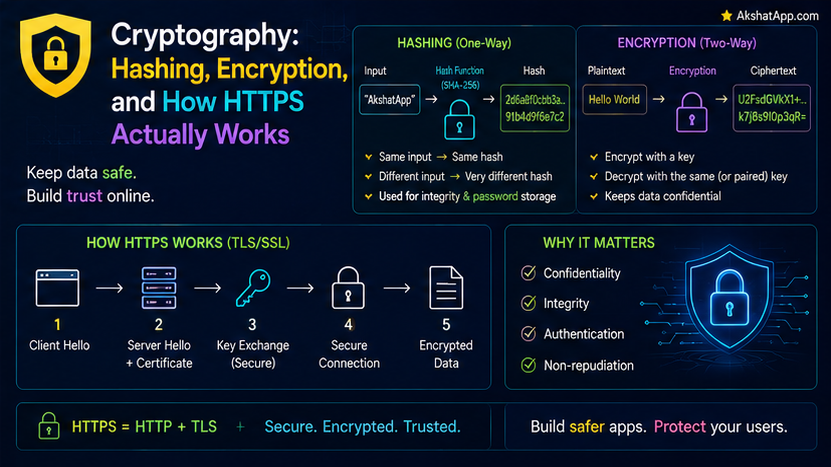
Post #13 covered HTTP as plain, readable text — a request and response anyone intercepting the connection could read directly. Post #4 covered hashing as a speed optimization, mapping keys to array indices for fast lookup. This post covers two genuinely different topics that happen to share vocabulary with those earlier posts: cryptographic hashing, built for security rather than speed, and encryption, the mechanism that turns Post #13’s readable HTTP into the private, protected HTTPS every serious website actually uses.
Cryptographic Hashing: A Different Kind of Hash Function Entirely
Post #4’s hash function had one job: spread keys across an array quickly, with speed as the primary design goal. A cryptographic hash function is built for entirely different properties: given an output, it should be computationally infeasible to determine what input produced it (one-way), and it should be computationally infeasible to find two different inputs producing the identical output (collision-resistant) — properties Post #4’s simple hash function deliberately did not need and did not have.
import hashlib

password = "correct horse battery staple"
hashed = hashlib.sha256(password.encode()).hexdigest()
print(hashed)
# 'c74fc7edc6efe4c3286a0d5d9c... ' — a fixed-length string, genuinely infeasible to reverse
Change the input by even a single character, and the output changes completely and unpredictably — precisely the collision-resistance property that makes cryptographic hashes useful for security purposes Post #4’s hash tables were never designed for.
Why Passwords Are Hashed, Never Stored Plainly
A well-built system never stores your actual password — it stores the cryptographic hash of it, using exactly the one-way property covered above.
def register_user(password: str) -> str:
    return hashlib.sha256(password.encode()).hexdigest()  # store THIS, never the raw password

def verify_login(entered_password: str, stored_hash: str) -> bool:
    return hashlib.sha256(entered_password.encode()).hexdigest() == stored_hash
When you log in, the system hashes what you typed and compares it against the stored hash — it never needs to know, store, or even briefly reconstruct your actual password to verify it correctly. This is precisely why a data breach exposing a properly-built system’s password database does not directly hand attackers your actual passwords — they would need to reverse a one-way hash, which the cryptographic properties covered above make genuinely infeasible for a well-designed hash function and a sufficiently complex password.
A genuinely important real-world addition, worth knowing exists: production systems also add “salting” (unique random data mixed into each password before hashing) specifically to prevent attackers from using precomputed tables of common password hashes — a real, standard practice beyond this introductory post’s core coverage.
Encryption: Making Data Unreadable Without the Right Key
Hashing is deliberately one-way — there is no “unhash” operation. Encryption is different: it deliberately supports a reverse operation (decryption), given the correct key.
Symmetric Encryption: One Key, Both Directions
# Conceptual illustration — real symmetric encryption uses much more sophisticated algorithms
def simple_symmetric_encrypt(message: str, key: int) -> str:
    return "".join(chr(ord(char) + key) for char in message)

def simple_symmetric_decrypt(encrypted: str, key: int) -> str:
    return "".join(chr(ord(char) - key) for char in encrypted)

encrypted = simple_symmetric_encrypt("hello", 3)
print(simple_symmetric_decrypt(encrypted, 3))  # "hello"
The identical key both encrypts and decrypts — genuinely fast, computationally efficient, and directly practical for encrypting large amounts of data. The real problem symmetric encryption has: both parties need the same secret key, which raises a genuine chicken-and-egg problem — how do you securely share that key in the first place, over a connection you have no existing secure way to protect?
Asymmetric Encryption: Two Mathematically Related Keys
Asymmetric encryption uses a key pair — a public key, freely shareable with anyone, and a private key, kept secret — mathematically related such that anything encrypted with the public key can only be decrypted with the corresponding private key.
# Conceptual illustration only — real asymmetric encryption (RSA and similar)
# relies on genuinely sophisticated number theory, not simple arithmetic

# Anyone can encrypt a message using your PUBLIC key
# Only YOU, holding the matching PRIVATE key, can decrypt it
This directly solves symmetric encryption’s key-distribution problem: your public key can be shared openly, with no secrecy required at all, since only the corresponding private key — which never needs to leave your possession — can actually decrypt anything encrypted with it. The tradeoff: asymmetric encryption is computationally considerably more expensive than symmetric encryption, genuinely impractical for encrypting large volumes of data directly.
How HTTPS Actually Combines Both
This is the direct, practical payoff connecting everything in this post to Post #13’s plain-text HTTP:
1. Your browser connects to a server and requests a secure connection (the "TLS handshake")
2. The server sends its public key (bundled in a certificate, covered below)
3. Your browser uses that PUBLIC key to encrypt a newly generated, temporary SYMMETRIC key,
   and sends it to the server
4. Only the server's PRIVATE key can decrypt this — so only the genuine server now knows
   this new symmetric key, and no eavesdropper who intercepted the exchange does
5. Both sides now use this shared symmetric key for the REST of the actual conversation —
   fast, efficient, and genuinely secret, since only they both know it
This is precisely why HTTPS uses asymmetric encryption only briefly, at the very start of a connection, specifically to solve the key-distribution problem covered above — and then switches to fast symmetric encryption for the actual, potentially large volume of HTTP request and response data covered in Post #13, getting the security benefit of asymmetric encryption’s public-key exchange combined with the genuine performance of symmetric encryption for the bulk of the actual conversation.
Certificates: How You Know You’re Talking to the Real Server
A public key alone does not prove whose public key it actually is — anyone could generate a key pair and claim to be your bank’s website. Certificates, issued by trusted third-party Certificate Authorities, cryptographically bind a public key to a verified domain identity — your browser checks that a website’s certificate is genuinely signed by a trusted authority before treating the connection as secure, which is precisely the mechanism behind the padlock icon browsers display.
Real-World Use Cases
Every password-based login system: The hash-don’t-store-plainly pattern covered in this post is standard, essential practice across virtually every properly-built authentication system.
Every HTTPS website you visit: Directly covered above — the asymmetric-then-symmetric handshake is happening, transparently, every single time you load a secure page, precisely completing the picture Post #13 left as “HTTPS adds encryption, covered later.”
File integrity verification: Cryptographic hashing is used to verify that a downloaded file has not been corrupted or tampered with — comparing the downloaded file’s hash against a publicly published expected hash, using exactly the collision-resistance property covered in this post.
Digital signatures: Asymmetric encryption used in reverse — encrypting with a private key (which only the owner has) so that anyone with the public key can verify the signature genuinely came from that specific owner — underlies software update verification and many other trust-critical systems.
Common Mistakes and Gotchas
⚠️ Mistake 1: Confusing hashing with encryption Covered throughout this post — hashing is deliberately one-way, with no legitimate “un-hash” operation; encryption is deliberately reversible, given the correct key. Using one where the other is actually needed is a genuine, consequential security mistake, not merely a terminology slip.
⚠️ Mistake 2: Assuming symmetric encryption alone can solve secure communication over an untrusted connection Covered directly above — the key-distribution problem is real and unavoidable without either a pre-existing secure channel or asymmetric encryption’s public-key solution.
⚠️ Mistake 3: Storing passwords in plain text or using a weak, non-cryptographic hash for them Post #4’s simple, speed-optimized hash function is genuinely unsuitable for password storage — it lacks the collision-resistance and one-way guarantees a genuine cryptographic hash function like SHA-256 provides, covered directly at this post’s start.
⚠️ Mistake 4: Ignoring browser certificate warnings A certificate warning specifically indicates the cryptographic identity verification covered in this post has failed — the connection may still be encrypted, but you can no longer be confident you are actually talking to the genuine, intended server rather than an impersonator.
Quick Reference
import hashlib

# Cryptographic hashing — one-way, for passwords and integrity checks
hashlib.sha256(data.encode()).hexdigest()

# Symmetric encryption: one key, both directions — fast, needs secure key sharing
# Asymmetric encryption: public/private key pair — solves key sharing, slower

# HTTPS handshake:
# 1. Server shares public key (via certificate)
# 2. Browser encrypts a new symmetric key using that public key
# 3. Only the server's private key can decrypt it — now both sides share a secret
# 4. Fast symmetric encryption handles the actual conversation from here
Exercises
Exercise 1 — Direct application
Using Python’s hashlib, hash the same string with sha256 twice, confirm the outputs are identical, then change a single character in the input and confirm the output changes completely.
Exercise 2 — Slight variation Implement a simple password registration/verification system (exactly as this post’s code example outlines) that never stores or prints the actual plain-text password anywhere after the initial hashing step.
Exercise 3 — Real-world combination Using your browser’s developer tools or a URL-inspection tool, view the actual TLS/SSL certificate details for a real HTTPS website, and identify the issuing certificate authority and the domain it’s verified for.
Exercise 4 — Open-ended challenge Research what “salting” a password hash actually means and why it specifically defends against precomputed hash lookup tables, connecting your explanation directly to this post’s one-way and collision-resistance properties.
FAQ
Q: If hashing is one-way, how does a “forgot password” feature work? A: It genuinely cannot recover your original password — a properly built system sends a password reset link instead, allowing you to set an entirely new password, which then gets hashed and stored the same way; if a service ever emails you your actual original password, that is a strong, concrete signal it is not following the practice covered in this post.
Q: Is asymmetric encryption used for the entire HTTPS conversation, or just the beginning? A: Just the beginning, covered directly above — the performance cost of asymmetric encryption makes it impractical for bulk data; it exists specifically to securely establish a shared symmetric key, which then handles the actual conversation efficiently.
Q: Can a cryptographic hash ever have a collision? A: Mathematically, yes — since a hash function maps a much larger space of possible inputs to a fixed, smaller output size, collisions must theoretically exist; a genuinely well-designed cryptographic hash function makes finding one computationally infeasible with current technology, which is the practical security guarantee that actually matters.
Q: Why do some websites still show as “not secure” in 2026? A: Typically because they are serving plain HTTP (Post #13) without the TLS/certificate layer covered in this post — any website handling sensitive information without HTTPS is a genuine, current security concern worth taking seriously as a user.
Summary and Next Steps
You now understand cryptographic hashing as a genuinely different tool than Post #4’s speed-focused hashing — built for one-way, collision-resistant security properties specifically — and understand precisely how HTTPS combines asymmetric encryption’s key-distribution solution with symmetric encryption’s speed to protect the plain-text HTTP conversation covered in Post #13. The padlock icon in your browser is no longer an unexplained trust signal; it represents a specific, understandable cryptographic handshake you can now describe precisely.
Your next step: Complete Exercise 3 — inspecting a real website’s actual TLS certificate — since seeing the genuine certificate authority, the verified domain, and the cryptographic details directly in your own browser makes this post’s HTTPS handshake concrete rather than theoretical.
Last updated: August 2026.
Share This Post

Join our newsletter!
Get the latest developer guides, tutorials, and tips delivered straight to your inbox.



