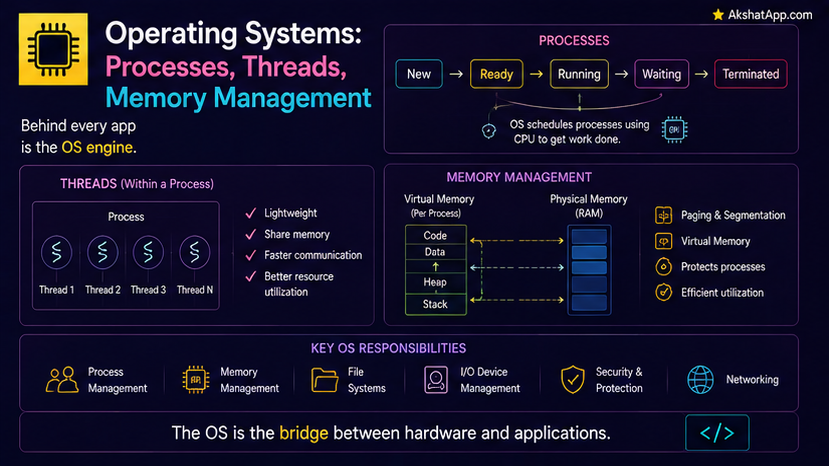
Post #1 described a single CPU’s fetch-decode-execute cycle as if one program had the entire processor to itself. Your actual computer, at this exact moment, is running a browser, a music player, a background sync service, and dozens of other processes — on a CPU with far fewer cores than that. This is not a contradiction; it is the operating system’s core job, and understanding how it accomplishes this illusion directly explains the threading-versus-multiprocessing decision this blog’s Python content covers, and the memory-per-program isolation every application quietly relies on.
What an Operating System Actually Does
The operating system sits directly between your running programs and the raw hardware covered in Post #1 — it does not run your applications’ logic itself; it manages who gets access to shared hardware resources, and when: which program’s instructions the CPU executes right now, which program owns which region of RAM, which program can currently write to a specific file. Every program you run makes requests to the operating system for these resources rather than accessing hardware directly — a deliberate, essential layer of coordination and protection.
Processes: Isolated, Independent Programs
A process is a running instance of a program, with its own independent memory space — genuinely isolated from every other process, by design. One process cannot directly read or corrupt another process’s memory, precisely because the operating system enforces this separation at the hardware level.
import subprocess

# Starting a new, genuinely separate process
result = subprocess.run(["python3", "--version"], capture_output=True, text=True)
print(result.stdout)
This isolation is a genuine safety feature — a bug or crash in one process (a misbehaving browser tab, for instance) cannot directly corrupt an unrelated process’s data, since the operating system’s memory protection keeps them fundamentally separate.
Threads: Lighter-Weight Units Within a Process
A thread is a separate stream of execution within a single process, sharing that process’s memory space directly — genuinely different from a separate process’s full isolation.
import threading

def worker():
    print("Running in a separate thread, sharing the same process's memory")

thread = threading.Thread(target=worker)
thread.start()
thread.join()
Because threads within the same process share memory directly, communication between them is fast and simple — no need to explicitly copy data between separate memory spaces, the way genuinely separate processes require. This convenience comes with a real cost: shared memory means threads can genuinely interfere with each other’s data if not carefully coordinated, exactly the race condition concern covered directly in this blog’s Python concurrency content.
The Scheduler: Creating the Illusion of Simultaneity
With more running processes and threads than available CPU cores, the operating system’s scheduler rapidly switches which one actually has the CPU’s attention — giving each a small slice of time, then switching to the next, cycling through so quickly (many times per second) that it creates a convincing illusion of true simultaneity, even on a single core.
Context switching: Each time the scheduler switches which process or thread runs, it must save the current one’s complete state (register values, covered in Post #1, and other execution context) and restore the next one’s — genuine, real overhead, which is precisely why excessive, unnecessary context switching (far more threads than a system can efficiently manage) degrades performance rather than improving it.
On a genuinely multi-core CPU, true simultaneous execution does happen across those cores — directly connecting to the multiprocessing content covered elsewhere on this blog, where separate processes genuinely run in parallel across multiple cores, not merely time-sliced on one.
Memory Management: Why Every Process Thinks It Owns All of RAM
Post #1 covered RAM as a single, shared resource — yet every process behaves as though it has its own private, complete address space, often even addressing memory starting from the same base address as every other process. This is virtual memory: the operating system maintains a mapping between each process’s private, virtual addresses and the actual, physical RAM locations those addresses really correspond to, translating transparently on every single memory access.
Process A's virtual address 0x1000  →  maps to  →  actual physical RAM address 0x7A3C1000
Process B's virtual address 0x1000  →  maps to  →  actual physical RAM address 0x2F8B4000
Both processes can use the identical virtual address 0x1000 simultaneously, entirely unaware of each other, because the operating system’s memory mapping keeps their actual physical locations completely separate — this is precisely the mechanism underlying the process isolation covered earlier in this post.
This directly explains Post #1’s swap/paging mention: when physical RAM runs low, the operating system can temporarily move a less-actively-used process’s virtual memory pages out to storage (Post #1’s slower tier), freeing physical RAM for whatever needs it more urgently right now — transparent to the process itself, which continues addressing its virtual memory normally, unaware some of it has been temporarily relocated to considerably slower storage.
Processes vs. Threads: The Direct Connection to This Blog’s Concurrency Content
This post’s coverage of process isolation versus thread-shared-memory is precisely the underlying mechanism behind a decision this blog’s Python content covers directly: threading suits I/O-bound work because threads share memory cheaply and Python’s GIL releases during I/O waits, while multiprocessing suits CPU-bound work because separate processes, each with their own memory space and their own Python interpreter, achieve genuine parallel execution across multiple cores — exactly the isolation-versus-shared-memory tradeoff this post has covered from the operating system’s own perspective, now fully explaining why that Python-level guidance is structured the way it is.
Real-World Use Cases
Understanding why one crashed browser tab doesn’t crash your entire browser: Modern browsers deliberately run each tab as a separate process, specifically to leverage the process isolation covered in this post — a crash in one tab’s process cannot directly corrupt another’s.
Choosing threading vs. multiprocessing correctly: Directly covered above — this post’s process/thread distinction is the actual mechanism underlying that practical, everyday programming decision.
Diagnosing “my computer feels slow with too many programs open”: Directly connects to this post’s scheduler and virtual memory coverage — excessive context switching and active swapping to slower storage are both concrete, diagnosable causes, not vague “the computer is just slow” explanations.
Understanding containerization technologies: Modern deployment tools (covered elsewhere on this blog in the context of packaging Python applications) build directly on operating system process isolation concepts, providing an additional layer of resource and dependency isolation on top of what this post covers.
Common Mistakes and Gotchas
⚠️ Mistake 1: Assuming more threads always means more actual parallelism On a single core, or when threads are heavily I/O-bound and Python’s GIL is relevant (covered directly in this blog’s concurrency content), adding more threads beyond a certain point adds context-switching overhead without corresponding real speedup.
⚠️ Mistake 2: Assuming processes and threads are interchangeable Covered throughout this post — the memory isolation (or lack thereof) is a fundamental, consequential difference, not a minor implementation detail; choosing incorrectly between them has real correctness and performance implications.
⚠️ Mistake 3: Forgetting that virtual memory addresses are not actual physical memory locations Directly relevant to genuinely low-level debugging — a memory address you observe in one process’s context has no necessary relationship to the same-looking address in another process, precisely because of the virtual-to-physical mapping covered in this post.
⚠️ Mistake 4: Not understanding why heavy swapping causes such dramatic slowdowns Directly connects back to Post #1 — once physical RAM is exhausted and the operating system resorts to swap, normally RAM-speed memory accesses can silently become storage-speed accesses instead, a dramatic, often confusing performance cliff rather than a gradual slowdown.
Quick Reference
Process: independent program, own isolated memory space
Thread: execution stream WITHIN a process, shares that process's memory

Scheduler: rapidly switches CPU attention across processes/threads (context switching)
Virtual memory: each process's private address space, mapped to actual physical RAM
Swap/paging: moving inactive memory to slower storage when physical RAM is exhausted| Processes | Threads | |
|---|---|---|
| Memory | Isolated, separate | Shared within the process |
| Communication cost | Higher (explicit, copied) | Lower (direct, shared) |
| Crash isolation | Strong — one crash doesn’t affect others | Weak — a thread crash can affect the whole process |
| Best for | CPU-bound parallel work | I/O-bound concurrent work |
Exercises
Exercise 1 — Direct application Using your operating system’s task manager or activity monitor, identify how many processes are currently running on your machine, and pick three to research what they actually do.
Exercise 2 — Slight variation
Write a short Python script using threading to run two functions “simultaneously,” and a second version using multiprocessing to do the same — observe any differences in behavior or output ordering between the two.
Exercise 3 — Real-world combination Explain, in your own words, why a web browser running each tab as a separate process (rather than as threads within one process) trades some performance and memory efficiency for a genuine, valuable safety benefit — connecting your answer directly to this post’s process isolation coverage.
Exercise 4 — Open-ended challenge Research how much physical RAM your own computer has, and explore your operating system’s settings related to virtual memory/swap — identify how much swap space is currently configured, and explain, using this post’s coverage, what would happen if your system attempted to use significantly more memory than physically available.
FAQ
Q: Why do threads share memory when processes don’t — couldn’t threads just be isolated too? A: Shared memory is precisely threads’ defining, useful characteristic — it enables fast, direct communication between them without needing to explicitly copy data, which is exactly the appeal of using threads over separate processes in the first place; isolating them would eliminate the specific advantage threads offer.
Q: Does every operating system handle processes and threads identically? A: The fundamental concepts covered in this post (isolation vs. shared memory, scheduling, virtual memory) apply broadly across major modern operating systems, though specific implementation details, terminology, and performance characteristics genuinely vary between them.
Q: Is virtual memory the same thing as “swap” or “page file”? A: Related but distinct — virtual memory is the general addressing mechanism giving every process its own private address space, covered throughout this post; swap/paging is specifically what happens when that virtual memory needs to be backed by storage rather than physical RAM due to memory pressure.
Q: How does this post’s content relate to the concurrency and async programming covered elsewhere on this blog? A: Directly — this post covers the operating-system-level mechanisms (processes, threads, scheduling) that make concurrent and parallel programming possible at all; this blog’s language-specific concurrency content (async/await, threading, multiprocessing) covers how to actually use these underlying OS capabilities from application code.
Summary and Next Steps
You now understand the operating system as the essential coordination layer between Post #1’s raw hardware and the many programs competing to use it — processes providing genuine memory isolation, threads providing lightweight, shared-memory concurrency within a process, the scheduler creating the illusion of simultaneity through rapid context switching, and virtual memory giving every process its own private address space while transparently managing the physical-RAM-versus-storage tradeoff from Post #1.
Your next step: Complete Exercise 2 — running the same logical task with both threading and multiprocessing — since directly observing how they behave differently in your own code is what turns this post’s process-versus-thread distinction from abstract description into practical, applied understanding.
Last updated: August 2026.
Share This Post

Join our newsletter!
Get the latest developer guides, tutorials, and tips delivered straight to your inbox.



