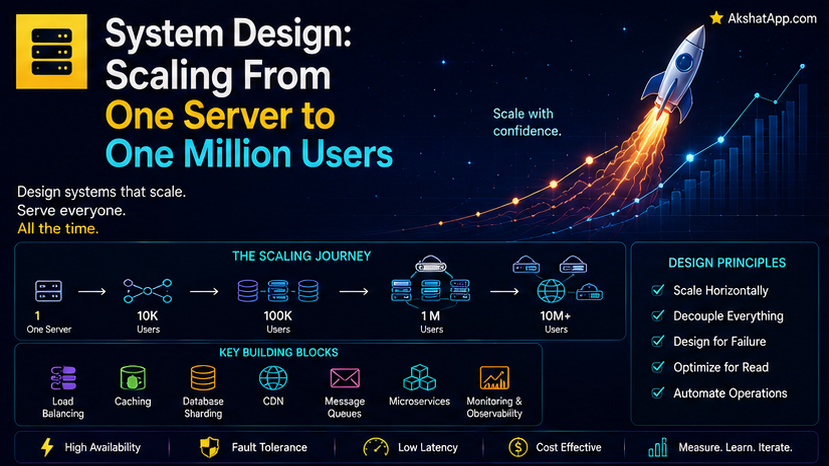
Post #13 covered networking. Post #14 covered databases. Post #15 covered operating systems. Each was necessary, and each was incomplete on its own — a real, working system that serves real users combines all three, plus every foundational concept from earlier in this series, into an actual architecture. This post follows that architecture’s genuine, realistic evolution: starting from the simplest possible working system, and scaling it, one real bottleneck at a time, toward something that can serve a million users. The single most striking thing about this journey: Post #1’s memory hierarchy — fast-and-small versus slow-and-large — reappears, in a new form, at literally every stage.
Stage 1: One Server, Doing Everything
Every real system starts here — a single machine running the application code, the database, everything, directly reachable via the DNS-and-HTTP path covered fully in Post #13.
[User's Browser] → (DNS, TCP, HTTP — Post #13) → [Single Server: App + Database]This genuinely works, and works well, for a real, meaningful range of traffic — the mistake worth naming immediately, and returned to in this post’s common mistakes section, is assuming you need anything more complex than this before you actually have evidence you do.
Stage 2: The First Real Bottleneck — Vertical vs. Horizontal Scaling
As traffic genuinely grows, the single server eventually cannot keep up — directly, concretely explained by Post #1’s hardware limits (a finite CPU, finite RAM) and Post #15’s scheduler (only so much can be time-sliced across so many simultaneous requests before response times degrade).
Vertical scaling: Get a bigger server — more CPU cores, more RAM. Simple, requires no architectural change, but has a genuine, hard ceiling — there is always a most powerful single machine currently available, and it costs disproportionately more as you approach that ceiling.
Horizontal scaling: Add more servers, and distribute traffic across them. More complex to set up, but has no comparable hard ceiling — you can, in principle, keep adding servers.
Stage 3: Load Balancing — Distributing Traffic Across Servers
[User's Browser] → [Load Balancer] → [Server 1]
                                   → [Server 2]
                                   → [Server 3]
A load balancer sits in front of multiple identical servers, distributing incoming requests across them — commonly using strategies like round-robin (cycling evenly through servers) or routing based on current server load. This directly requires something Post #15 flagged implicitly: if a user’s session data lives only on the specific server that first handled their request, a subsequent request routed to a different server won’t have access to it — a genuine architectural problem horizontal scaling introduces, typically solved by storing session data somewhere all servers can reach (directly setting up this post’s next section).
Stage 4: Caching — Post #1’s Memory Hierarchy, Reappearing at System Scale
This is the single most important conceptual thread in this entire post. Post #1 established that fast-but-small memory (registers, cache, RAM) should hold what’s needed right now, while slow-but-large storage holds everything else. At system scale, this exact same principle reappears, just at a dramatically larger physical distance:
[User's Browser] → [Load Balancer] → [Cache: Redis, Post #14's key-value store]
                                            ↓ (only on a cache miss)
                                    → [Server] → [Database: Post #14]
A request for frequently-accessed data checks a fast, in-memory cache first — directly, literally Post #14’s key-value store, itself directly Post #4’s hash table — before ever reaching the considerably slower database. This is not a new idea introduced at system-design scale; it is Post #1’s memory hierarchy, applied to network architecture instead of a single computer’s internal components, with the exact same underlying logic: keep what’s needed most often as close and as fast as possible.
Stage 5: Database Scaling — Read Replicas and Sharding
As traffic grows further, the database itself, covered in Post #14, becomes the bottleneck.
Read replicas: Copies of the database that handle read queries (the overwhelming majority of most applications’ traffic), while a single primary database handles writes — directly exploiting the fact that most real applications read far more often than they write.
Sharding: Splitting the database itself across multiple machines, each holding a portion of the total data (commonly split by user ID range, or another natural partition key) — genuinely more complex to manage than read replicas, reserved for scale where a single database machine’s storage or write capacity, not just read capacity, becomes the limiting factor.
Stage 6: CDNs — Caching, Geographically
A Content Delivery Network applies this post’s caching principle geographically: static content (images, videos, JavaScript files) gets cached on servers physically distributed around the world, so a user in Tokyo requesting a file retrieves it from a nearby cached copy rather than making the full, slower round trip (Post #13’s networking coverage) to a single, possibly distant origin server.
[User in Tokyo] → [Nearby CDN Cache] → (only if not cached) → [Origin Server]
[User in London] → [Nearby CDN Cache] → (only if not cached) → [Origin Server]
This is, once again, the identical fast-and-close versus slow-and-distant tradeoff from Post #1, now applied across actual physical geography rather than a computer’s internal components — the same underlying principle, reappearing for the third distinct time in this single post.
The Complete Picture
[Users worldwide]
      ↓
[CDN — cached static content, geographically close]
      ↓
[Load Balancer]
      ↓
[Multiple App Servers] ←→ [Cache layer — Redis, fast, in-memory]
      ↓
[Primary Database] → [Read Replicas]
Every single box in this diagram is something this series has already covered in isolation — networking (Post #13), the OS-level process/thread model underneath each server (Post #15), hash-table-based caching (Post #4, Post #14), and database indexing and query optimization (Post #14). System design is not new, separate knowledge — it is the synthesis of everything already covered, applied to the genuine, realistic problem of serving many users reliably and fast.
Real-World Use Cases
Deciding when your application genuinely needs more than a single server: Directly connects to this post’s common mistakes section — real evidence of a genuine bottleneck (measured, not assumed, exactly the Post #17-from-Python-series discipline this blog applies consistently) should drive this decision, not a general assumption that “real” systems need to be complex.
Choosing what to cache and at which layer: A direct application of Post #1’s memory hierarchy reasoning — cache what’s expensive to compute or fetch and frequently requested, at the layer (application cache, CDN) closest to where it’s actually needed.
Understanding why a specific real product feels fast globally: Any application with genuinely fast load times for users spread across the world is very likely relying on the CDN caching covered in this post.
Diagnosing a real production bottleneck: Understanding this post’s staged architecture helps correctly identify which specific layer (network, cache, application server, database) is actually the current constraint, rather than guessing.
Common Mistakes and Gotchas
⚠️ Mistake 1: Building a complex, multi-server, multi-cache architecture before you have any actual traffic Genuinely one of the most common, costly mistakes in real software engineering — Stage 1’s single server handles a meaningful range of real-world traffic perfectly well, and premature architectural complexity adds genuine cost and maintenance burden without a corresponding, evidenced need.
⚠️ Mistake 2: Scaling vertically indefinitely instead of recognizing horizontal scaling’s eventual necessity Covered directly above — vertical scaling has a genuine, hard ceiling; assuming “just get a bigger server” remains the answer indefinitely eventually runs into that ceiling at a genuinely inconvenient time.
⚠️ Mistake 3: Caching data that changes frequently, or forgetting to invalidate a cache when underlying data changes A cache serving stale, outdated data is often worse than no cache at all, since it appears to work while actually returning incorrect information — cache invalidation (knowing when cached data needs to be refreshed) is a genuinely difficult, well-known hard problem in real system design.
⚠️ Mistake 4: Sharding a database before read replicas and caching have been genuinely exhausted as simpler options Covered directly above — sharding is considerably more complex to build and maintain correctly than read replicas or caching; reach for it specifically when those simpler approaches have been shown, with real evidence, to be insufficient.
Quick Reference
Stage 1: Single server (sufficient for real, meaningful traffic — start here)
Stage 2: Vertical scaling (bigger server) OR horizontal scaling (more servers)
Stage 3: Load balancer (distributes traffic across horizontal servers)
Stage 4: Cache layer (Post #1's memory hierarchy, applied at system scale)
Stage 5: Database read replicas → sharding (as database load specifically grows)
Stage 6: CDN (caching, applied geographically)
The one idea underneath all of it: keep frequently-needed things as close and as fast as possible; only add complexity in response to a real, measured bottleneck.
Exercises
Exercise 1 — Direct application For a hypothetical application you’re familiar with (a to-do list app, a blog, a photo-sharing site), sketch which of this post’s six stages it would genuinely need at 100 users, at 100,000 users, and at 10 million users — justifying each stage with a specific bottleneck it addresses.
Exercise 2 — Slight variation Explain, in your own words, why a cache layer specifically helps read-heavy applications far more than write-heavy ones, connecting your answer to Post #14’s read-replica coverage.
Exercise 3 — Real-world combination Pick a real, popular website or application you use regularly, and — based on its behavior (does it load fast worldwide? does it handle huge traffic spikes?) — hypothesize which stages of this post’s architecture it likely uses, and why.
Exercise 4 — Open-ended challenge Research a real, publicly documented case study of a company scaling their architecture (many technology companies publish these), and map their actual, real decisions onto this post’s six stages — noting anywhere their real journey differed from this post’s simplified, general model.
FAQ
Q: Do I need to design for a million users from the very start of a new project? A: No — directly covered in this post’s mistakes section, this is one of the most common, costly over-engineering mistakes; start with Stage 1, and scale specifically in response to genuine, measured bottlenecks as they actually arise.
Q: Is caching always a straightforward win with no downsides? A: No — covered directly above, cache invalidation (correctly knowing when to refresh stale data) is a genuinely hard problem, and caching adds real architectural complexity; it earns its place specifically when the performance benefit clearly outweighs that added complexity for your actual, measured use case.
Q: How is this post’s content different from what a “systems administrator” or “DevOps engineer” does? A: Genuinely overlapping — this post covers the conceptual architecture; the practical, ongoing work of actually building, deploying, and maintaining systems like this is a substantial, specialized professional discipline in its own right, briefly touched on but not comprehensively covered by this introductory post.
Q: Does every company actually need all six stages covered in this post? A: No, and this is genuinely the most important takeaway — most real applications never need Stage 5’s sharding at all, and many successful, real products run happily on something closer to Stage 2 or 3 indefinitely; this post’s stages represent a general progression, not a checklist every system must complete.
Summary and Next Steps
You have now watched this entire series’ foundational concepts — Post #1’s memory hierarchy, Post #4’s hash tables, Post #13’s networking, Post #14’s databases, Post #15’s operating system model — combine into an actual, realistic system architecture, scaling deliberately from a single server through load balancing, caching, database scaling, and geographic CDN distribution. The single idea threading through every stage, worth carrying forward: keep frequently-needed things close and fast, and add complexity only in response to real, measured need.
Your next step: Complete Exercise 1 — sketching your own hypothetical application’s architecture at three different scales — since applying this post’s staged model to a project you actually understand well is what turns “system design” from an intimidating, abstract topic into a concrete, applicable engineering skill.
This concludes Module 4 of this series. The final module turns to synthesis: recurring design patterns across software generally, how your code actually becomes something a computer executes, and where the field of computer science itself is heading.
Last updated: August 2026.
Share This Post

Join our newsletter!
Get the latest developer guides, tutorials, and tips delivered straight to your inbox.



