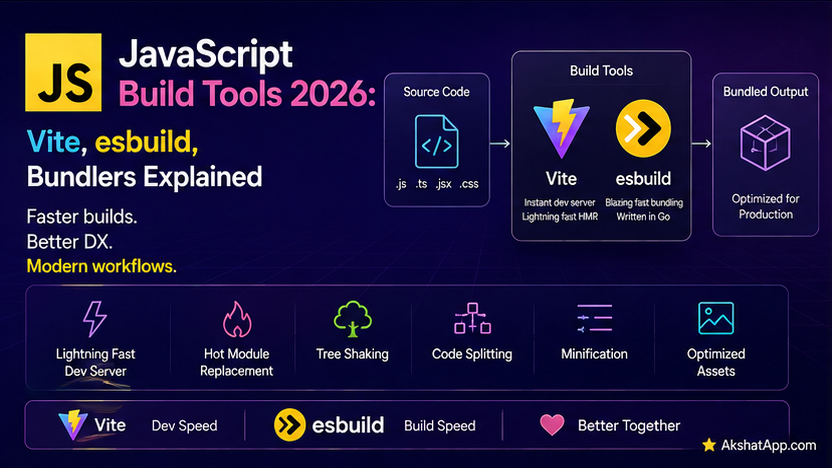
Post #12 organized the task tracker into four clean, properly-scoped ES modules — genuinely excellent for development, and genuinely inefficient to ship directly to a real user’s browser as-is. Four separate files mean four separate HTTP requests before the page becomes interactive. Nothing has been minified. Nothing accounts for a user on an older browser without full support for every modern syntax feature this series has used since Post #2. This is precisely the gap build tools exist to close.
This post covers why bundling, transpilation, and minification matter for real deployment, esbuild as the extraordinarily fast engine powering much of the modern JavaScript tooling ecosystem, and Vite — the dominant development and build tool for 2026 — configured to take the task tracker’s modules and produce something genuinely ready to deploy.
The Mental Model: Why Bundling Exists at All
Modern browsers genuinely can load ES modules directly, using <script type="module"> — no build step is strictly, technically required. In practice, shipping unbundled modules directly to production has real costs: every import triggers a separate network request, which adds up quickly across a real application’s dozens or hundreds of files; nothing is minified, meaning users download considerably more bytes than necessary; and code using very recent syntax may not run correctly on every browser your users actually have. Build tools address all three: bundling combines many files into fewer, larger ones; minification strips whitespace, shortens variable names, and removes dead code to reduce file size; transpilation converts newer syntax into an older, more broadly compatible form when needed.
esbuild: The Fast Engine Underneath Modern Tooling
esbuild, written in Go, is dramatically faster than the JavaScript-based bundlers that preceded it — the same “written in a faster systems language” pattern this series has referenced for bun (Post #1) and this blog’s broader coverage of tools like uv and ruff in its Python content. esbuild can be used directly, and — more commonly — serves as the underlying engine inside higher-level tools, including Vite, covered next.
npm install --save-dev esbuild
npx esbuild src/main.js --bundle --outfile=dist/bundle.js
npx esbuild src/main.js --bundle --minify --outfile=dist/bundle.min.js--bundle combines main.js and everything it imports into one output file. --minify additionally strips whitespace and shortens identifiers for a smaller final file size. This is genuinely useful to understand directly, even though most projects in 2026 reach for a higher-level tool built on top of it rather than configuring raw esbuild calls by hand.
Vite: The Dominant Modern Tool
Vite (“veet,” French for “fast”) combines a genuinely fast development server with a production-grade build process — using esbuild for near-instant development-mode transformations, and Rollup (a separate, more thorough bundler) for the final, most-optimized production build.
npm create vite@latest task-tracker -- --template vanilla
cd task-tracker
npm install
npm run dev     # starts the development server, with instant hot module reloading
npm run build    # produces an optimized production build in dist/
Why Vite’s Development Server Is Genuinely Fast
Older bundlers rebuilt the entire application bundle on every single file change during development — Vite instead serves your source files as native ES modules directly to the browser during development, transforming only the specific file you just changed, on demand, using esbuild’s speed. This is why Vite’s development experience feels close to instantaneous even on large projects, compared to older tools that could take seconds to rebuild after every save.
Basic Configuration
// vite.config.js
import { defineConfig } from "vite";

export default defineConfig({
    root: "src",
    build: {
        outDir: "../dist",
    },
});
Vite deliberately favors sensible defaults over required configuration — a genuinely minimal or even empty vite.config.js is sufficient for many projects, with configuration added specifically when you need to override a particular default.
Tree Shaking in Practice
Post #12 mentioned tree shaking conceptually — here it is demonstrated directly:
// utils.js
export function usedFunction() {
    return "used";
}

export function unusedFunction() {
    return "never imported anywhere in this project";
}
// main.js
import { usedFunction } from "./utils.js";
console.log(usedFunction());Because unusedFunction is never imported anywhere in the entire project, Vite’s production build (via Rollup) automatically detects this and excludes it entirely from the final bundled output — genuinely absent from the shipped code, not merely unreferenced. This works specifically because ES modules’ static import/export structure (covered in Post #12) is analyzable without executing any code, exactly the advantage Post #12 attributed to ES modules over CommonJS’s more dynamic require() calls.
Code Splitting With Dynamic Imports, in a Real Bundler
Post #12 covered import() as a function returning a Promise, loading a module on demand. In a bundler-processed project, this does something additionally powerful:
async function loadSettingsPage() {
    const { renderSettings } = await import("./settingsPage.js");
    renderSettings();
}

button.addEventListener("click", loadSettingsPage);
Vite (and virtually every modern bundler) automatically creates a separate output file for settingsPage.js and everything it exclusively depends on — this separate chunk is only downloaded by the browser the first time loadSettingsPage() actually runs, not as part of the initial page load. For any application with features not every user needs immediately (a settings page, an admin panel, a rarely-used report generator), this can meaningfully reduce the amount of code a typical user downloads before the page becomes interactive.
Environment Variables in Vite
# .env
VITE_API_URL=https://api.example.com
// In your code
const apiUrl = import.meta.env.VITE_API_URL;⚠️ The VITE_ Prefix Requirement Is a Deliberate Security Boundary
# .env
SECRET_API_KEY=sk-abc123  # NOT exposed to client code — no VITE_ prefix!
VITE_PUBLIC_CONFIG=some-value  # IS exposed to client code
Vite only exposes environment variables explicitly prefixed with VITE_ to your client-side bundled code — this is a deliberate security boundary, not an arbitrary naming convention, specifically preventing a genuine, common class of mistake: accidentally bundling a server-side secret (an API key, a database credential) directly into JavaScript that ships to every visitor’s browser, where it would be trivially visible to anyone who opens the browser’s developer tools. Anything without the VITE_ prefix stays entirely server-side (available, for instance, to your vite.config.js itself, or to Post #18’s Node.js server code), never reaching the bundled client output at all.
webpack: The Older, Still Extremely Common Alternative
// webpack.config.js
const path = require("path");

module.exports = {
    entry: "./src/main.js",
    output: {
        filename: "bundle.js",
        path: path.resolve(__dirname, "dist"),
    },
    mode: "production",
};
webpack predates Vite significantly and remains extremely common in existing, especially larger and older, codebases — many established enterprise applications and pre-Vite React setups (including the historically dominant Create React App tooling) were built on webpack. It is generally more configurable and, correspondingly, requires more explicit configuration than Vite’s convention-over-configuration approach. The practical guidance for new projects in 2026: Vite is the recommended default; understanding webpack’s basic shape remains valuable specifically for working with the many existing projects still built on it.
Building the Task Tracker for Real Deployment
task-tracker/
├── index.html
├── vite.config.js
├── package.json
├── .env
└── src/
    ├── main.js
    ├── TaskManager.js
    ├── taskUtils.js
    └── api.js
<!-- index.html -->
<!DOCTYPE html>
<html lang="en">
<head>
<meta charset="UTF-8" />
<title>Task Tracker</title>
</head>
<body>
<div id="app"></div>
<script type="module" src="/src/main.js"></script>
</body>
</html>npm run builddist/
├── index.html
└── assets/
├── main-a1b2c3d4.js (bundled, minified, tree-shaken)
└── main-a1b2c3d4.cssThe dist/ folder is genuinely production-ready — a small number of optimized, minified, cache-friendly files (the hashed filename, main-a1b2c3d4.js, changes automatically whenever the content changes, enabling aggressive browser caching for unchanged files) that can be deployed directly to any static hosting provider, with none of the four-separate-module-files overhead the raw Post #12 version would have incurred in production.
Real-World Use Cases
Shipping any real, deployed web application: Essentially every production JavaScript web application in 2026 goes through some build step — the specific tool varies (Vite is the dominant modern default; older projects may use webpack), but the underlying need (bundling, minification, tree shaking) is close to universal.
Supporting a broader range of browsers: Transpilation, configured via a build tool, allows writing modern JavaScript (exactly as this entire series has taught) while still shipping code compatible with browsers that do not yet support every recent feature natively.
Reducing initial page load time: Tree shaking and code splitting, both covered directly in this post, are among the highest-impact, most automatic ways to reduce how much JavaScript a typical user downloads before a page becomes interactive.
Working safely with environment-specific configuration: The VITE_ prefix convention is the standard, deliberate mechanism for distinguishing genuinely public configuration from server-side secrets that must never reach client-side bundled code.
Common Mistakes and Gotchas
⚠️ Mistake 1: Committing node_modules or dist to version control
Both are generated, reproducible from package.json/package-lock.json (or npm run build) respectively — committing either bloats a repository unnecessarily and risks committing stale, out-of-sync build output. Both belong in .gitignore.
⚠️ Mistake 2: Accidentally exposing secrets by using the VITE_ prefix incorrectly
Covered at length above — double-check that any environment variable containing genuinely sensitive data deliberately omits the VITE_ prefix, keeping it server-side only.
⚠️ Mistake 3: Confusing development mode behavior with production build behavior
Vite’s development server intentionally skips minification and some optimizations for speed and easier debugging — code that “looks unminified” or runs slightly differently during npm run dev is expected; always test genuinely production-representative behavior against the actual output of npm run build before assuming something is broken.
⚠️ Mistake 4: Over-configuring when Vite’s sensible defaults already handle the situation Vite deliberately ships with strong defaults for the overwhelming majority of common project shapes — reaching immediately for extensive custom configuration, before confirming the defaults genuinely do not meet your specific need, often adds unnecessary complexity and maintenance burden.
⚠️ Mistake 5: Not understanding that a build step is genuinely optional for very small, personal projects For a small, personal script or an internal tool with a handful of users on modern browsers, skipping a build step entirely and shipping raw ES modules directly (exactly as Post #10’s browser examples did) remains a completely valid, simpler choice — build tooling earns its complexity specifically at the scale where the problems it solves (many files, unsupported syntax, unminified size) become genuine, measurable concerns.
Performance Note
The performance benefits build tools provide are concentrated specifically in what a real user’s browser experiences — smaller total download size (minification, tree shaking), fewer network requests (bundling), and faster initial interactivity (code splitting deferring non-essential code) — rather than any change to raw JavaScript execution speed once the code is actually running, which remains governed by everything covered in Post #15’s V8-focused coverage. These are genuinely complementary, not competing, performance concerns: build tooling optimizes getting code to the browser; Post #15’s techniques optimize what happens once it’s there.
Quick Reference
# esbuild — fast, foundational bundler
npx esbuild src/main.js --bundle --minify --outfile=dist/bundle.js

# Vite — modern dev server + production build tool
npm create vite@latest my-project -- --template vanilla
npm run dev      # development server with hot reloading
npm run build     # production build to dist/
npm run preview    # locally preview the production build
// vite.config.js — often minimal or unnecessary
import { defineConfig } from "vite";
export default defineConfig({ /* overrides only where needed */ });# Environment variables (.env)
VITE_PUBLIC_VALUE=exposed-to-client # accessible via import.meta.env.VITE_PUBLIC_VALUE
SECRET_VALUE=never-exposed # NOT accessible client-side, no VITE_ prefix// Dynamic import — automatic code splitting in a bundled project
const module = await import("./featureModule.js");Exercises
Exercise 1 — Direct application
Scaffold a fresh Vite project (npm create vite@latest), copy in taskUtils.js and TaskManager.js from Post #12, and confirm npm run dev correctly serves a working page importing them.
Exercise 2 — Slight variation
Run npm run build on your Exercise 1 project, inspect the generated dist/ folder’s output file, and compare its size to the combined size of the original, unbundled source files — noting the difference minification made.
Exercise 3 — Real-world combination Add a dynamically-imported “detailed statistics” feature to the task tracker (a function computing and displaying completion rates by priority, loaded only when a button is clicked), and confirm — using your browser’s Network tab — that its code is not downloaded until the button is actually clicked.
Exercise 4 — Open-ended challenge
Add both a VITE_APP_NAME and a SECRET_TEST_VALUE to a .env file, log both import.meta.env.VITE_APP_NAME and import.meta.env.SECRET_TEST_VALUE in your client code, and confirm directly — by inspecting the built output — that only the VITE_-prefixed one actually appears anywhere in the bundled JavaScript.
FAQ
Q: Do I need a build tool for a simple personal project? A: Not necessarily — covered directly in this post’s mistakes section. Raw ES modules served directly, exactly as Post #10 demonstrated, remain entirely valid for small-scale, personal, or internal projects where the specific problems build tools solve are not yet genuine concerns.
Q: Is Vite only for frontend/browser projects, or does it work for Node.js too?
A: Vite is specifically focused on browser-targeted output — for Node.js server-side projects, the module system and tooling needs covered in Post #12 and Post #18 (native ES modules, fs/promises, and similar) are typically sufficient without a bundling step, since Node.js runs your source files directly rather than needing them optimized for network delivery to a browser.
Q: What’s the actual relationship between esbuild and Vite?
A: Vite uses esbuild internally for its fast development-mode transformations (pre-bundling dependencies, transpiling on the fly) and uses Rollup — a separate, more thorough bundler — for its final production build step, combining esbuild’s development speed with Rollup’s production-grade optimization capabilities.
Q: Should I learn webpack if I’m starting fresh in 2026? A: Not as a first priority — Vite is the recommended default for new projects, covered throughout this post. Basic familiarity with webpack’s configuration shape remains worth having specifically for working with the substantial number of existing projects still built on it, rather than as your primary tool for new work.
Summary and Next Steps
You now understand precisely why build tools exist — bundling, minification, and transpilation address real, measurable production concerns that raw ES modules alone do not solve — and can use Vite for both a genuinely fast development experience and an optimized production build, with tree shaking and code splitting working automatically on top of the module structure Post #12 established. The task tracker now has a real, deployable dist/ folder, and you understand the deliberate VITE_ prefix security boundary protecting server-side secrets from ever reaching client-side bundled code.
Your next step: Complete Exercise 2 — building your project and directly comparing the bundled, minified output size to the original source — since seeing the concrete size reduction is considerably more convincing than reading about minification’s value in the abstract.
The final post in this series looks at what’s current in the broader JavaScript ecosystem heading into and beyond 2026 — recent ECMAScript features, the frameworks built on everything this series has covered, and where the language and its tooling are heading next.
Code tested with Node.js 22 LTS, Vite 5.x. Last updated: July 2026.
Share This Post

Join our newsletter!
Get the latest developer guides, tutorials, and tips delivered straight to your inbox.



