Post #7’s BankAccount.withdraw() has a real, unresolved problem: attempting to overdraw prints “Insufficient funds” to the console and then… nothing stops. The balance stays correctly unchanged, but the calling code has no reliable way to know the operation actually failed — a console.log buried inside a method gives nothing back that can be checked, tested, or acted on programmatically.
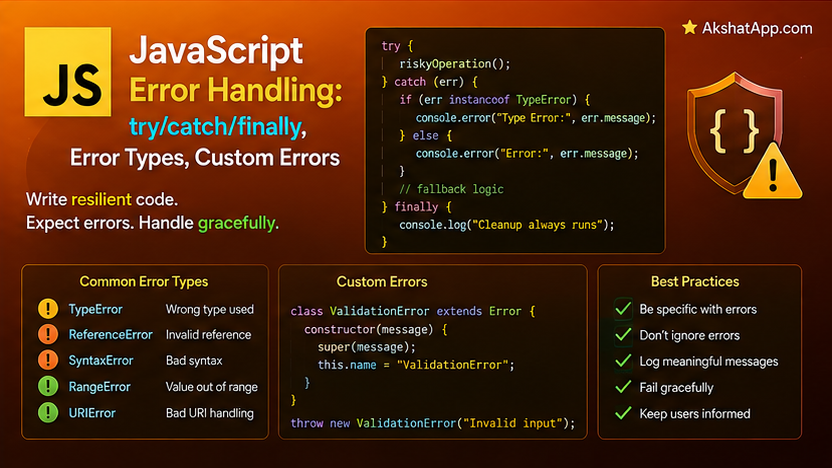
Every JavaScript program encounters situations it cannot fully prevent in advance — invalid input, malformed JSON, operations attempted on missing data. This post covers the language’s real mechanism for handling that: try/catch/finally, the built-in Error types JavaScript itself throws, and — directly building on Post #7’s class inheritance — custom error classes that let BankAccount finally, genuinely refuse an invalid withdrawal rather than merely logging about it.
The Mental Model: Errors as Objects, try/catch as the Handling Mechanism
When something goes wrong in JavaScript, an error object is created and “thrown” — execution immediately stops at that point and jumps to the nearest enclosing catch block, skipping everything else in between. try/catch is the mechanism for saying “attempt this code, and if something goes wrong, run this specific recovery logic instead of letting the whole program crash.”
try {
    const data = JSON.parse(userInput);
    console.log(data);
} catch (error) {
    console.log("Invalid JSON:", error.message);
} finally {
    console.log("Done attempting to parse");
}
Everything inside try runs normally unless an error occurs; if one does, execution jumps immediately to catch, skipping any remaining lines in try. finally runs always — whether an error occurred or not — the standard place for cleanup that must happen regardless of outcome.
The Error Object
try {
    null.someProperty;
} catch (error) {
    console.log(error.name);      // "TypeError"
    console.log(error.message);     // "Cannot read properties of null (reading 'someProperty')"
    console.log(error.stack);        // full stack trace, useful for debugging
    console.log(error instanceof Error);     // true
    console.log(error instanceof TypeError);  // true — TypeError is a subclass of Error
}
Every error object carries a name (the error type), a message (a human-readable description), and a stack (the call stack at the moment the error was thrown, invaluable for tracing exactly where and how the error occurred). error instanceof Error — directly using the instanceof operator from Post #7 — confirms an object is a genuine error, and checking against more specific subtypes like TypeError lets you distinguish between different categories of failure.
JavaScript’s Built-In Error Types
undefinedVariable;              // ReferenceError: undefinedVariable is not defined
null.foo;                         // TypeError: Cannot read properties of null
new Array(-1);                      // RangeError: Invalid array length
JSON.parse("{invalid}"); // SyntaxError: Unexpected token i in JSON| Type | Thrown when |
|---|---|
TypeError |
An operation is attempted on a value of the wrong type — calling something that isn’t a function, accessing a property of null/undefined |
RangeError |
A value is outside the range JavaScript allows for that operation — an invalid array length, an out-of-range number conversion |
ReferenceError |
Code references a variable that doesn’t exist in any accessible scope |
SyntaxError |
Invalid syntax — usually caught before code even runs, but functions like JSON.parse can throw this at runtime when given malformed input |
JSON.parse throwing SyntaxError at runtime is worth remembering specifically — it is one of the most common places a genuinely unexpected runtime error appears in otherwise-correct code, precisely because the input (often from a network request or user-provided text) is not something you fully control.
throw: Signaling Your Own Errors
function withdraw(balance, amount) {
    if (amount > balance) {
        throw new Error("Insufficient funds");
    }
    return balance - amount;
}

try {
    withdraw(100, 150);
} catch (error) {
    console.log(error.message); // "Insufficient funds"
}
throw new Error("...") creates a generic error object and immediately halts normal execution, propagating upward until a catch block handles it (or, if none exists anywhere in the call chain, the program crashes with an unhandled error). This is the exact mechanism your own code uses to signal “something is genuinely wrong here” — the same mechanism built-in operations like null.someProperty use internally.
Custom Error Classes: Building on Post #7’s Inheritance
A generic Error communicates that something went wrong, but not what specifically, or with what structured detail. Custom error classes — extending the built-in Error class exactly the way Post #7 covered extending any other class — communicate intent precisely and can carry additional, structured data.
class InvalidAmountError extends Error {
    constructor(amount) {
        super(`Amount must be positive, got ${amount}`);
        this.name = "InvalidAmountError";
        this.amount = amount;
    }
}

class InsufficientFundsError extends Error {
    constructor(balance, amount) {
        super(`Cannot withdraw ${amount}: balance is only ${balance}`);
        this.name = "InsufficientFundsError";
        this.balance = balance;
        this.amount = amount;
    }
}
extends Error and super(message) work exactly as covered in Post #7 for any class inheritance — super(message) passes the message string to Error’s own constructor, which sets up .message and .stack correctly. Setting this.name explicitly ensures error.name reports the specific custom type ("InsufficientFundsError"), rather than the generic "Error" it would otherwise inherit.
Properly Fixing BankAccount
class BankAccount {
    #balance;

    constructor(initialBalance) {
        this.#balance = initialBalance;
    }

    deposit(amount) {
        if (amount <= 0) {
            throw new InvalidAmountError(amount);
        }
        this.#balance += amount;
    }

    withdraw(amount) {
        if (amount <= 0) {
            throw new InvalidAmountError(amount);
        }
        if (amount > this.#balance) {
            throw new InsufficientFundsError(this.#balance, amount);
        }
        this.#balance -= amount;
    }

    get balance() {
        return this.#balance;
    }
}
const account = new BankAccount(100);
try {
account.withdraw(150);
} catch (error) {
if (error instanceof InsufficientFundsError) {
console.log(`Transaction declined: ${error.message}`);
console.log(`Attempted: ${error.amount}, Available: ${error.balance}`);
} else if (error instanceof InvalidAmountError) {
console.log(`Invalid input: ${error.message}`);
} else {
throw error; // an unexpected error type — re-throw rather than silently swallow it
}
}withdraw() no longer logs a message and silently continues — it genuinely halts the operation by throwing InsufficientFundsError, forcing whatever code called it to explicitly handle the failure (or let it propagate further, which is itself a deliberate, visible choice, not an accident). The custom error also carries structured data (error.balance, error.amount) that calling code can use programmatically — something a plain logged string never could provide.
Optional Catch Binding
try {
    riskyOperation();
} catch {
    // no (error) parameter needed when you don't care about the error's specific details
    console.log("Something went wrong — using a fallback instead.");
}
Added in ES2019, omitting the parameter entirely (catch { ... } instead of catch (error) { ... }) is valid whenever you genuinely do not need to inspect the error itself — useful for simple fallback logic where any failure, regardless of specifics, triggers the same recovery path.
A Preview of Error Handling in Async Code
Post #9 covers asynchronous JavaScript in full, but the shape of error handling there is worth previewing now, since it uses the exact same try/catch mechanism:
// Full explanation of async/await arrives in Post #9 — this is a preview only
async function loadTasksFromServer(url) {
    try {
        const response = await fetch(url);
        const data = await response.json();
        return data;
    } catch (error) {
        console.log("Failed to load tasks:", error.message);
        return [];
    }
}try/catch works identically around awaited operations as it does around synchronous code — a genuine consistency worth appreciating once Post #9 covers exactly why this works the way it does.
Real-World Use Cases
Input validation across the entire application: Any user input, form submission, or configuration value is an opportunity for unexpected data — custom errors, exactly as demonstrated with BankAccount, are the standard way to respond clearly rather than crashing or silently continuing with bad data.
API and network response handling: Post #11’s Fetch API coverage builds directly on this post’s error handling — network calls fail in ways your own code never does, and proper try/catch (or, in async contexts, the async equivalent from Post #9) is what separates a robust integration from one that crashes the moment a request fails.
Parsing external or user-provided data: JSON.parse, and similar operations working with data you do not fully control, should virtually always be wrapped in try/catch — exactly the scenario this post opened with.
Building domain-specific error hierarchies: InvalidAmountError and InsufficientFundsError, both extending Error, demonstrate the same design pattern real applications use for their own specific business rule violations — a permission-denied error, an out-of-stock error, a validation-failed error, each communicating a specific, actionable failure mode.
Common Mistakes and Gotchas
⚠️ Mistake 1: Catching too broadly, obscuring which specific line actually failed
try {
    const value = parseInput(userInput);
    const result = calculate(value);
    saveToDatabase(result);
} catch (error) {
    console.log("Something failed"); // which of the three lines? No idea.
}
Keep try blocks narrowly scoped to the specific operation that might genuinely fail, so a caught error clearly indicates which step went wrong, rather than requiring guesswork across several unrelated operations bundled into one block.
⚠️ Mistake 2: Forgetting that JSON.parse can throw
const data = JSON.parse(apiResponseText); // will throw SyntaxError on malformed input, with no try/catch!Any code parsing external JSON — API responses, localStorage values, user-provided text — should assume the input could be malformed and wrap the parse attempt in try/catch.
⚠️ Mistake 3: Silently swallowing errors with an empty catch block
try {
    riskyOperation();
} catch (error) {
    // nothing here — the error vanishes with no trace whatsoever
}
An empty catch block hides real bugs, sometimes for a long time, until they surface as a much harder mystery elsewhere. At minimum, log the error; ideally, handle it meaningfully or deliberately re-throw it.
⚠️ Mistake 4: Comparing errors by message string instead of type
if (error.message === "Insufficient funds") { ... } // fragile — breaks if the message wording ever changesUse instanceof against a specific error class, exactly as BankAccount’s calling code demonstrates — this remains correct even if the error’s message text is later reworded, translated, or made more detailed.
⚠️ Mistake 5: Not re-throwing genuinely unexpected error types
} catch (error) {
    if (error instanceof InsufficientFundsError) {
        // handle it
    }
    // silently does nothing for any OTHER error type — a real bug gets hidden!
}
When a catch block only knows how to handle specific, expected error types, it should explicitly re-throw anything else (else { throw error; }, exactly as this post’s BankAccount example does) rather than silently absorbing genuinely unexpected failures.
Performance Note
try/catch itself carries negligible overhead in modern JavaScript engines when no error actually occurs — the “happy path” is optimized aggressively, exactly the same principle covered for exception handling in this blog’s Python series. The measurable cost is concentrated specifically in the moment an error is actually thrown and caught, which is meaningfully more expensive than a simple conditional check — one more reason to reserve throw for genuinely exceptional situations rather than using it as routine control flow for conditions that occur on every normal call.
Quick Reference
// Basic structure
try {
    riskyOperation();
} catch (error) {
    handleIt(error);
} finally {
    alwaysRunsRegardless();
}

// Optional catch binding (no parameter needed)
try {
    riskyOperation();
} catch {
    fallbackBehavior();
}

// Throwing
throw new Error("message");
throw new CustomError(data);

// Custom error class
class MyError extends Error {
    constructor(data) {
        super(`Something about ${data}`);
        this.name = "MyError";
        this.data = data;
    }
}

// Checking error type
if (error instanceof MyError) { ... }

// Built-in error types
TypeError       // wrong type for the operation
RangeError        // value outside allowed range
ReferenceError     // undeclared variable referenced
SyntaxError          // invalid syntax, including at runtime via JSON.parse
Exercises
Exercise 1 — Direct application
Write a function safeDivide(a, b) that returns the result of a / b, throwing a custom DivisionByZeroError (extending Error) if b is zero, rather than returning Infinity (JavaScript’s default behavior for division by zero).
Exercise 2 — Slight variation
Add a transfer(otherAccount, amount) method to BankAccount that withdraws from this and deposits into otherAccount. Ensure that if the withdrawal throws, the deposit never happens — no money should ever be created or destroyed due to a partial failure.
Exercise 3 — Real-world combination
Write a function parseTaskFromJSON(jsonString) that uses JSON.parse wrapped in try/catch, throwing a custom InvalidTaskDataError with a clear message if the JSON is malformed, or if the parsed result is missing a required description field.
Exercise 4 — Open-ended challenge
Add proper input validation to taskManager.addTask from earlier posts, throwing a TypeError if description is not a non-empty string. Then write calling code that attempts to add several tasks, some deliberately invalid, using try/catch around each attempt so that one invalid task does not prevent the valid ones from being added successfully.
FAQ
Q: What’s the difference between Error and TypeError/RangeError/etc.?
A: TypeError, RangeError, ReferenceError, and SyntaxError are all built-in subclasses of the base Error class — error instanceof Error is true for all of them, exactly the inheritance relationship covered in Post #7. Use the base Error class directly for generic errors, or a specific built-in/custom subtype when you want callers to be able to distinguish categories of failure.
Q: Should I always create a custom error class instead of using plain Error?
A: For genuinely distinct, meaningful failure categories your application needs to handle differently (as InsufficientFundsError and InvalidAmountError demonstrate), yes. For a one-off, simple failure with no need for callers to distinguish it programmatically, a plain new Error("message") remains entirely appropriate.
Q: Can I catch an error and then re-throw it?
A: Yes — inside a catch block, a bare throw error; (or throw with no argument in some contexts, referring to the currently-caught error) re-raises the same error, preserving its original stack trace, useful when you want to log or react to an error without fully suppressing it from propagating further.
Q: Does finally run even if the try block has a return statement inside it?
A: Yes — finally runs regardless of how the try block exits, including via return, throw, or normal completion. This makes it reliable for cleanup logic (closing a resource, resetting a loading state) that must happen no matter which path the function actually took.
Summary and Next Steps
You can now catch and handle errors with try/catch/finally, recognize JavaScript’s built-in error types and understand what triggers each, throw your own errors deliberately, and — building directly on Post #7’s class inheritance — design a real custom error hierarchy. BankAccount.withdraw() now genuinely refuses an invalid withdrawal by throwing InsufficientFundsError, rather than logging a message and silently continuing.
Your next step: Complete Exercise 2 — the transfer() method — and pay close attention to the order of operations: confirming that a failed withdrawal genuinely prevents the deposit from happening at all, the same “no partial failure corruption” discipline this blog’s Python series applied to an identical transfer scenario.
The next post covers JavaScript’s most distinctive feature: asynchronous execution — callbacks, Promises, and async/await — building directly on the error-handling patterns previewed in this post’s async section.
Code tested with Node.js 22 LTS. Last updated: July 2026.
Share This Post

Join our newsletter!
Get the latest developer guides, tutorials, and tips delivered straight to your inbox.



