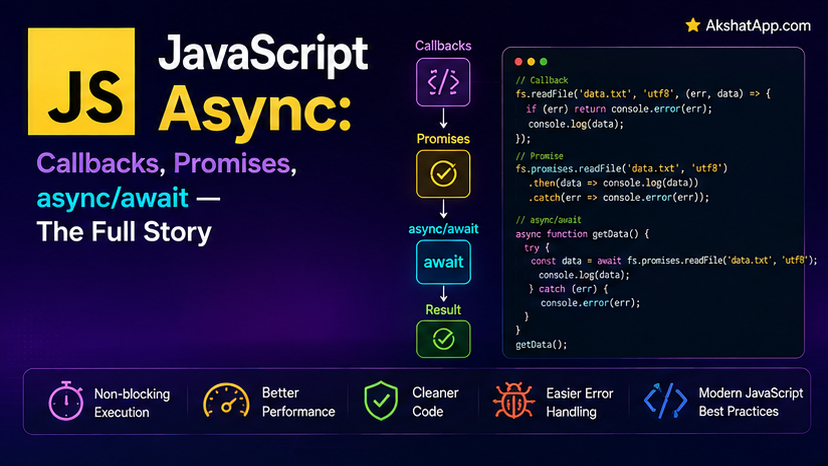
Post #1 stated that JavaScript is single-threaded but handles waiting for slow operations without freezing everything else, through a mechanism called the event loop — and then moved on without fully explaining it. This post is that explanation, in full, along with everything built on top of it: callbacks, the “callback hell” problem they eventually caused, Promises as the fix, and async/await as the final, most readable evolution of the same underlying mechanism.
This is arguably the single most consequential post in this entire series. Asynchronous behavior is not an advanced, optional JavaScript feature — it is fundamental to how the language handles anything involving waiting: network requests (Post #11), file operations, timers, user interaction. Getting it right, including a specific, common performance mistake covered directly below, is the difference between an application that feels instant and one that mysteriously takes three times longer than it needs to.
The Event Loop, Properly Explained
JavaScript runs on a single thread — one call stack, executing one thing at a time. If a slow operation (a network request taking 500ms, a file read) blocked that single thread while waiting, the entire program — including any user interface — would freeze completely until it finished. JavaScript avoids this through the event loop:
- Your code runs on the call stack — the currently executing function calls, one on top of another.
- When an asynchronous operation starts (a
setTimeout, a network request), JavaScript hands it off to the browser’s or Node.js’s own underlying system — not the JavaScript engine itself — and immediately continues running the rest of your code, without waiting. - When that operation eventually completes, its callback (or resolved Promise, covered below) is placed into a queue.
- The event loop continuously checks: is the call stack currently empty? If so, it takes the next item from the queue and pushes it onto the stack to run.
console.log("1: Starting");

setTimeout(() => {
    console.log("3: This runs later, after the stack clears");
}, 0);

console.log("2: This runs immediately, before the timeout callback");
1: Starting
2: This runs immediately, before the timeout callback
3: This runs later, after the stack clearsEven with a 0ms delay, the setTimeout callback runs after all synchronous code has finished — because it must wait for the queue mechanism, which only processes once the call stack is empty. This single example demonstrates the entire event loop mechanism in miniature: synchronous code always runs to completion first, asynchronous callbacks always run after, regardless of how short their delay is.
Callbacks: The Original Solution
function fetchUser(id, callback) {
    setTimeout(() => {
        callback({ id, name: "Alex" });
    }, 500);
}

fetchUser(1, (user) => {
    console.log(user); // runs ~500ms later
});

console.log("This prints FIRST, before the user data arrives");
A callback is simply a function passed to another function, to be called once an asynchronous operation completes — the original, foundational pattern for async JavaScript, and still genuinely useful for simple, single-step asynchronous operations.
Callback Hell
function fetchUser(id, callback) {
    setTimeout(() => callback({ id, name: "Alex" }), 300);
}
function fetchTasks(userId, callback) {
    setTimeout(() => callback([{ id: 1, description: "Task 1" }]), 300);
}
function fetchTaskDetails(taskId, callback) {
    setTimeout(() => callback({ description: "Task 1", priority: "high" }), 300);
}

fetchUser(1, (user) => {
    fetchTasks(user.id, (tasks) => {
        fetchTaskDetails(tasks[0].id, (details) => {
            console.log(details);
            // each additional async step nests one level deeper, indefinitely
        });
    });
});
Each dependent asynchronous step requires nesting one level deeper — a pattern that becomes genuinely difficult to read, difficult to add error handling to consistently, and difficult to modify once more than two or three steps are chained together. This specific, well-known pain point — nicknamed “callback hell” or “the pyramid of doom” — is precisely what Promises were introduced to solve.
Promises: Flattening the Nesting
A Promise represents a value that may not be available yet — it exists in one of three states: pending (still waiting), fulfilled (completed successfully, with a resulting value), or rejected (failed, with an error).
function fetchUser(id) {
    return new Promise((resolve, reject) => {
        setTimeout(() => {
            if (id > 0) {
                resolve({ id, name: "Alex" });
            } else {
                reject(new Error("Invalid user ID"));
            }
        }, 300);
    });
}
new Promise((resolve, reject) => { ... }) takes a function (called the “executor”) that receives two functions as arguments: call resolve(value) on success, reject(error) on failure. Whichever one is called first determines the Promise’s final, permanent state — a Promise settles exactly once, either fulfilled or rejected, never both and never more than once.
function fetchTasks(userId) {
    return new Promise((resolve) => {
        setTimeout(() => resolve([{ id: 1, description: "Task 1" }]), 300);
    });
}
function fetchTaskDetails(taskId) {
    return new Promise((resolve) => {
        setTimeout(() => resolve({ description: "Task 1", priority: "high" }), 300);
    });
}

fetchUser(1)
    .then((user) => fetchTasks(user.id))
    .then((tasks) => fetchTaskDetails(tasks[0].id))
    .then((details) => console.log(details))
    .catch((error) => console.log("Something failed:", error.message));
.then(callback) runs its callback once the Promise fulfills, and — critically — returning a value (or another Promise) from inside .then() becomes the input to the next .then() in the chain, which is exactly what flattens the previously deeply-nested callback structure into a single, readable, linear chain. .catch() at the end catches a rejection from any step in the chain, without needing separate error handling at every individual level.
⚠️ The Classic Forgotten-Return Bug
fetchUser(1)
    .then((user) => {
        fetchTasks(user.id); // BUG — forgot to return this!
    })
    .then((tasks) => {
        console.log(tasks); // undefined — the previous .then() returned nothing
    });
If a .then() callback does not explicitly return the next Promise (or value), the chain’s next .then() receives undefined instead of the intended result — a genuinely common, easy-to-miss bug, since the code runs without any error at all, it simply produces the wrong (missing) data silently.
async/await: Promises, Read Like Synchronous Code
async/await, added in ES2017, is syntax sugar directly over Promises — worth stating precisely, the same way Post #7 established that class is sugar over prototypes. Nothing new happens underneath; the same Promise mechanism runs, expressed in a form that reads far more naturally.
async function loadUserTaskDetails(userId) {
    try {
        const user = await fetchUser(userId);
        const tasks = await fetchTasks(user.id);
        const details = await fetchTaskDetails(tasks[0].id);
        console.log(details);
    } catch (error) {
        console.log("Something failed:", error.message);
    }
}

loadUserTaskDetails(1);
async before a function declaration marks it as returning a Promise automatically (even if you return a plain value, it gets wrapped in a resolved Promise). await, usable only inside an async function, pauses that function’s execution at that exact line — without blocking the rest of the program — until the awaited Promise settles, then either continues with the resolved value or, if the Promise rejected, throws that rejection as a genuine, catchable error, exactly matching the try/catch mechanism from Post #8.
This reads almost exactly like synchronous, step-by-step code — while remaining fully non-blocking underneath, exactly the same event loop mechanism covered at the start of this post.
The Critical Performance Mistake: Sequential Await When Parallel Would Work
This is the single most important practical lesson in this post, and it is a genuinely common real-world mistake:
// SLOW — sequential, even though these three calls don't depend on each other at all
async function loadDashboard() {
    const user = await fetchUser(1);              // waits ~300ms
    const settings = await fetchSettings(1);         // THEN waits another ~300ms
    const notifications = await fetchNotifications(1);  // THEN another ~300ms
    // Total time: roughly 900ms
}
Each await pauses the function until that specific operation completes before even starting the next one — even though fetchSettings and fetchNotifications have no dependency on fetchUser’s result and could easily run at the same time.
// FAST — parallel, using Promise.all
async function loadDashboardFast() {
    const [user, settings, notifications] = await Promise.all([
        fetchUser(1),
        fetchSettings(1),
        fetchNotifications(1),
    ]);
    // Total time: roughly 300ms — all three run concurrently
}
Promise.all([...]) starts every Promise in the array immediately, all at once, and resolves once all of them have completed — with results returned in the same order as the input array, destructured directly via Post #4’s array destructuring. The rule to internalize: only await sequentially when each step genuinely depends on the previous step’s result. When operations are independent, start them all together with Promise.all and await the combined result — the difference, as shown here, is not marginal; it is frequently a 2-3x speed difference for real dashboard-style data loading.
Promise.all, Promise.race, and Promise.allSettled
// Promise.all — waits for ALL, rejects immediately if ANY one rejects
Promise.all([fetchUser(1), fetchUser(2)])
    .then((users) => console.log(users))
    .catch((error) => console.log("At least one failed:", error.message));

// Promise.race — settles as soon as the FIRST Promise settles, ignoring the rest
Promise.race([fetchUser(1), timeoutAfter(2000)])
    .then((result) => console.log("First to finish:", result));

// Promise.allSettled — waits for ALL, NEVER rejects, reports each individual outcome
Promise.allSettled([fetchUser(1), fetchUser(-1)]).then((results) => {
    results.forEach((result) => {
        if (result.status === "fulfilled") {
            console.log("Success:", result.value);
        } else {
            console.log("Failed:", result.reason.message);
        }
    });
});
Promise.all is the right tool when you need every result and a single failure should abort the whole operation. Promise.allSettled is the right tool when you want to attempt several independent operations and handle successes and failures individually, without one failure preventing you from seeing the others’ results. Promise.race is useful specifically for timeout patterns — racing a real operation against a timer that rejects after a maximum wait.
Unhandled Promise Rejections
async function riskyOperation() {
    throw new Error("Oops");
}

riskyOperation(); // No .catch() and no surrounding try/catch — produces an UnhandledPromiseRejection warning
Every Promise that rejects needs something handling that rejection — either a .catch() in the chain, or try/catch around an await call. A rejected Promise with nothing to handle it produces a runtime warning (and, in some environments, can crash the process entirely) — exactly the same underlying concern as an uncaught exception in synchronous code, covered in Post #8, just applying to the asynchronous case specifically.
Giving the Task Tracker Real Async Load and Save
Using setTimeout to simulate a network delay, exactly as this post’s earlier examples did, the task tracker gets genuine (simulated) server persistence:
function saveTasksToServer(tasks) {
    return new Promise((resolve, reject) => {
        setTimeout(() => {
            if (tasks.length > 100) {
                reject(new Error("Too many tasks to save at once"));
                return;
            }
            console.log(`Saved ${tasks.length} tasks to server`);
            resolve({ success: true, count: tasks.length });
        }, 400);
    });
}

function loadTasksFromServer() {
    return new Promise((resolve) => {
        setTimeout(() => {
            resolve([
                { description: "Learn async/await", completed: true, priority: "high" },
                { description: "Build a real project", completed: false, priority: "medium" },
            ]);
        }, 400);
    });
}

class TaskManager {
    #tasks = [];

    async loadTasks() {
        try {
            console.log("Loading tasks...");
            this.#tasks = await loadTasksFromServer();
            console.log(`Loaded ${this.#tasks.length} tasks`);
        } catch (error) {
            console.log("Failed to load tasks:", error.message);
            this.#tasks = [];
        }
    }

    async saveTasks() {
        try {
            await saveTasksToServer(this.#tasks);
        } catch (error) {
            console.log("Failed to save:", error.message);
        }
    }

    get tasks() {
        return [...this.#tasks];
    }
}

const manager = new TaskManager();
await manager.loadTasks();
console.log(manager.tasks);
This combines Post #7’s classes and private fields, Post #8’s try/catch error handling, and this post’s async/await into one coherent example — the task tracker now genuinely simulates the real shape of loading and saving data from a server, which Post #11 replaces with an actual, live HTTP request using the exact same async/await and error-handling patterns established here.
Real-World Use Cases
Any network request: Every API call — covered fully in Post #11 — is inherently asynchronous, and async/await is the standard modern way to write and read that code.
Loading multiple independent resources efficiently: The Promise.all dashboard-loading pattern covered in this post is one of the most common, highest-impact real-world async optimizations — directly applicable to any page or application loading several independent pieces of data on startup.
File and database operations: In Node.js specifically, file reads, writes, and database queries are asynchronous by default for exactly the same reason network calls are — they involve genuine waiting that should not block the single JavaScript thread.
Timeout and retry patterns: Promise.race against a timer, combined with try/catch retry loops, is the standard pattern for handling operations that might hang or fail transiently — directly relevant once real network code appears in Post #11.
Common Mistakes and Gotchas
⚠️ Mistake 1: Forgetting await
async function loadData() {
    const result = fetchUser(1); // missing await!
    console.log(result); // logs a pending Promise object, not the actual user data
}
Without await, you get the Promise object itself, not its eventually-resolved value — a common source of confusion, especially since this produces no error, just an unexpected Promise { <pending> } where actual data was expected.
⚠️ Mistake 2: Using sequential await for independent operations
Covered at length above — this is the single highest-impact mistake in this entire post, silently making applications 2-3x slower than necessary for no correctness benefit whatsoever.
⚠️ Mistake 3: Forgetting to return a value inside a .then() chain
Covered above with the Promise chain example — always explicitly return whatever the next step in the chain should receive.
⚠️ Mistake 4: Not handling Promise rejections at all
Every async function call, and every Promise chain, needs a .catch() or surrounding try/catch somewhere — an unhandled rejection is a real, visible problem, not a silent non-issue.
⚠️ Mistake 5: Using async/await inside forEach, expecting it to wait
async function processAll(items) {
    items.forEach(async (item) => {
        await processItem(item); // does NOT make processAll wait for these!
    });
    console.log("Done!"); // this runs BEFORE any of the items actually finish processing
}forEach’s callback being async does not make forEach itself wait for each callback’s Promise — forEach has no awareness of Promises at all, and simply calls the callback repeatedly without waiting. Use a for...of loop (which does correctly pause on each await, exactly as Post #5 covered for early-exit scenarios) or Promise.all with .map() instead, when you genuinely need to wait for every item’s async processing to complete.
Performance Note
The sequential-versus-parallel distinction covered in this post is, practically speaking, the single highest-leverage async performance lesson in the entire language — the difference between Promise.all and sequential await calls scales directly with how many independent async operations a given piece of code performs, and the mistake is exceptionally easy to make by default (writing await on separate lines simply looks sequential, even when the underlying operations have no actual dependency on each other). Always ask, for any group of await calls: does step two genuinely need step one’s result, or are these independent operations that happen to be written one after another?
Quick Reference
// Callback (original pattern)
function fetchData(callback) {
    setTimeout(() => callback(result), 500);
}

// Promise
function fetchData() {
    return new Promise((resolve, reject) => {
        setTimeout(() => resolve(result), 500);
    });
}
fetchData().then(result => ...).catch(error => ...);

// async/await
async function loadData() {
    try {
        const result = await fetchData();
    } catch (error) {
        // handle it
    }
}

// Sequential (only when genuinely dependent)
const a = await fetchA();
const b = await fetchB(a); // depends on a

// Parallel (when independent — usually the right choice)
const [a, b, c] = await Promise.all([fetchA(), fetchB(), fetchC()]);

// Promise combinators
Promise.all([...]);         // all or nothing
Promise.allSettled([...]);   // every result, success or failure, individually
Promise.race([...]);           // first to settle wins
Exercises
Exercise 1 — Direct application
Write an async function fetchWithDelay(value, ms) returning a Promise that resolves with value after ms milliseconds — then use it to demonstrate the event loop by logging “start,” calling fetchWithDelay, logging “middle” immediately after (without awaiting), and finally logging the resolved value once it arrives.
Exercise 2 — Slight variation
Take three independent fetchWithDelay calls with different delays and different values, and load all three using Promise.all, confirming via console.time/console.timeEnd that the total time matches the longest individual delay, not the sum of all three.
Exercise 3 — Real-world combination
Add a retryLoad(maxAttempts = 3) method to TaskManager that calls loadTasksFromServer(), retrying up to maxAttempts times with a short delay between attempts if it fails, before finally giving up and throwing.
Exercise 4 — Open-ended challenge
Deliberately reproduce the forEach-with-async mistake from this post — using it to “process” a list of items with delays, expecting it to wait for each one — and confirm the “Done!” message logs before the items actually finish. Then fix it properly using a for...of loop, and separately using Promise.all with .map(), comparing both approaches.
FAQ
Q: Is async/await faster than plain Promises with .then()?
A: No — they compile to the same underlying mechanism and have identical runtime performance. async/await is purely a readability improvement, exactly the same relationship class has to prototypes covered in Post #7.
Q: Can I use await outside of an async function?
A: At the top level of an ES module (covered in Post #12), yes — “top-level await” is supported in modern JavaScript. Inside a regular, non-async function, no — attempting to use await there is a SyntaxError.
Q: What actually happens if I forget to handle a Promise rejection? A: In Node.js, an unhandled Promise rejection currently produces a warning and, depending on configuration, may terminate the process. In browsers, it typically produces a console warning without crashing the page. Neither is a safe assumption to build on deliberately — always handle rejections explicitly.
Q: Is setTimeout actually part of JavaScript itself?
A: No — setTimeout, along with the entire timer and network-request mechanism referenced throughout this post, is provided by the surrounding environment (the browser or Node.js), not by the core JavaScript language specification itself. This is why the event loop mechanism at the start of this post specifically describes handing async work off to “the browser’s or Node.js’s own underlying system,” not the JavaScript engine.
Summary and Next Steps
You now understand the event loop precisely — not as an abstract concept, but as the concrete mechanism (call stack, queue, continuous checking) that makes JavaScript’s single-threaded, non-blocking behavior work at all. You have traced the evolution from callbacks through Promises to async/await, and — critically — internalized the sequential-versus-parallel distinction that is very likely the single highest-impact performance lesson in this entire series.
Your next step: Complete Exercise 2 — measuring the actual time difference between sequential and parallel loading with real console.time output — since seeing the concrete millisecond difference on your own machine makes this lesson considerably more durable than reading about it in the abstract.
The next post moves from the abstract async concepts covered here to their most common real-world application in browser JavaScript: the DOM, and responding to real user interaction.
Code tested with Node.js 22 LTS. Last updated: July 2026.
Share This Post

Join our newsletter!
Get the latest developer guides, tutorials, and tips delivered straight to your inbox.



