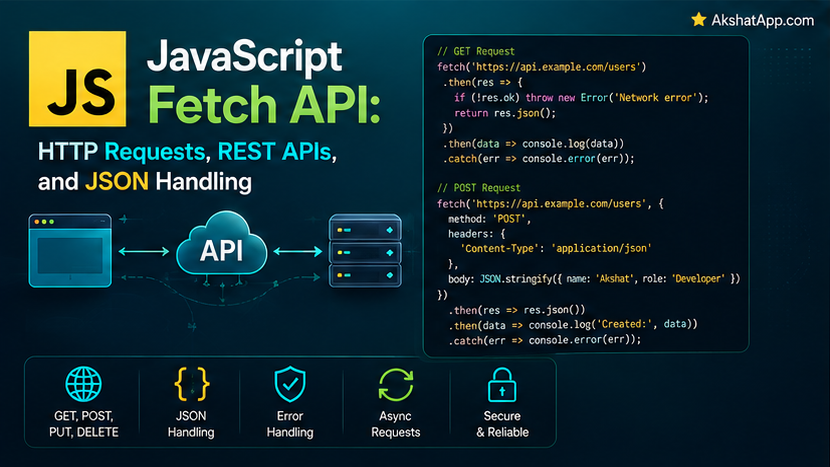
Post #9’s TaskManager.loadTasks() used setTimeout to simulate a server response — a genuinely useful way to learn async/await without external dependencies, but not a real network request. This post replaces that simulation with fetch(), JavaScript’s built-in, Promise-based way to make actual HTTP requests, connecting the task tracker to a genuine, live API for the first time in this series.
This post also covers the single most important, most commonly misunderstood detail about fetch specifically: it does not reject on HTTP error status codes. A 404 Not Found or 500 Internal Server Error response is, as far as fetch’s own Promise is concerned, a perfectly successful request — you have to check for this yourself, explicitly, every time. Missing this detail is one of the most common real-world JavaScript bugs in code that makes network requests, and this post makes sure you never write it.
The Mental Model: fetch Returns a Promise, Directly Building on Post #9
fetch(url) sends an HTTP request and returns a Promise — exactly the mechanism covered in full in Post #9. That Promise resolves with a Response object once the server has responded (or rejects if the request could not be made at all — a genuine network failure, not an HTTP error status). Everything covered in Post #9 about async/await, .then() chains, and error handling applies directly and identically here.
Your First Fetch Request
async function getData() {
    const response = await fetch("https://jsonplaceholder.typicode.com/todos/1");
    const data = await response.json();
    console.log(data);
}

getData();
// { userId: 1, id: 1, title: "delectus aut autem", completed: false }
Two await calls, doing genuinely different things: await fetch(url) waits for the HTTP response itself to arrive — headers, status code, and the beginning of the body. await response.json() is a separate asynchronous step, parsing the response body as JSON — worth noting explicitly, since it is easy to assume fetch alone gives you the actual data, when it actually gives you a Response object wrapping that data.
⚠️ The Single Most Important fetch Gotcha
const response = await fetch("https://jsonplaceholder.typicode.com/todos/999999999");

console.log(response.ok);      // false
console.log(response.status);   // 404

// But no error was thrown! fetch's Promise resolved successfully,
// even though the server returned a 404 Not Foundfetch’s Promise only rejects on genuine network failure — no internet connection, DNS failure, the request could not be sent or a response could not be received at all. A 404, a 500, a 403 — every one of these is, as far as fetch itself is concerned, a perfectly successful round trip: a request was sent, a response came back. You must check response.ok (a boolean, true for status codes 200–299) or response.status directly, every single time, and throw your own error if the request was not actually successful:
async function getData(url) {
    const response = await fetch(url);

    if (!response.ok) {
        throw new Error(`HTTP error: ${response.status} ${response.statusText}`);
    }

    return response.json();
}
This directly builds on Post #8’s error handling — throw new Error(...) here converts fetch’s “technically successful, but actually an HTTP error” response into a genuine, catchable JavaScript error, exactly the pattern any calling code using try/catch (Post #8) or .catch() (Post #9) expects to work with.
Making a GET Request With Error Handling
async function loadTask(id) {
    try {
        const response = await fetch(`https://jsonplaceholder.typicode.com/todos/${id}`);

        if (!response.ok) {
            throw new Error(`Failed to load task: HTTP ${response.status}`);
        }

        const task = await response.json();
        return task;
    } catch (error) {
        console.log("Error loading task:", error.message);
        return null;
    }
}
This pattern — check response.ok, throw if not, let try/catch handle both that thrown error and any genuine network failure uniformly — is the correct, complete shape for essentially every fetch call you will write.
POST Requests: Sending Data
async function createTask(description) {
    const response = await fetch("https://jsonplaceholder.typicode.com/todos", {
        method: "POST",
        headers: {
            "Content-Type": "application/json",
        },
        body: JSON.stringify({ title: description, completed: false }),
    });

    if (!response.ok) {
        throw new Error(`Failed to create task: HTTP ${response.status}`);
    }

    return response.json();
}fetch’s second argument is an options object: method specifies the HTTP verb ("GET" is the default if omitted), headers declares metadata about the request — Content-Type: application/json is required whenever sending a JSON body, telling the server how to correctly interpret it — and body is the actual data being sent, which must be a string (JSON.stringify, from this blog’s earlier JSON coverage in this series applied to network requests) rather than a raw JavaScript object.
⚠️ Forgetting Content-Type
// Without the header, many servers won't correctly interpret the body as JSON at all
fetch(url, {
    method: "POST",
    body: JSON.stringify({ title: "New task" }), // missing headers!
});
Omitting Content-Type: application/json is a genuinely common mistake — the request still sends, fetch does not error, but many servers will fail to parse the body correctly (or reject the request entirely) without that header explicitly declaring what format the body is actually in.
Timeouts With AbortController
fetch has no built-in timeout — left alone, it will wait indefinitely for a response that may never arrive. AbortController is the modern, standard way to add one:
async function fetchWithTimeout(url, timeoutMs = 5000) {
    const controller = new AbortController();
    const timeoutId = setTimeout(() => controller.abort(), timeoutMs);

    try {
        const response = await fetch(url, { signal: controller.signal });
        clearTimeout(timeoutId);
        return response;
    } catch (error) {
        if (error.name === "AbortError") {
            throw new Error(`Request timed out after ${timeoutMs}ms`);
        }
        throw error; // some other genuine network failure — re-throw it as-is
    }
}
controller.signal is passed into fetch’s options; calling controller.abort() (here, triggered by a setTimeout after the specified delay) causes the in-flight fetch to reject with an AbortError — caught, checked by name, and converted into a clearer timeout-specific error message. clearTimeout(timeoutId) on success cancels the pending abort timer, since it is no longer needed once the response has already arrived.
Giving TaskManager a Real API
Replacing Post #9’s simulated setTimeout-based server with an actual, live API — using JSONPlaceholder, a free, public API specifically designed for exactly this kind of learning and testing:
class TaskManager {
    #tasks = [];
    #apiUrl = "https://jsonplaceholder.typicode.com/todos";

    async loadTasks() {
        try {
            console.log("Loading tasks from API...");
            const response = await fetch(`${this.#apiUrl}?_limit=5`);

            if (!response.ok) {
                throw new Error(`Failed to load tasks: HTTP ${response.status}`);
            }

            const data = await response.json();
            this.#tasks = data.map((item) => ({
                description: item.title,
                completed: item.completed,
            }));
            console.log(`Loaded ${this.#tasks.length} tasks`);
        } catch (error) {
            console.log("Failed to load tasks:", error.message);
            this.#tasks = [];
        }
    }

    async addTaskToAPI(description) {
        try {
            const response = await fetch(this.#apiUrl, {
                method: "POST",
                headers: { "Content-Type": "application/json" },
                body: JSON.stringify({ title: description, completed: false }),
            });

            if (!response.ok) {
                throw new Error(`Failed to save task: HTTP ${response.status}`);
            }

            const savedTask = await response.json();
            console.log("Saved to server:", savedTask);
            return savedTask;
        } catch (error) {
            console.log("Failed to save task:", error.message);
            throw error;
        }
    }

    get tasks() {
        return [...this.#tasks];
    }
}

const manager = new TaskManager();
await manager.loadTasks();
console.log(manager.tasks);
Every piece of this is genuinely working code against a real API endpoint — no simulation. loadTasks correctly checks response.ok before proceeding, exactly the discipline this post has emphasized throughout. addTaskToAPI sends a real POST request with the correct headers and body format. This class can now be combined directly with Post #10’s DOM techniques to build a task tracker that genuinely persists data to (and loads it from) a real server, rather than only ever existing in memory for the duration of a single page load.
A Brief Note on CORS
If you build your own backend API and call it via fetch from a browser page served from a different origin (different domain, port, or protocol), you may encounter a CORS (Cross-Origin Resource Sharing) error — a browser security mechanism preventing a page from making requests to a different origin unless that origin’s server explicitly permits it via specific response headers. This is not something you fix from the requesting JavaScript code itself — it requires the server you are calling to include the correct CORS headers in its responses. JSONPlaceholder, used throughout this post’s examples, is configured to permit requests from anywhere specifically so it can be used freely for learning exactly like this.
Real-World Use Cases
Loading data when a page or component initializes: The loadTasks() pattern — fetch on load, handle errors gracefully, update the UI once data arrives — is the standard shape of nearly every data-driven web page, directly combinable with Post #10’s DOM rendering techniques.
Form submissions that save to a server: addTaskToAPI’s POST pattern, combined with Post #10’s form handling, is the standard way any real web form ultimately persists its data.
Polling or periodically refreshing data: Combining fetch with setInterval (a repeating version of setTimeout) is a common pattern for keeping displayed data reasonably current without requiring a full page reload.
Building resilient integrations: The AbortController timeout pattern and the response.ok check together form the foundation of genuinely production-ready network code — code that fails clearly and predictably rather than hanging indefinitely or silently treating an error response as success.
Common Mistakes and Gotchas
⚠️ Mistake 1: Assuming fetch rejects on HTTP error status codes
Covered at the very top of this post, and worth repeating as the single most important lesson here: fetch only rejects on network failure. Always check response.ok explicitly and throw your own error when it is false.
⚠️ Mistake 2: Forgetting that response.json() is itself asynchronous
const response = await fetch(url);
const data = response.json(); // BUG — missing await! data is a Promise, not the actual data
.json() returns a Promise that must itself be awaited (or .then()-chained) — a genuinely easy detail to miss, since it looks like it should just be a plain method call.
⚠️ Mistake 3: Missing Content-Type on POST requests Covered above — many servers silently fail to parse the request body correctly without this header explicitly present.
⚠️ Mistake 4: Not handling both network failure AND HTTP error status in the same try/catch
try {
    const response = await fetch(url);
    const data = await response.json(); // if response.ok check is missing, this might parse an error page as if it were valid data!
} catch (error) {
    // only catches genuine network failures, NOT a 404/500 that was never explicitly checked for
}
Both failure modes need explicit handling — the try/catch alone only catches the network-failure case; the HTTP-error-status case requires the explicit if (!response.ok) throw ... check covered throughout this post.
⚠️ Mistake 5: Not setting a timeout for requests that might hang
Without AbortController, a fetch call to an unresponsive server waits indefinitely by default — genuinely problematic for any user-facing application, where an unresponsive request should fail with a clear message rather than leave the interface hanging forever.
Performance Note
Each fetch call carries real network latency — even a fast, nearby server typically responds in tens to low hundreds of milliseconds, dramatically slower than any in-memory JavaScript operation covered elsewhere in this series. Making several independent fetch calls sequentially with await, rather than starting them together with Promise.all (covered in Post #9), produces exactly the same accumulated-latency problem demonstrated there — the identical lesson applies directly to real network requests, not just the simulated examples used to teach it.
Quick Reference
// Basic GET
const response = await fetch(url);
if (!response.ok) throw new Error(`HTTP ${response.status}`);
const data = await response.json();

// POST with JSON body
const response = await fetch(url, {
    method: "POST",
    headers: { "Content-Type": "application/json" },
    body: JSON.stringify(payload),
});

// Timeout with AbortController
const controller = new AbortController();
setTimeout(() => controller.abort(), 5000);
const response = await fetch(url, { signal: controller.signal });

// Checking response
response.ok;          // true for 200-299
response.status;        // the actual numeric status code
response.statusText;      // e.g. "Not Found"

// Full error-safe pattern
try {
    const response = await fetch(url);
    if (!response.ok) throw new Error(`HTTP ${response.status}`);
    const data = await response.json();
} catch (error) {
    // handles BOTH network failure AND HTTP error status
}
Exercises
Exercise 1 — Direct application
Write an async function getRandomTask() that fetches a random task from https://jsonplaceholder.typicode.com/todos/{id} where id is a random number between 1 and 200, with proper response.ok checking and error handling.
Exercise 2 — Slight variation
Add a deleteTaskFromAPI(id) method to TaskManager using fetch with method: "DELETE" against https://jsonplaceholder.typicode.com/todos/{id}, with the same error-checking discipline as addTaskToAPI.
Exercise 3 — Real-world combination
Combine this post’s fetchWithTimeout with Post #9’s Promise.all to load three different task IDs simultaneously, each with a 3-second timeout, using Promise.allSettled (from Post #9) so that one timing out does not prevent the others from being reported.
Exercise 4 — Open-ended challenge
Deliberately fetch a URL that returns a 404 (like https://jsonplaceholder.typicode.com/todos/999999) without checking response.ok, and confirm that your code proceeds as if it succeeded, potentially working with malformed or unexpected data. Then add the proper check and confirm it now throws a clear, catchable error instead.
FAQ
Q: Should I use fetch or a library like axios?
A: fetch is built into every modern browser and Node.js, requiring no installation — a genuine advantage for simple use cases. Libraries like axios provide some conveniences fetch lacks natively (automatic JSON parsing, built-in timeout support, automatic rejection on HTTP error status) at the cost of an added dependency. For learning the underlying mechanics, and for many real projects, native fetch — with the patterns covered in this post — is entirely sufficient.
Q: Why doesn’t fetch just reject on 404/500 like most other HTTP libraries do?
A: This is a deliberate, if often-criticized, design decision — the fetch specification considers a successfully-received HTTP response, regardless of its status code, to be a “successful” fetch operation. Whether that response represents success or failure at the application level is left entirely to your own code to determine, exactly the response.ok check this post emphasizes throughout.
Q: Can I fetch data from any URL on the internet?
A: Only if the target server’s CORS configuration permits it, when calling from a browser (Node.js fetch calls are not subject to CORS restrictions, since CORS is specifically a browser security mechanism). Many public APIs, including JSONPlaceholder used in this post, are deliberately configured to allow this for exactly this kind of learning use case.
Q: How is fetch different from the older XMLHttpRequest?
A: XMLHttpRequest is JavaScript’s original, considerably more verbose mechanism for making HTTP requests, predating Promises entirely. fetch, Promise-based and far more ergonomic especially combined with async/await, has been the standard, recommended approach for new code for years — XMLHttpRequest remains present in older codebases but is not something new code should reach for.
Summary and Next Steps
You can now make real GET and POST requests with fetch, correctly handle the critical distinction between network failure and HTTP error status (the single most important lesson in this post), send properly-formatted JSON request bodies, and add timeouts with AbortController. The TaskManager class now loads from and saves to a genuine, live API — no more setTimeout simulation.
Your next step: Complete Exercise 4 — deliberately skipping the response.ok check against a real 404 response, then adding it back — since seeing your own code silently “succeed” against an actual error response is what makes this post’s central lesson concrete rather than theoretical.
The next post addresses something this series has deferred since Post #1: properly organizing JavaScript code across multiple files using the real ES module system, import and export.
Code tested with Node.js 22 LTS and current browsers. Last updated: July 2026.
Share This Post

Join our newsletter!
Get the latest developer guides, tutorials, and tips delivered straight to your inbox.



