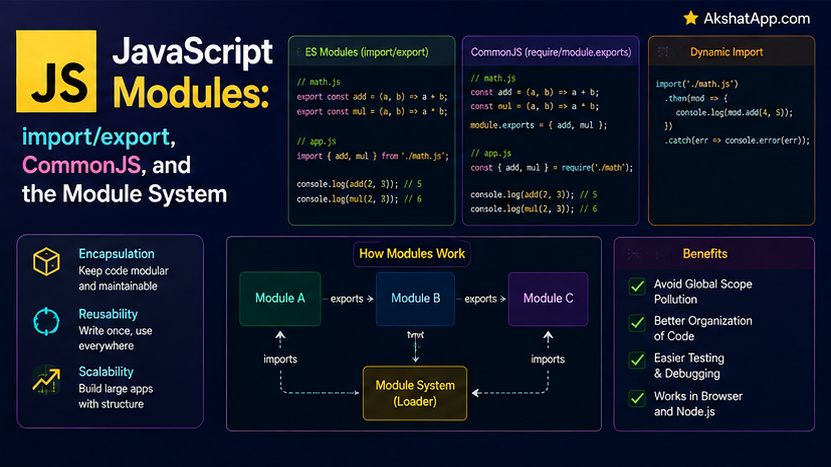
Every single file across this entire eleven-post series has been exactly that — one file. Post #6 achieved a form of privacy using an IIFE specifically because it needed to demonstrate the concept of encapsulation before this post could properly cover the real mechanism JavaScript now provides for it directly: ES modules, using import and export.
This post covers the genuine module system — named exports, default exports, and the practical difference between it and CommonJS, the older Node.js module system (require/module.exports) that remains extremely common in existing code and libraries. It also covers a specific, genuine gotcha that catches nearly every developer moving from browser-bundled JavaScript to plain Node.js ES modules: file extensions are not optional. By the end, the task tracker is split across proper, production-style files for the first time in this series.
The Mental Model: Modules Are Files With Their Own Private Scope
An ES module is simply a JavaScript file, treated with one crucial difference from a plain script: everything declared inside it is private to that file by default — no accidental global scope pollution, exactly the problem Post #6’s IIFE-based Module Pattern worked around manually. Nothing is shared between modules unless you explicitly export it, and nothing from another module is usable unless you explicitly import it.
Named Exports and Imports
// taskUtils.js
export function createTask(description, priority = "medium") {
    if (typeof description !== "string" || description.trim().length === 0) {
        throw new TypeError("Task description must be a non-empty string");
    }
    return { description, priority, completed: false };
}

export function isValidTask(task) {
    return Boolean(task && typeof task.description === "string");
}

export const DEFAULT_PRIORITY = "medium";
// main.js
import { createTask, isValidTask, DEFAULT_PRIORITY } from "./taskUtils.js";
const task = createTask("Learn ES modules");
console.log(isValidTask(task)); // trueexport in front of a function, class, or variable declaration makes it available for other files to import — by its exact name, wrapped in curly braces on the importing side, matching precisely how object destructuring (Post #4) looks, though the underlying mechanism is genuinely different (a live binding to the module, not a value copy).
Default Exports
// TaskManager.js
export default class TaskManager {
    #tasks = [];

    addTask(description) {
        this.#tasks.push({ description, completed: false });
    }

    get tasks() {
        return [...this.#tasks];
    }
}
// main.js
import TaskManager from "./TaskManager.js"; // no curly braces, and any name works
const manager = new TaskManager();Every module can have at most one default export, imported without curly braces, and — because there is only ever one possible default per module — the importing file can name it anything it wants (import TaskManager from "./TaskManager.js" and import TM from "./TaskManager.js" both import the exact same thing, just bound to different local names). The practical convention: use a default export for a module’s single, primary piece of functionality (as with the TaskManager class here) — use named exports for modules providing several related, individually-useful pieces (as taskUtils.js does with its two functions and one constant).
Renaming During Export or Import
// Renaming on export
function createTask() { ... }
export { createTask as makeTask };

// Renaming on import
import { createTask as make } from "./taskUtils.js";
Useful for avoiding naming collisions when importing from multiple modules that happen to export something with the same name, or simply for a more contextually appropriate local name.
Importing Everything From a Module
import * as TaskUtils from "./taskUtils.js";

TaskUtils.createTask("Learn modules");
TaskUtils.isValidTask(someTask);
console.log(TaskUtils.DEFAULT_PRIORITY);
import * as Name gathers every named export from a module into a single object, accessed via dot notation — useful when a module has many related exports you want to reference together under one namespace, rather than listing each one individually in the import statement.
CommonJS: The Older System, Still Everywhere
Before ES modules were standardized and widely supported in Node.js, CommonJS (require/module.exports) was the only module system Node.js had — and it remains extremely common in existing packages, tutorials, and company codebases.
// CommonJS — taskUtils.js
function createTask(description) {
    return { description, completed: false };
}

module.exports = { createTask };
// or, equivalently:
// module.exports.createTask = createTask;
// CommonJS — main.js
const { createTask } = require("./taskUtils.js");
const task = createTask("Learn CommonJS");require() is a synchronous function call (not import, not asynchronous, not part of the ES module syntax at all) that loads and returns a module’s module.exports object directly. Structurally, this achieves a similar goal to ES modules’ named/default export system, but through an entirely different underlying mechanism, with real practical differences covered next.
How to Tell Which System a Project Uses
// package.json
{
  "type": "module"
}
A "type": "module" field in package.json tells Node.js to treat every .js file in that project as an ES module (import/export). Without this field — the default if it is omitted entirely — Node.js treats .js files as CommonJS (require/module.exports) instead. Two file extensions override this setting explicitly, regardless of package.json: .mjs always means ES module, .cjs always means CommonJS, no matter what the rest of the project is configured for.
The practical guidance for this series, and for new projects generally: set "type": "module" in package.json and use ES module syntax throughout — the modern, standard choice. Recognizing CommonJS syntax remains essential, since you will encounter it constantly in existing packages (many published npm packages still ship CommonJS, or both formats simultaneously) and in tutorials or codebases predating widespread ES module adoption in Node.js.
⚠️ The File Extension Gotcha
// This works in many bundler-based setups (webpack, Vite) and in TypeScript
import { createTask } from "./taskUtils";

// This is REQUIRED in plain Node.js ES modules — the extension is NOT optional!
import { createTask } from "./taskUtils.js";
Error [ERR_MODULE_NOT_FOUND]: Cannot find module '/path/to/taskUtils'
imported from /path/to/main.jsPlain Node.js, running ES modules directly (without a bundler like webpack or Vite doing extension resolution automatically), requires the exact, explicit file extension on every relative import. This differs from CommonJS’s require(), which happily resolves require("./taskUtils") to taskUtils.js automatically, and it differs from many bundler-based frontend setups, which also resolve extensions automatically. This inconsistency across different JavaScript environments is a genuine, common source of “why doesn’t this import work” confusion — the fix, in plain Node.js specifically, is always the same: include the .js extension explicitly on every relative import path.
Dynamic Imports: Loading Modules on Demand
// Static import — always at the top of the file, loaded immediately when the file runs
import { createTask } from "./taskUtils.js";

// Dynamic import — can appear anywhere, returns a PROMISE, loaded only when actually called
async function loadTaskUtilsWhenNeeded() {
    const { createTask } = await import("./taskUtils.js");
    return createTask("Loaded on demand");
}
import() as a function call (rather than the import { } from statement form) returns a Promise — directly building on Post #9’s Promise and async/await coverage — and loads the target module only at the moment it is actually called, rather than upfront when the file first runs. This is genuinely useful for code splitting: loading a large, infrequently-used module (a complex report generator, a rarely-used settings panel) only when a user actually needs it, rather than paying the loading cost for every user on every page load regardless of whether they ever use that feature.
Splitting the Task Tracker Into Real Modules
The complete project, finally organized across proper files:
// src/taskUtils.js
export function createTask(description, priority = "medium") {
    if (typeof description !== "string" || description.trim().length === 0) {
        throw new TypeError("Task description must be a non-empty string");
    }
    return { description, priority, completed: false };
}

export function isValidTask(task) {
    return Boolean(task && typeof task.description === "string");
}
// src/api.js
const API_URL = "https://jsonplaceholder.typicode.com/todos";
export async function fetchTasks(limit = 5) {
const response = await fetch(`${API_URL}?_limit=${limit}`);
if (!response.ok) {
throw new Error(`Failed to fetch tasks: HTTP ${response.status}`);
}
return response.json();
}
export async function saveTask(task) {
const response = await fetch(API_URL, {
method: "POST",
headers: { "Content-Type": "application/json" },
body: JSON.stringify({ title: task.description, completed: task.completed }),
});
if (!response.ok) {
throw new Error(`Failed to save task: HTTP ${response.status}`);
}
return response.json();
}// src/TaskManager.js
import { createTask } from "./taskUtils.js";
import { fetchTasks, saveTask } from "./api.js";
export default class TaskManager {
#tasks = [];
async loadTasks() {
try {
const data = await fetchTasks();
this.#tasks = data.map((item) => createTask(item.title, "medium"));
} catch (error) {
console.log("Failed to load:", error.message);
this.#tasks = [];
}
}
addTask(description, priority) {
const task = createTask(description, priority);
this.#tasks.push(task);
return task;
}
get tasks() {
return [...this.#tasks];
}
}// src/main.js
import TaskManager from "./TaskManager.js";
const manager = new TaskManager();
await manager.loadTasks();
manager.addTask("Learn ES modules", "high");
console.log(manager.tasks);// package.json
{
"name": "task-tracker",
"type": "module",
"main": "src/main.js"
}Notice the deliberate structure: taskUtils.js and api.js use named exports — several individually-useful, related pieces. TaskManager.js uses a default export — one primary class, the module’s whole reason for existing. TaskManager.js itself imports from both of the other two files, composing them together, and main.js imports only what it directly needs — the TaskManager class itself, with every internal detail of how it loads or saves data now genuinely hidden inside TaskManager.js and the modules it depends on.
Real-World Use Cases
Organizing any project beyond a handful of files: The exact split demonstrated above — utility functions, API interaction, and the main orchestrating class each in their own file — is the standard shape real JavaScript (and Node.js) projects take once they grow past a single-file script.
Working with existing npm packages: The overwhelming majority of installed packages (Post #1’s npm install from the very start of this series) use either CommonJS, ES modules, or both — recognizing which is genuinely necessary for correctly importing and using them.
Code splitting in web applications: Dynamic import() is the standard mechanism modern bundlers and frameworks use to split a large application into smaller chunks loaded only when needed, directly improving initial page load performance for features not every user immediately requires.
Publishing your own reusable code: Any code intended to be shared — across your own projects, or published publicly — benefits from the same named/default export discipline covered in this post, giving consumers a clear, explicit public API.
Common Mistakes and Gotchas
⚠️ Mistake 1: Forgetting the file extension in Node.js ES module imports
Covered at length above — this is the single most common “why won’t this import” frustration when working with plain Node.js ES modules specifically. Always include the explicit .js extension on relative imports.
⚠️ Mistake 2: Mixing require() and import in the same file
import { createTask } from "./taskUtils.js";
const fs = require("fs"); // SyntaxError — cannot mix CommonJS and ESM syntax in one file
A single file is either an ES module or a CommonJS module, determined by package.json’s "type" field (or the .mjs/.cjs extension) — never both simultaneously.
⚠️ Mistake 3: Confusing default and named export/import syntax
export default function createTask() { ... }
import { createTask } from "./taskUtils.js"; // WRONG — this was a default export, needs no braces!

// Correct:
import createTask from "./taskUtils.js";
Using curly braces for a default import (or omitting them for a named one) produces either an error or, confusingly, undefined rather than the intended import — double-check which export style a module actually used.
⚠️ Mistake 4: Circular imports between two modules
// a.js
import { b } from "./b.js";
// b.js
import { a } from "./a.js"; // circular — a needs b, b needs a
Two modules importing from each other directly can produce partially-initialized values or outright errors, depending on the exact circumstances — the fix is almost always a design issue: extract the shared logic both modules need into a third module they can both import from independently, rather than importing from each other.
⚠️ Mistake 5: Assuming top-level await works everywhere
Top-level await (used directly in main.js above, with no enclosing async function) works at a module’s top level in ES modules specifically — it does not work in CommonJS files, and does not work inside a regular, non-module script tag in a browser without type="module" set on that script tag.
Performance Note
ES modules are statically analyzable — JavaScript engines and bundlers can determine a module’s exact imports and exports without executing any code, purely by reading the import/export statements themselves. This enables tree shaking — a bundler eliminating exports that are never actually imported anywhere, reducing the final bundled file size for browser delivery. CommonJS’s dynamic require() calls (which can technically appear anywhere, even conditionally) are considerably harder to analyze this way, which is one genuine, practical advantage ES modules have for real-world web application bundle sizes, beyond the cleaner syntax covered throughout this post.
Quick Reference
// Named exports
export function myFunction() { ... }
export const myConstant = 42;
export { myFunction as renamedFunction };

// Named imports
import { myFunction, myConstant } from "./module.js";
import { myFunction as renamed } from "./module.js";
import * as ModuleName from "./module.js";

// Default export (one per module)
export default class MyClass { ... }

// Default import (any name, no braces)
import AnyNameYouWant from "./module.js";

// Dynamic import (returns a Promise)
const module = await import("./module.js");
// CommonJS (older, still common)
module.exports = { myFunction };
const { myFunction } = require("./module.js");// package.json — determines module system for plain .js files
{ "type": "module" } // ES modules
{ "type": "commonjs" } // CommonJS (also the default if omitted)Exercises
Exercise 1 — Direct application
Split the printTask function and any related helper functions from earlier posts into their own taskDisplay.js module using named exports, and import them into a fresh main.js.
Exercise 2 — Slight variation
Convert taskUtils.js from this post’s example to CommonJS syntax (module.exports/require), and update the corresponding import in a test file to use require instead of import — confirming you can write both styles correctly.
Exercise 3 — Real-world combination
Add a fourth module, validators.js, exporting a named function validatePriority(priority) that throws if the value is not one of "low", "medium", "high" — then import and use it inside taskUtils.js’s createTask function.
Exercise 4 — Open-ended challenge Deliberately create a circular import between two small modules (module A importing from module B, and module B importing from module A), run it, observe the actual error or unexpected behavior Node.js produces, then fix it by extracting the shared piece both modules need into a third module.
FAQ
Q: Do I need to convert every existing CommonJS project to ES modules? A: Not urgently — CommonJS remains fully supported and widely used. For new projects, ES modules are the modern, recommended default (used throughout the rest of this series); converting a large existing CommonJS codebase is a deliberate migration decision with real tradeoffs, not something to do casually.
Q: Can an ES module import a CommonJS module, or vice versa?
A: ES modules can import CommonJS modules in Node.js (with some limitations around named exports specifically), but CommonJS files cannot use import/export syntax directly — this asymmetry is one more reason ES modules are generally considered the more forward-compatible choice for new code.
Q: What happens if I forget to add "type": "module" but write import/export syntax anyway?
A: Node.js will produce a SyntaxError, since without that field, .js files are parsed as CommonJS by default, and CommonJS does not recognize import/export keywords at all.
Q: Is there a limit to how many named exports one module can have? A: No practical limit — a module can have as many named exports as make sense for its purpose. There is a hard limit of exactly one default export per module, which is why the choice between named and default exports (covered in this post) matters for how a module’s public API is structured.
Summary and Next Steps
You can now organize JavaScript code across multiple, properly encapsulated files using real ES modules — named exports for related utility functions, default exports for a module’s primary class or function, and dynamic import() for on-demand loading. You also understand CommonJS well enough to recognize and work with it in the existing packages and codebases you will inevitably encounter, and know precisely how to tell which system any given project uses. The task tracker is now split across four properly organized files, each with a clear, single responsibility.
Your next step: Complete Exercise 4 — deliberately creating and then fixing a circular import — since experiencing this specific failure mode firsthand, in a small, controlled example you built yourself, makes it something you will recognize immediately if it ever appears unexpectedly in a larger real project.
The next post addresses something conspicuously absent from this entire series so far: automated tests for any of this code, ensuring it keeps working correctly as it continues to grow and change.
Code tested with Node.js 22 LTS. Last updated: July 2026.
Share This Post

Join our newsletter!
Get the latest developer guides, tutorials, and tips delivered straight to your inbox.



