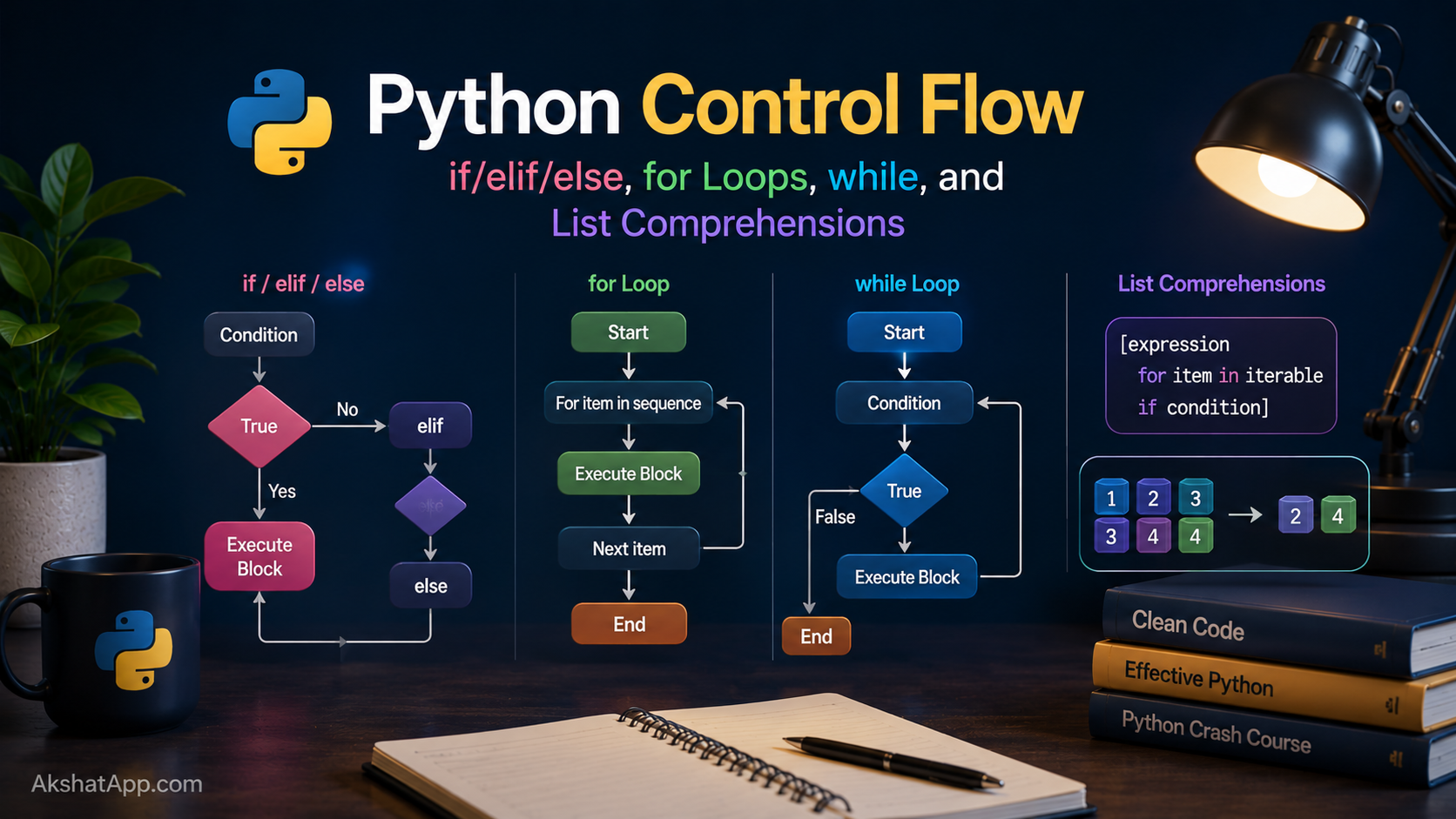
Run the unit converter from Post #1 and it does exactly one conversion, then exits. Ask a real user to run a program that only works once, and they will ask you why it doesn’t just let them convert another value without restarting it manually every time.
This is the gap between a script that demonstrates a concept and a program someone would actually use: the ability to make decisions based on changing conditions, and the ability to repeat work without writing the same code over and over. Every program you have ever used — a website, a game, a spreadsheet — is, underneath, a very long sequence of decisions and repetitions. This post covers both halves of that: conditionals, which decide, and loops, which repeat.
By the end, you will fix the unit converter properly — letting it run until the user chooses to stop — and you will have the tool that professional Python developers reach for constantly: list comprehensions.
The Mental Model: Decisions and Repetition
Every piece of control flow in every programming language reduces to two ideas:
Conditionals answer the question “should this code run, given what is true right now?” — if, elif, and else are Python’s way of expressing that.
Loops answer the question “how many times, and under what condition, should this code repeat?” — for and while are Python’s two answers, and they solve different versions of that question. A for loop is for “repeat this once per item in a known collection.” A while loop is for “repeat this until some condition becomes false,” where you may not know in advance how many repetitions that will take.
Getting comfortable choosing the right tool for each situation — rather than defaulting to whichever one you learned first — is most of what this post is really teaching.
Conditionals: if, elif, else
Comparison Operators
5 == 5    # True — equal to
5 != 3    # True — not equal to
5 > 3     # True — greater than
5 < 3     # False — less than
5 >= 5    # True — greater than or equal to
5 <= 4    # False — less than or equal to
Basic if / elif / else
temperature = 72

if temperature > 85:
    print("It's hot")
elif temperature > 65:
    print("It's pleasant")
elif temperature > 40:
    print("It's cool")
else:
    print("It's cold")
Python checks each condition in order, top to bottom, and runs the first block whose condition is True — it does not check the rest once it finds a match. elif is short for “else if,” letting you chain multiple exclusive conditions without deeply nesting if statements inside each other.
Logical Operators: and, or, not
age = 25
has_license = True

if age >= 18 and has_license:
    print("Can drive")

is_weekend = False
is_holiday = True
if is_weekend or is_holiday:
    print("No work today")

if not has_license:
    print("Cannot drive")
Python spells its logical operators as actual words — and, or, not — rather than symbols like &&, ||, ! used in many other languages. This is a deliberate readability choice consistent with the Zen of Python from Post #1.
Chained Comparisons — a Genuine Python Feature
age = 25

# Most languages require:
if age >= 18 and age < 65:
    print("Working age")

# Python allows this directly:
if 18 <= age < 65:
    print("Working age")
This chained form is not just shorthand — it is a real, distinct feature most languages do not have. 18 <= age < 65 reads almost exactly like the mathematical notation it resembles, and it evaluates both comparisons correctly as a single combined check.
Conditional Expressions (the “ternary”)
age = 16
status = "adult" if age >= 18 else "minor"
This is a full if/else compressed into one line that produces a value rather than running a block of statements — useful specifically when you are assigning one of two values based on a condition, not when you need to run multiple lines of code in each branch.
# Good use — assigning a value
label = "pass" if score >= 60 else "fail"

# Bad use — cramming complex logic into one line hurts readability
result = do_a() if x else do_b() if y else do_c()  # avoid this
for Loops: Repeat Once Per Item
fruits = ["apple", "banana", "cherry"]

for fruit in fruits:
    print(fruit)
# apple
# banana
# cherry
A for loop in Python iterates directly over the items in a collection — there is no manual index tracking required, unlike the classic C-style for (int i = 0; i < length; i++) pattern found in many other languages. This is deliberate: Python optimizes for “give me each item,” and gives you separate tools when you also need the index.
range(): Looping a Specific Number of Times
for i in range(5):
    print(i)
# 0 1 2 3 4 — five iterations, starting at 0

for i in range(2, 10):
    print(i)
# 2 through 9 — starts where you say, stops before the end value

for i in range(0, 20, 5):
    print(i)
# 0 5 10 15 — start, stop, and step size
range() produces numbers from the start value up to — but not including — the stop value. This “stops one before the number you’d expect” behavior is the single most common off-by-one bug source for people new to the language, and it is consistent with how slicing worked in Post #2 (name[0:3] also stops before index 3).
enumerate(): Getting Index and Value Together
fruits = ["apple", "banana", "cherry"]

for index, fruit in enumerate(fruits):
    print(f"{index}: {fruit}")
# 0: apple
# 1: banana
# 2: cherry
Before learning enumerate(), most beginners write for i in range(len(fruits)): print(i, fruits[i]) — it works, but it is not how experienced Python developers write this. enumerate() is the idiomatic tool whenever you need both the position and the value.
Iterating Directly Over Strings
for letter in "Python":
    print(letter)
# P y t h o n — each printed on its own line
Strings are iterable, just like lists — a direct consequence of Post #2’s coverage of strings as sequences that support indexing and slicing.
while Loops: Repeat Until a Condition Changes
count = 0
while count < 5:
    print(count)
    count += 1
# 0 1 2 3 4
A while loop keeps running its block as long as the condition remains True, checking that condition again before every single pass — including the very first one. Unlike a for loop, there is no built-in mechanism tracking how many times it has run; you are responsible for changing something inside the loop that will eventually make the condition False. Forget that step, and the loop runs forever.
The Infinite Loop Trap
# DANGER: this never stops — count never changes
count = 0
while count < 5:
    print(count)
# Ctrl+C to escape this if you accidentally run it
This is the single most common while loop bug: forgetting to update the variable the condition depends on. Every while loop should make you ask, explicitly: “what in this loop’s body will eventually make the condition false?”
break and continue
# break — exit the loop immediately, regardless of the condition
count = 0
while True:  # deliberately infinite
    print(count)
    count += 1
    if count >= 5:
        break

# continue — skip the rest of this iteration, go to the next one
for num in range(10):
    if num % 2 == 0:
        continue  # skip even numbers
    print(num)
# 1 3 5 7 9
while True: combined with a break condition inside is an extremely common, fully idiomatic pattern — it means “repeat this indefinitely until something inside decides to stop,” which is often a more natural way to express “keep asking the user until they give a valid answer” than trying to front-load the exit condition into the while line itself.
Finally Fixing the Unit Converter
Post #1 left an open question in Exercise 2: how do you let the program run more than once? Now you have every tool needed.
def main():
    while True:
        print("\n=== Unit Converter ===")
        print("1. Miles to Kilometers")
        print("2. Kilometers to Miles")
        print("3. Fahrenheit to Celsius")
        print("4. Celsius to Fahrenheit")
        print("5. Quit")

        choice = input("Choose an option (1-5): ")

        if choice == "5":
            print("Goodbye!")
            break

        value = float(input("Enter the value to convert: "))

        if choice == "1":
            result = value * 1.60934
            print(f"{value} miles = {result:.2f} kilometers")
        elif choice == "2":
            result = value / 1.60934
            print(f"{value} kilometers = {result:.2f} miles")
        elif choice == "3":
            result = (value - 32) * 5 / 9
            print(f"{value}°F = {result:.2f}°C")
        elif choice == "4":
            result = (value * 9 / 5) + 32
            print(f"{value}°C = {result:.2f}°F")
        else:
            print("Invalid choice. Please choose 1-5.")


if __name__ == "__main__":
    main()
The change from Post #1 is exactly two things: the entire body is now wrapped in while True:, and a new option "5" triggers break to exit cleanly. Everything else — the conditional chain choosing which conversion to run — is untouched. This is a good example of how a small, well-placed control flow addition transforms a one-shot script into something you would actually keep open and use repeatedly.
List Comprehensions: The Pythonic Way to Build Lists
A huge fraction of loops exist purely to build a new list from an existing one. Python has a dedicated, more compact syntax for exactly this pattern.
# The "manual" way, using a for loop
numbers = [1, 2, 3, 4, 5]
squares = []
for n in numbers:
    squares.append(n ** 2)
print(squares)  # [1, 4, 9, 16, 25]

# The list comprehension way — identical result, one line
squares = [n ** 2 for n in numbers]
Read a list comprehension left to right: “give me n ** 2, for each n in numbers.” Once this reading order feels natural, list comprehensions become the default way experienced Python developers build lists from other iterables.
Adding a Condition
numbers = [1, 2, 3, 4, 5, 6, 7, 8, 9, 10]

evens = [n for n in numbers if n % 2 == 0]
# [2, 4, 6, 8, 10]

# Equivalent for loop:
evens = []
for n in numbers:
    if n % 2 == 0:
        evens.append(n)
The comprehension version is not just shorter — for most Python developers, past a certain point of familiarity, it is genuinely faster to read and understand than the four-line loop equivalent, because it matches how you would describe the operation in plain English: “the even numbers, from this list.”
When NOT to Use a Comprehension
# This technically works, but it is a readability disaster — avoid it
result = [x*y for x in range(10) for y in range(10) if x != y if (x+y) % 2 == 0]

# If a comprehension needs a comment to explain what it does,
# write it as a regular loop instead
The rule of thumb: if a comprehension fits comfortably on one line and reads clearly at a glance, use it. If you find yourself nesting multiple for clauses or multiple if conditions inside one, a standard loop with clear variable names is more maintainable — and maintainability outranks brevity every time they conflict.
Real-World Use Cases
Input validation loops: A while True loop combined with break is the standard pattern for “keep asking until the user provides a valid answer” — exactly what the fixed unit converter now does with its menu.
Filtering data: List comprehensions with a condition are the idiomatic way to filter a collection — extracting active users from a list, valid entries from a form submission, or files matching a pattern from a directory listing.
Transforming data: List comprehensions without a condition transform every item uniformly — converting a list of Fahrenheit temperatures to Celsius, formatting a list of names, or extracting one field from a list of records.
Retry logic: while loops with break on success and a maximum attempt counter are the standard shape for retrying a network request or a flaky operation a bounded number of times — a pattern you will build properly once error handling arrives in Post #7.
Menu-driven CLI tools: The while True + numbered options + break on quit pattern used in the unit converter above appears in an enormous number of real command-line tools, from installers to database admin scripts.
Common Mistakes and Gotchas
⚠️ Mistake 1: Off-by-one errors with range()
range(5) gives you 0, 1, 2, 3, 4 — five numbers, not including 5. Expecting it to include the stop value is the most common range-related bug for newcomers.
⚠️ Mistake 2: Forgetting to update the while condition
Covered above — every while loop needs something inside its body that eventually makes the condition false. If you find yourself hitting Ctrl+C to stop a hanging program, this is almost always why.
⚠️ Mistake 3: Modifying a list while iterating over it
# Wrong — modifying the list you're looping over causes items to be skipped
numbers = [1, 2, 3, 4, 5]
for n in numbers:
    if n % 2 == 0:
        numbers.remove(n)  # dangerous — changes the list mid-iteration

# Right — build a new list instead
numbers = [1, 2, 3, 4, 5]
numbers = [n for n in numbers if n % 2 != 0]
Removing items from a list while a for loop is actively iterating over it shifts every subsequent index, causing items to be silently skipped. This is exactly the kind of bug that looks fine in a quick test and then behaves wrong on slightly different data.
⚠️ Mistake 4: Confusing break and continue
break exits the entire loop immediately. continue skips only the rest of the current iteration and moves to the next one. Reaching for the wrong one produces code that either stops too early or does not skip the intended item.
⚠️ Mistake 5: Overusing elif chains for things a dictionary would handle better
The unit converter’s if/elif chain works, but as the number of options grows, this pattern becomes unwieldy. Post #5 revisits this exact program and replaces the entire conditional chain with a four-line dictionary lookup — worth remembering that control flow is not always the final answer to a repeated-choice problem.
Performance Note
List comprehensions are not just more readable than equivalent for loops with .append() calls — they are also measurably faster in CPython, because the comprehension is optimized internally in a way that avoids the repeated method-lookup overhead of calling .append() on every iteration. For small lists this difference is invisible; for large-scale data processing, it is one of several reasons comprehensions are the default professional choice, not just a stylistic preference. Post #17 covers profiling techniques to measure differences like this directly rather than taking claims like this on faith.
Quick Reference
# Conditionals
if condition:
    ...
elif other_condition:
    ...
else:
    ...

# Comparison operators: == != < > <= >=
# Logical operators: and, or, not
# Chained comparison: 18 <= age < 65
# Conditional expression: x if condition else y

# for loop
for item in iterable:
    ...

for i in range(5):          # 0 to 4
for i in range(2, 10):       # 2 to 9
for i in range(0, 20, 5):    # 0, 5, 10, 15

for index, item in enumerate(some_list):
    ...

# while loop
while condition:
    ...

while True:      # deliberate infinite loop
    if done:
        break     # exit loop immediately
    if skip_this:
        continue  # skip to next iteration

# List comprehension
[expression for item in iterable]
[expression for item in iterable if condition]
Exercises
Exercise 1 — Direct application
Write a while loop that asks the user to guess a number between 1 and 10, and keeps asking until they guess correctly (hardcode the target number for now — random number generation is not covered yet).
Exercise 2 — Slight variation
Using a list comprehension, take the list ["Alice", "bob", "CHARLIE", "dave"] and produce a new list where every name is capitalized consistently (first letter upper, rest lower). Hint: strings have a .capitalize() method.
Exercise 3 — Real-world combination
Write a program that asks the user to enter numbers one at a time (using a while True loop), adding each to a running total, until they type “done” instead of a number. Print the final total. Hint: you will need to check if the input equals “done” before trying to convert it to a number.
Exercise 4 — Open-ended challenge
The unit converter now has a while True loop with five menu options. Add a sixth option that shows a running count of how many conversions have been performed in the current session. Hint: you will need a variable that persists across loop iterations, initialized before the while loop begins.
FAQ
Q: When should I use a for loop instead of a while loop?
A: Use for when you are iterating over a known collection (a list, a range, a string) — you know in advance what you are looping over. Use while when you are repeating based on a condition that might take an unknown number of iterations to become false — waiting for valid input, retrying until success, or running until a user chooses to quit.
Q: Is there a do-while loop in Python, like in other languages?
A: No — Python has no dedicated do-while construct. The equivalent pattern is while True: with a break at the point where you would normally check the condition, which is exactly what the “keep asking until valid” pattern in this post demonstrates.
Q: Why does my list comprehension with multiple conditions look confusing even though it works?
A: This is a real signal, not just aesthetic preference. Comprehensions are meant to compress simple, single-purpose transformations. Once you need multiple if clauses or nested loops inside one, you have exceeded what a comprehension should reasonably hold — a standard loop with named intermediate variables will be easier for you (and anyone else) to understand months later.
Q: Can I use elif without a final else?
A: Yes — else is always optional. Use it when you want an explicit fallback for every case not otherwise handled; omit it when it is fine for nothing to happen if none of the conditions match.
Q: Does Python have a switch/case statement like other languages?
A: Python added match/case — a pattern-matching statement more powerful than a traditional switch — in version 3.10. It is worth knowing exists, though for the conditional logic covered in this post, if/elif/else remains the more commonly used and more broadly applicable tool for most everyday cases.
Summary and Next Steps
You can now make your programs respond to changing conditions with if/elif/else, repeat fixed-count operations with for loops, repeat condition-based operations with while loops, safely exit or skip iterations with break and continue, and build filtered or transformed lists in a single readable line with list comprehensions. The unit converter now runs as a real, repeatable tool instead of a one-shot script.
Your next step: Complete Exercise 3 — the running-total program — since it combines a while True loop, input validation logic, and a persistent accumulator variable, which is exactly the shape of logic Post #4 will show you how to wrap into a clean, reusable function.
Code tested with Python 3.13. Last updated: June 2026.
Share This Post

Join our newsletter!
Get the latest developer guides, tutorials, and tips delivered straight to your inbox.



