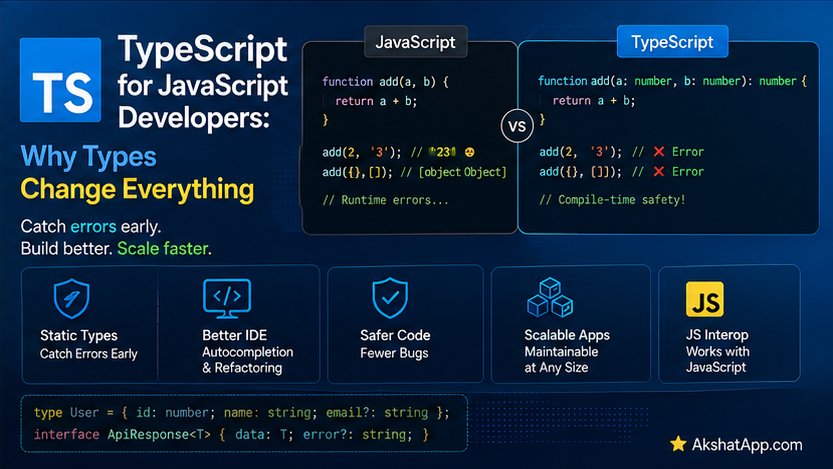
Every function across this fifteen-post series has carried an invisible risk. createTask(description, priority) never actually verified that priority was "low", "medium", or "high" rather than a typo like "hihg" — nothing caught that until, at best, a downstream comparison silently failed, or at worst, nothing failed at all and the bug simply shipped, undetected. JavaScript’s dynamic typing, covered thoroughly in Post #2, means the language itself will not stop you from passing the wrong shape of data anywhere in a program — it will simply attempt to work with whatever you gave it.
TypeScript, a superset of JavaScript developed by Microsoft, adds a static type system on top of everything covered in this series so far — literally every valid JavaScript program is already valid TypeScript, and TypeScript adds the ability to declare, and have the compiler enforce, exactly what shape your data and functions expect. This post covers TypeScript from first principles, and gives the task tracker’s Task object — informally the same shape since Post #1, never once formally verified — genuine, compiler-enforced structure for the first time in this series.
The Mental Model: A Superset, Compiled Away Before Runtime
TypeScript is not a different language that happens to resemble JavaScript — it is JavaScript, with an additional type-annotation syntax layered on top, checked by a separate tool (the TypeScript compiler, tsc) before your code ever runs. Critically: types are erased entirely during compilation — the JavaScript that actually executes at runtime contains no trace of TypeScript’s type annotations at all. This has a direct, important consequence: TypeScript’s type checking has zero runtime performance cost — it is purely a development-time and compile-time tool, catching mistakes before they ever become an actual bug in running code.
// TypeScript source
function greet(name: string): string {
    return `Hello, ${name}`;
}
// The compiled JavaScript output — types completely stripped away
function greet(name) {
return `Hello, ${name}`;
}Installation and Setup
npm install --save-dev typescript
npx tsc --init
npx tsc --init generates a tsconfig.json — TypeScript’s configuration file, controlling how strictly it checks your code, which JavaScript version it compiles down to, and where compiled output goes.
npx tsc            # compile all TypeScript files according to tsconfig.json
npx tsc --watch      # recompile automatically on every save
Basic Type Annotations
let name: string = "Alex";
let age: number = 29;
let isActive: boolean = true;
let scores: number[] = [85, 92, 78];
let mixed: (string | number)[] = ["a", 1, "b"]; // union type inside an array annotation
Type Inference: Often, You Don’t Need to Annotate At All
let count = 5; // TypeScript infers 'number' automatically — no annotation needed
count = "five"; // Error: Type 'string' is not assignable to type 'number'
TypeScript infers types from initial values whenever possible — explicit annotations are most valuable specifically on function parameters (where there is no initial value for TypeScript to infer from) and in situations where being explicit genuinely improves clarity, not on every single variable declaration reflexively.
Function Parameter and Return Types
function createTask(description: string, priority: string = "medium"): { description: string; priority: string; completed: boolean } {
    return { description, priority, completed: false };
}
Annotating parameters catches mistakes immediately, at the call site, rather than deep inside a function body or, worse, silently producing a wrong result:
createTask(42); // Error: Argument of type 'number' is not assignable to parameter of type 'string'This inline return type is already unwieldy — exactly the problem interfaces, covered next, solve directly.
Interfaces: Formally Defining the Task Shape
Every version of the task tracker since Post #1 has used objects shaped like { description, completed, priority }, informally, never once verified. An interface makes this shape explicit and compiler-enforced:
interface Task {
    description: string;
    completed: boolean;
    priority: "low" | "medium" | "high"; // a union of specific string literals, not just any string
}

function createTask(description: string, priority: Task["priority"] = "medium"): Task {
    if (description.trim().length === 0) {
        throw new TypeError("Task description must be a non-empty string");
    }
    return { description, priority, completed: false };
}
priority: "low" | "medium" | "high" is a union of string literal types — not just any string, but specifically one of these three exact values, and nothing else. This directly, formally enforces something Post #4 could only handle through runtime checks or comments:
const task = createTask("Learn TypeScript", "urgent");
// Error: Argument of type '"urgent"' is not assignable to
// parameter of type '"low" | "medium" | "high"'
This is caught by the compiler, before the code ever runs — not a runtime error discovered during testing (Post #13) or, worse, in production, but a mistake that cannot even be compiled in the first place.
function completeTask(task: Task): Task {
    return { ...task, completed: true };
}

completeTask({ description: "Test" });
// Error: Property 'completed' is missing in type '{ description: string; }'
//        but required in type 'Task'
Every function that expects a Task now genuinely enforces that expectation — passing an incomplete or malformed object is caught immediately, at the exact call site, rather than producing a confusing undefined deep inside some later function that assumed task.completed would always exist.
Optional Properties
interface Task {
    description: string;
    completed: boolean;
    priority: "low" | "medium" | "high";
    dueDate?: string; // the ? marks this property as genuinely optional
}

const task1: Task = { description: "Learn TS", completed: false, priority: "high" }; // valid — no dueDate
const task2: Task = { description: "Learn TS", completed: false, priority: "high", dueDate: "2026-08-01" }; // also valid
? after a property name declares it may or may not be present — accessing it produces a type of string | undefined, correctly forcing you to handle the “might not be there” case explicitly (often with the optional chaining ?. and nullish coalescing ?? operators from earlier in this series) rather than assuming it always exists.
Union Types Beyond String Literals
function formatId(id: string | number): string {
    return `ID-${id}`;
}

formatId(42);       // valid
formatId("abc123");   // valid
formatId(true);         // Error — boolean is not part of the union
Union types (|) express “this could be one of several specific types,” genuinely useful whenever a value’s type legitimately varies depending on context, without resorting to the unchecked any type covered next.
Type Aliases vs. Interfaces
// Type alias
type Priority = "low" | "medium" | "high";

// Interface — generally the preferred choice specifically for object shapes
interface Task {
    description: string;
    priority: Priority;
}
Both type and interface can describe object shapes, and for most everyday use their capabilities overlap significantly. The practical convention this series follows: use interface for object shapes (like Task), and type for unions, simpler aliases, and shapes that are not plain objects (like the Priority union above) — a widely-followed community convention rather than a strict technical requirement.
Generics: Reusable, Type-Safe Functions
function getFirst<T>(items: T[]): T {
    return items[0];
}

const firstTask: Task = getFirst<Task>(tasks);       // T is inferred/specified as Task
const firstNumber: number = getFirst<number>([1, 2, 3]); // T is inferred/specified as number
<T> is a generic type parameter — a placeholder for “whatever type is actually passed in,” letting getFirst work correctly and type-safely across arrays of any type, rather than needing a separate, near-identical function written for each specific type. TypeScript can frequently infer T automatically from the argument, without needing the explicit <Task>/<number> annotation shown here for clarity.
The any Type: Understand It to Avoid It
let data: any = fetchSomething();
data.whateverPropertyYouWant(); // NO error, even if this property doesn't exist at all!
any disables type checking entirely for that specific value — TypeScript will not flag anything you do with it, effectively opting that one value back out of everything this post has covered. any should be treated as a last resort, not a convenient escape hatch — reaching for it defeats the entire purpose of adopting TypeScript in the first place for that specific piece of code, and it is one of the most common ways a codebase’s type safety quietly erodes over time as more and more anys accumulate.
// unknown is the safer alternative when you genuinely don't know the type yet
let data: unknown = fetchSomething();
data.someProperty; // Error — TypeScript forces you to narrow the type first
if (typeof data === "object" && data !== null && "someProperty" in data) {
    // now TypeScript allows safer access, after you've proven something about the shape
}
unknown is the type-safe alternative to any for genuinely unknown data — it forces you to check or narrow the type before doing anything with it, rather than silently allowing anything at all.
The Fully Typed TaskManager
Bringing together interfaces, classes (Post #7), custom errors (Post #8), async/await (Post #9), and fetch (Post #11), fully typed:
interface Task {
    description: string;
    completed: boolean;
    priority: "low" | "medium" | "high";
}

interface ApiTodoItem {
    title: string;
    completed: boolean;
}

class TaskManager {
    #tasks: Task[] = [];
    #apiUrl: string = "https://jsonplaceholder.typicode.com/todos";

    async loadTasks(): Promise<void> {
        try {
            const response = await fetch(`${this.#apiUrl}?_limit=5`);
            if (!response.ok) {
                throw new Error(`Failed to load tasks: HTTP ${response.status}`);
            }
            const data: ApiTodoItem[] = await response.json();
            this.#tasks = data.map(
                (item): Task => ({
                    description: item.title,
                    completed: item.completed,
                    priority: "medium",
                })
            );
        } catch (error) {
            console.log("Failed to load tasks:", (error as Error).message);
            this.#tasks = [];
        }
    }

    addTask(description: string, priority: Task["priority"] = "medium"): Task {
        const task: Task = { description, completed: false, priority };
        this.#tasks.push(task);
        return task;
    }

    get tasks(): Task[] {
        return [...this.#tasks];
    }
}
Notice (error as Error).message — inside a catch block, TypeScript types the caught value as unknown by default (not Error, since JavaScript technically permits throwing any value, not only genuine Error objects), requiring an explicit type assertion (as Error) before accessing .message safely. This is a small but genuinely important detail that surprises developers new to TypeScript’s error handling specifically.
Every piece of this class is now verified at compile time: addTask cannot be called with an invalid priority, loadTasks cannot accidentally produce a Task missing a required field, and tasks is guaranteed, by the type system itself, to always return an array of genuinely well-formed Task objects.
Real-World Use Cases
Catching integration mistakes before deployment: Any function accepting structured data — exactly like Task throughout this series — benefits from interfaces catching malformed calls at compile time rather than discovering them through a runtime error, or worse, silently wrong behavior, in production.
Self-documenting function signatures: function addTask(description: string, priority: Task["priority"]): Task tells any reader — including future you — exactly what this function expects and returns, without needing to read the implementation or hunt down a separate document.
Safer refactoring at scale: Renaming or restructuring a Task interface’s properties causes the compiler to immediately flag every single place in the codebase that needs updating — a considerably stronger safety net than relying purely on a test suite (Post #13) or manual code review to catch every affected usage.
Working confidently with third-party libraries: The overwhelming majority of popular npm packages ship with, or have community-maintained, TypeScript type definitions, giving you compile-time verification and editor autocomplete for code you did not write yourself.
Common Mistakes and Gotchas
⚠️ Mistake 1: Overusing any and defeating the entire purpose
Covered at length above — every any is a deliberate opt-out of type checking for that value. Reach for unknown combined with explicit narrowing when you genuinely do not know a type in advance, rather than defaulting to any out of convenience.
⚠️ Mistake 2: Forgetting that types provide zero runtime protection
function createTask(description: string): Task {
    return { description, completed: false, priority: "medium" };
}

// @ts-ignore
createTask(42); // TypeScript would normally catch this, but nothing stops it at RUNTIME
                // if this value somehow arrives from outside TypeScript's checking (e.g., a JS caller)
TypeScript’s guarantees apply specifically at compile time, within code TypeScript itself checked — data arriving from an external API response, localStorage, or plain JavaScript code calling into your TypeScript can still violate your types at runtime, since the type annotations are entirely erased by the time the code actually executes. Runtime validation (covered throughout this series’ error-handling posts) remains necessary at genuine trust boundaries, even in fully-typed code.
⚠️ Mistake 3: Confusing when to use interface versus type Covered above — the community convention (interface for object shapes, type for unions and aliases) is worth following for consistency, even though both can technically accomplish overlapping goals in many cases.
⚠️ Mistake 4: Not handling the unknown type of caught errors correctly
Covered above with TaskManager’s (error as Error).message — forgetting this type assertion (or a proper type guard) produces a compile error the first time you try to access a property on a caught error without first confirming its type.
⚠️ Mistake 5: Assuming TypeScript makes runtime type-checking (like the validation from Post #7/#8) unnecessary
TypeScript checks types you have declared, at compile time, within your own codebase. It cannot verify data arriving from genuinely external sources (user input, API responses, JSON.parse results) at runtime — the validation and custom error patterns covered throughout Post #7 and Post #8 remain necessary specifically at those trust boundaries, working alongside TypeScript’s compile-time guarantees rather than replacing them.
Performance Note
TypeScript’s type checking happens entirely at compile time and adds zero runtime performance cost — the compiled JavaScript output contains no trace of the type system at all, exactly as this post’s opening example demonstrated. The only performance consideration genuinely worth being aware of is compile time itself — very large TypeScript codebases can have meaningfully slow tsc compilation, a build-tooling concern (addressed by tools like esbuild or swc for faster compilation) rather than anything affecting the actual running application’s speed.
Quick Reference
// Basic types
let x: string; let y: number; let z: boolean;
let arr: number[]; let mixed: (string | number)[];

// Function types
function fn(param: string): number { ... }

// Interface (preferred for object shapes)
interface Task {
    description: string;
    priority: "low" | "medium" | "high";
    dueDate?: string;  // optional
}

// Type alias (preferred for unions/simple aliases)
type Priority = "low" | "medium" | "high";

// Union types
function fn(id: string | number): void { ... }

// Generics
function first<T>(items: T[]): T { return items[0]; }

// any (avoid) vs unknown (safer)
let a: any;       // disables type checking entirely
let u: unknown;    // requires narrowing before use

// Caught errors are 'unknown' by default
catch (error) {
    console.log((error as Error).message);
}
npm install --save-dev typescript
npx tsc --init
npx tsc --watchExercises
Exercise 1 — Direct application
Write a BankAccount interface (drawing on Post #7/#8’s BankAccount class) with balance: number, and a fully-typed withdraw(account: BankAccount, amount: number): BankAccount function returning a new object rather than mutating.
Exercise 2 — Slight variation
Add an optional tags?: string[] property to the Task interface from this post, and update createTask to accept an optional tags parameter, defaulting to an empty array when not provided.
Exercise 3 — Real-world combination
Write a generic function findByProperty<T>(items: T[], key: keyof T, value: T[keyof T]): T | undefined that finds the first item in an array where a specified property equals a given value — using it to find a task by its description.
Exercise 4 — Open-ended challenge
Take the JavaScript version of TaskManager from Post #12 and convert it, piece by piece, into the fully-typed TypeScript version from this post, deliberately introducing a type mismatch (like passing a number where description: string is expected) to confirm the compiler genuinely catches it before you fix it.
FAQ
Q: Do I need to rewrite my entire JavaScript project in TypeScript at once?
A: No — TypeScript supports gradual adoption, including via .d.ts declaration files describing existing JavaScript’s shape without rewriting it, and configuration options allowing JavaScript and TypeScript files to coexist in the same project during a migration.
Q: Does TypeScript replace the need for tests from Post #13? A: No — they address genuinely different concerns. TypeScript verifies shapes and types at compile time; tests verify behavior and logic at runtime, including cases TypeScript’s type system cannot express (a function’s specific numeric output for a given input, for instance). Well-typed code with no tests can still contain genuine logic bugs; thoroughly tested code with no types can still receive malformed data. The two are complementary, not substitutes for each other.
Q: Is TypeScript required to use modern JavaScript frameworks? A: Not strictly required for most, though it has become the de facto standard and default recommendation for the majority of professional JavaScript projects and major frameworks by 2026, specifically for the compile-time safety benefits covered throughout this post.
Q: What does “strict mode” in tsconfig.json actually do?
A: It enables a collection of stricter type-checking rules together — including disallowing implicit any, requiring null/undefined to be handled explicitly, and several related checks. Enabling "strict": true is the widely-recommended default for new projects, since it catches meaningfully more potential bugs than TypeScript’s default, more permissive configuration.
Summary and Next Steps
You can now declare interfaces formally describing object shapes — exactly the Task shape this series has used informally since Post #1 — with union types, optional properties, and generics for reusable, type-safe functions. You understand precisely why any defeats TypeScript’s purpose and when unknown is the safer alternative, and you have a fully-typed TaskManager bringing together classes, async code, and error handling from across this entire series, now with compiler-enforced correctness for the first time.
Your next step: Complete Exercise 4 — converting the full TaskManager class and deliberately breaking it with a type mismatch — since watching the compiler catch a genuine mistake before the code ever runs is the clearest possible demonstration of what this entire post has been building toward.
The next post returns to pure JavaScript, covering browser-specific Web APIs beyond the DOM: local storage, Web Workers, and other browser capabilities available directly to JavaScript.
Code tested with TypeScript 5.x, Node.js 22 LTS. Last updated: July 2026.
Share This Post

Join our newsletter!
Get the latest developer guides, tutorials, and tips delivered straight to your inbox.



