The unit converter’s if/elif chain, refactored into functions in Post #4, still has a structural problem: adding a fifth conversion means adding another elif branch, and a sixth means another, forever. The menu-printing code and the dispatch logic are two separate things that have to be kept in sync by hand, every time.
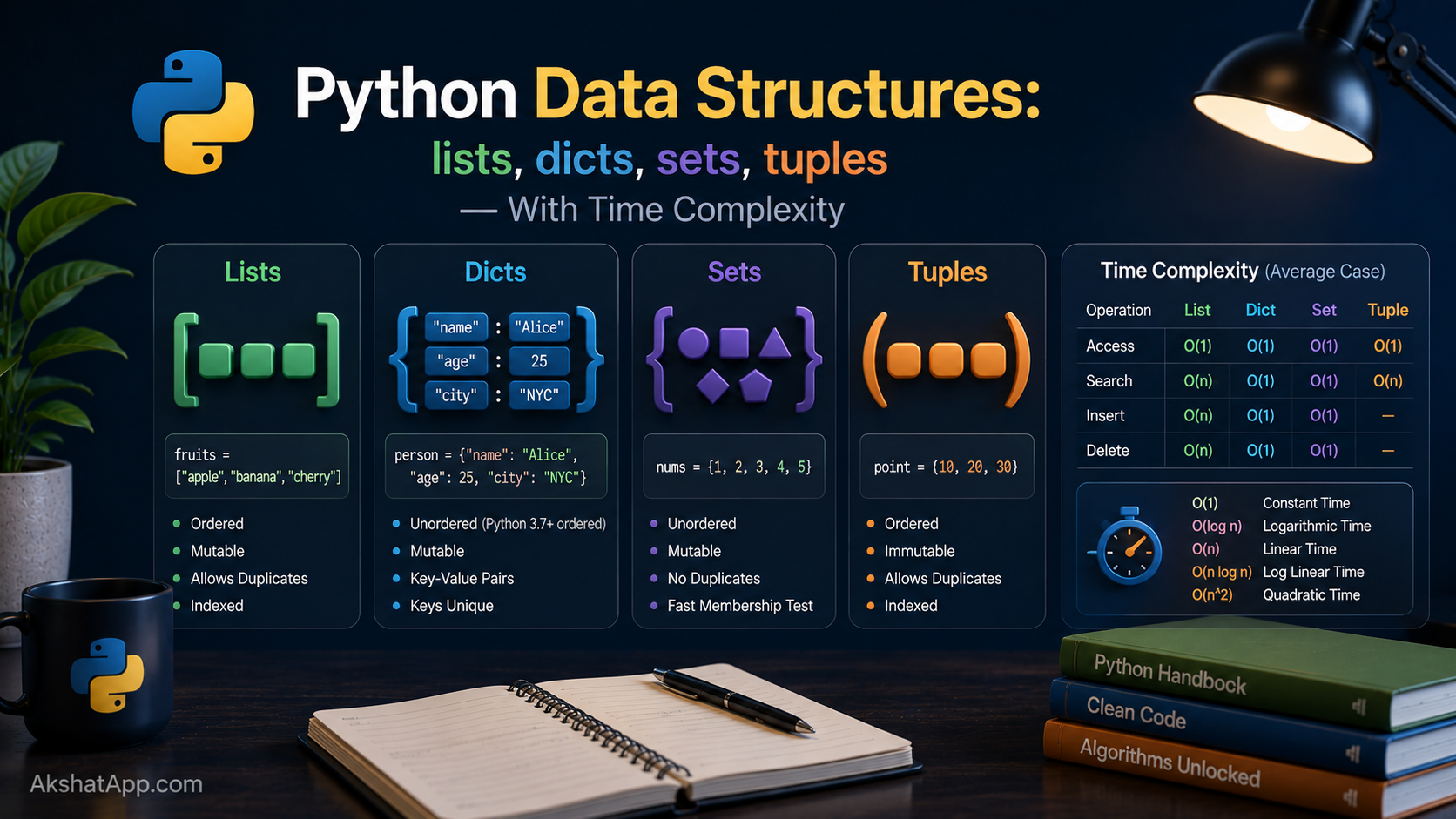
There is a data structure built exactly for this situation — mapping a key to a value, with instant lookup regardless of how many entries exist — and Python’s dictionary is one of four collection types every Python program leans on constantly. This post covers all four: lists, tuples, dictionaries, and sets. More importantly, it covers when to reach for each one, using the actual computational cost of their operations as the deciding factor rather than habit.
By the end, the unit converter’s entire elif chain collapses into a four-line dictionary — and you will understand exactly why that is not just shorter, but computationally better as the menu grows.
The Mental Model: Four Tools, Four Jobs
Python gives you four built-in collection types, and each one answers a different question about the data you are holding:
List — “I have an ordered sequence of things, and I need to change it (add, remove, reorder).” Tuple — “I have an ordered sequence of things that will never change.” Dictionary — “I need to look something up by a name or key, instantly, regardless of how much data I have.” Set — “I need to track unique items and check membership fast, without caring about order.”
Picking the right one is not a stylistic choice — each type has genuinely different performance characteristics for different operations, covered precisely in the time complexity sections below. Choosing a list where a set or dictionary belongs is a common source of code that works fine in testing and becomes slow once real data volume arrives.
Lists: Ordered and Mutable
fruits = ["apple", "banana", "cherry"]

fruits[0]          # "apple"
fruits[-1]          # "cherry" — last item
fruits[0:2]         # ["apple", "banana"] — slicing, same rules as strings from Post #2
len(fruits)         # 3
Lists are mutable — unlike strings, you can change a list in place without creating a new object:
fruits.append("date")           # add to the end
fruits.insert(1, "apricot")     # insert at a specific position
fruits.remove("banana")         # remove by value (first match)
popped = fruits.pop()            # remove and return the last item
fruits.sort()                    # sort in place, alphabetically
fruits.reverse()                 # reverse in place

print(fruits)
Checking Membership and Iterating
if "apple" in fruits:
    print("Found it")

for fruit in fruits:
    print(fruit)
Nested Lists
matrix = [
    [1, 2, 3],
    [4, 5, 6],
    [7, 8, 9],
]
print(matrix[1][2])  # 6 — row 1, column 2
A list can hold any type, including other lists — the foundation for representing grids, tables, and matrices before dedicated libraries like NumPy enter the picture later in this series’ data-adjacent territory.
Tuples: Ordered and Immutable
coordinates = (10.5, 20.3)
rgb_color = (255, 0, 128)

coordinates[0]     # 10.5
len(coordinates)    # 2
Tuples look almost identical to lists but cannot be changed after creation — no .append(), no .remove(), no in-place .sort(). This is not a limitation so much as a signal: when you reach for a tuple, you are telling readers of your code “this collection is fixed and will not change,” which is valuable, explicit information a list cannot convey on its own.
point = (3, 4)
point[0] = 5  # TypeError: 'tuple' object does not support item assignment
The Single-Element Tuple Trap
not_a_tuple = (5)       # this is just the integer 5 in parentheses!
actual_tuple = (5,)      # the trailing comma is what makes it a tuple

print(type(not_a_tuple))    # <class 'int'>
print(type(actual_tuple))    # <class 'tuple'>
Parentheses alone do not create a tuple — the comma does. This surprises almost everyone once, usually while debugging why a function that expects a tuple is receiving a plain number instead.
Tuple Unpacking
point = (3, 4)
x, y = point
print(x, y)  # 3 4
This is the exact mechanism Post #4 used when a function returned multiple values — return min(numbers), max(numbers) builds a tuple, and lowest, highest = min_and_max(...) unpacks it. Tuples are also the only one of these four types that can be used as dictionary keys or set members, a consequence of their immutability that becomes directly relevant later in this post.
Dictionaries: Key-Value Lookup
person = {
    "name": "Alex",
    "age": 29,
    "city": "Austin",
}

person["name"]          # "Alex"
person["age"] = 30       # update an existing key
person["email"] = "a@example.com"  # add a new key
del person["city"]        # remove a key
Dictionaries map keys to values — any immutable type (strings, numbers, tuples) can be a key; values can be absolutely anything. As of Python 3.7, dictionaries guarantee insertion order — iterating over a dict returns items in the order they were added, a language guarantee, not just an implementation detail you happen to be able to rely on.
Safely Accessing Keys That Might Not Exist
person = {"name": "Alex", "age": 29}

person["email"]              # KeyError! — crashes if the key doesn't exist
person.get("email")           # None — returns None instead of crashing
person.get("email", "N/A")    # "N/A" — returns your chosen default instead
.get() with a default value is the idiomatic way to handle “this key might not be there” without wrapping every access in error handling (which Post #7 covers properly). Prefer .get() whenever a missing key is a normal, expected possibility rather than a genuine bug.
Iterating Over Dictionaries
for key in person:                    # iterates over keys by default
    print(key)

for key, value in person.items():      # both key and value together
    print(f"{key}: {value}")

for value in person.values():          # values only
    print(value)
Dictionary Comprehensions
Directly analogous to the list comprehensions from Post #3:
squares = {n: n**2 for n in range(1, 6)}
print(squares)
# {1: 1, 2: 4, 3: 9, 4: 16, 5: 25}

# With a condition
even_squares = {n: n**2 for n in range(1, 11) if n % 2 == 0}
Sets: Unique and Unordered
colors = {"red", "green", "blue"}
colors.add("yellow")
colors.add("red")          # no effect — "red" is already present
print(colors)                # order is not guaranteed
A set automatically eliminates duplicates and does not preserve any particular order. Its real power is fast membership testing and the mathematical set operations built directly into the language:
a = {1, 2, 3, 4}
b = {3, 4, 5, 6}

a | b   # union: {1, 2, 3, 4, 5, 6}
a & b   # intersection: {3, 4}
a - b   # difference: {1, 2}
a ^ b   # symmetric difference: {1, 2, 5, 6} — in one but not both
Deduplicating a List Instantly
names = ["Alex", "Sam", "Alex", "Jo", "Sam", "Alex"]
unique_names = list(set(names))
# ['Alex', 'Sam', 'Jo'] — order not guaranteed to match the original
Converting a list to a set and back is the single fastest and most idiomatic way to remove duplicates in Python — a pattern worth recognizing on sight.
Time Complexity: Why This Actually Matters
“Time complexity” describes how the cost of an operation grows as the amount of data grows — a topic covered in full depth in the CS Fundamentals series’ post on Big O notation. For now, the practical version: O(1) means “constant time — the same cost regardless of size.” O(n) means “the cost grows in direct proportion to the number of items.”
| Operation | List | Dict | Set | Tuple |
|---|---|---|---|---|
| Access by index/key | O(1) | O(1) | N/A | O(1) |
| Search (“is X in here?”) | O(n) | O(1) | O(1) | O(n) |
| Add an item | O(1)* | O(1) | O(1) | N/A (immutable) |
| Remove an item | O(n) | O(1) | O(1) | N/A (immutable) |
*List append is O(1) “amortized” — occasionally slower when the underlying storage needs to grow, but averaged over many appends, effectively constant.
The line that matters most in practice: checking whether something is “in” a list costs more, the more items the list holds — Python has to check each item one by one until it finds a match or reaches the end. Checking whether something is “in” a dictionary or a set costs the same constant amount, whether it holds ten items or ten million, because both are built on hash tables under the hood.
# This gets slower as the list grows — O(n) per check
allowed_users = ["alice", "bob", "charlie", ...]  # imagine 100,000 entries
if username in allowed_users:  # scans up to 100,000 items
    ...

# This stays fast no matter how large it gets — O(1) per check
allowed_users = {"alice", "bob", "charlie", ...}  # same 100,000 entries, as a set
if username in allowed_users:  # roughly constant time
    ...
This single change — using a set instead of a list for membership testing — is one of the most common, highest-impact performance fixes in real Python code, and it costs nothing to apply from the start once you know to look for it.
The Unit Converter’s Final Refactor
Post #4 gave each conversion its own function. Now, replace the entire if/elif dispatch chain with a dictionary — because in Python, functions are values, and can be stored in a dictionary exactly like a string or a number can:
def miles_to_km(miles: float) -> float:
    return miles * 1.60934

def km_to_miles(km: float) -> float:
    return km / 1.60934

def fahrenheit_to_celsius(f: float) -> float:
    return (f - 32) * 5 / 9

def celsius_to_fahrenheit(c: float) -> float:
    return (c * 9 / 5) + 32


CONVERSIONS = {
    "1": ("Miles to Kilometers", miles_to_km),
    "2": ("Kilometers to Miles", km_to_miles),
    "3": ("Fahrenheit to Celsius", fahrenheit_to_celsius),
    "4": ("Celsius to Fahrenheit", celsius_to_fahrenheit),
}


def main():
    conversions_done = 0

    while True:
        print("\n=== Unit Converter ===")
        for key, (label, _) in CONVERSIONS.items():
            print(f"{key}. {label}")
        print("5. Quit")

        choice = input("Choose an option: ")

        if choice == "5":
            print(f"Goodbye! You performed {conversions_done} conversions.")
            break

        if choice not in CONVERSIONS:
            print("Invalid choice.")
            continue

        value = float(input("Enter the value to convert: "))
        label, convert = CONVERSIONS[choice]
        result = convert(value)
        print(f"{value} → {result:.2f}  ({label})")
        conversions_done += 1


if __name__ == "__main__":
    main()
Adding a fifth conversion no longer means writing a new elif and remembering to update the menu-printing code separately — it means adding one line to the CONVERSIONS dictionary, and the menu, the dispatch logic, and the lookup all update automatically together, because they now share a single source of truth instead of being maintained by hand in two places. This is not a minor stylistic improvement — it eliminates an entire category of bug where the menu and the logic silently drift out of sync as a program grows.
Real-World Use Cases
Configuration and settings: Application settings are almost always represented as a dictionary — keys map naturally to setting names, values to their current values.
Counting and grouping: Building a frequency count of items (word counts, votes, category tallies) is one of the most common dictionary use cases in real code, typically combined with .get(key, 0) + 1 to handle both new and existing keys in one line.
Fast lookup tables: Any time you would otherwise write a long if/elif chain checking one value against many possibilities — exactly the unit converter’s original design — a dictionary mapping is very often the better structure, both for readability and for the O(1) lookup speed.
Deduplication: Removing duplicate entries from a list of user submissions, log entries, or scraped data is a one-line set conversion, as shown above.
Coordinates and fixed records: Tuples are the natural fit for data with a fixed, known shape that will not change — a coordinate pair, an RGB color, a database row returned from a query.
Common Mistakes and Gotchas
⚠️ Mistake 1: Using a list when a set or dict would be dramatically faster Covered in depth above — if your code repeatedly checks whether something is “in” a growing list, that is the signal to switch to a set or dict.
⚠️ Mistake 2: Assuming (5) creates a tuple
It creates the integer 5. The trailing comma — (5,) — is what actually makes something a tuple, a rule that catches almost everyone at least once.
⚠️ Mistake 3: Trying to use a mutable type as a dictionary key
bad_dict = {[1, 2]: "value"}  # TypeError: unhashable type: 'list'
good_dict = {(1, 2): "value"}  # tuples work fine as keys
Dictionary keys (and set members) must be hashable, which in practice means immutable — lists cannot be keys, but the equivalent tuple can.
⚠️ Mistake 4: Modifying a list while iterating over it This was covered in Post #3’s control flow mistakes, and it applies here specifically because lists are the type most often iterated and modified together — the fix, building a new filtered list instead of mutating the original mid-loop, is the same.
⚠️ Mistake 5: Reaching for a dictionary key with [] when it might not exist
count = word_counts["new_word"] # KeyError if "new_word" hasn't been seen yetUse .get(key, default) when a missing key is a normal, expected case rather than a bug — reserve [] access for situations where a missing key genuinely indicates something has gone wrong.
Performance Note
The time complexity table above is not a theoretical exercise — it directly predicts real-world behavior at scale. A list-based membership check that feels instantaneous with 50 items will be measurably, noticeably slow with 500,000 items; the equivalent set-based check will feel identical at both sizes. This is precisely the kind of problem that does not show up in small-scale testing and becomes a serious production issue only once real data volume arrives — which is exactly why choosing the right structure from the start, rather than “whichever one I’m used to,” is a genuinely high-leverage habit to build early.
Quick Reference
# List — ordered, mutable
my_list = [1, 2, 3]
my_list.append(4)
my_list.remove(2)
my_list[0]           # O(1) access
2 in my_list           # O(n) search

# Tuple — ordered, immutable
my_tuple = (1, 2, 3)
x, y, z = my_tuple    # unpacking
single = (5,)          # comma required for one-element tuples

# Dict — key-value, O(1) average lookup
my_dict = {"a": 1, "b": 2}
my_dict.get("c", 0)     # safe access with default
my_dict["c"] = 3        # add/update
for k, v in my_dict.items(): ...

# Set — unique, unordered, O(1) average membership
my_set = {1, 2, 3}
my_set.add(4)
2 in my_set             # O(1) — fast regardless of size
set_a | set_b            # union
set_a & set_b            # intersection
Exercises
Exercise 1 — Direct application Given a list of student names with possible duplicates, write code that produces a list of only the unique names, in any order.
Exercise 2 — Slight variation
Write a function word_frequency(text: str) -> dict[str, int] that takes a string and returns a dictionary mapping each word to how many times it appears. Hint: .split() from Post #2 breaks a string into a list of words; .get(word, 0) + 1 is the standard counting idiom.
Exercise 3 — Real-world combination You have two lists of email addresses — one for a marketing campaign, one for existing customers. Using sets, find: (a) addresses on both lists, (b) addresses only on the marketing list, (c) all addresses combined with no duplicates.
Exercise 4 — Open-ended challenge
The unit converter’s CONVERSIONS dictionary currently maps a menu number to a tuple of (label, function). Add a fifth conversion (your choice — pounds to kilograms, for instance) by adding exactly one line to the dictionary, and verify the menu, the dispatch, and the calculation all work correctly without touching any other code.
FAQ
Q: When should I use a list instead of a tuple? A: Use a list when the collection needs to change — items added, removed, or reordered after creation. Use a tuple when the collection represents a fixed, complete set of values that will never change, like a coordinate pair or a database row — the immutability is a feature, communicating intent clearly to anyone reading the code.
Q: Are dictionaries actually ordered, or does it just look that way? A: As of Python 3.7, insertion order is a genuine, guaranteed language feature — not an implementation detail you happen to be able to rely on informally. Code that depends on dict ordering is safe on any Python 3.7+ interpreter.
Q: Why can’t I put a list inside a set? A: Set members, like dictionary keys, must be hashable — which requires immutability, because a hash value that could change after insertion would break the set’s internal lookup structure. Lists are mutable and therefore unhashable; the equivalent tuple works fine.
Q: What’s the actual difference between a set and a dictionary — don’t they look similar with curly braces?
A: A set holds standalone values with no associated data ({1, 2, 3}); a dictionary holds key-value pairs ({"a": 1, "b": 2}). An empty {} is always interpreted as a dict, not an empty set — to create an empty set explicitly, you must write set().
Q: Should I always use .get() instead of [] for dictionaries?
A: No — use [] when a missing key genuinely represents a bug you want to know about immediately (a KeyError is a useful, loud signal in that case). Use .get() specifically when a missing key is an expected, normal possibility that your code should handle gracefully rather than crash on.
Summary and Next Steps
You now know all four of Python’s core collection types, when each is the right structural choice, and — critically — the actual time complexity differences that determine whether your code stays fast as data grows. The unit converter’s dispatch logic is now a single dictionary, eliminating the maintenance burden of keeping a menu and a conditional chain in sync by hand.
Your next step: Complete Exercise 2 — the word frequency counter — since it combines string methods from Post #2, the dictionary .get() pattern from this post, and is one of the single most commonly reused patterns in real-world Python code, from log analysis to basic text processing.
The next post introduces object-oriented programming: bundling data and the functions that operate on it together into a single reusable unit, the natural next step once you are comfortable with functions and the structures that hold their data.
Code tested with Python 3.13. Last updated: June 2026.
Share This Post

Join our newsletter!
Get the latest developer guides, tutorials, and tips delivered straight to your inbox.



