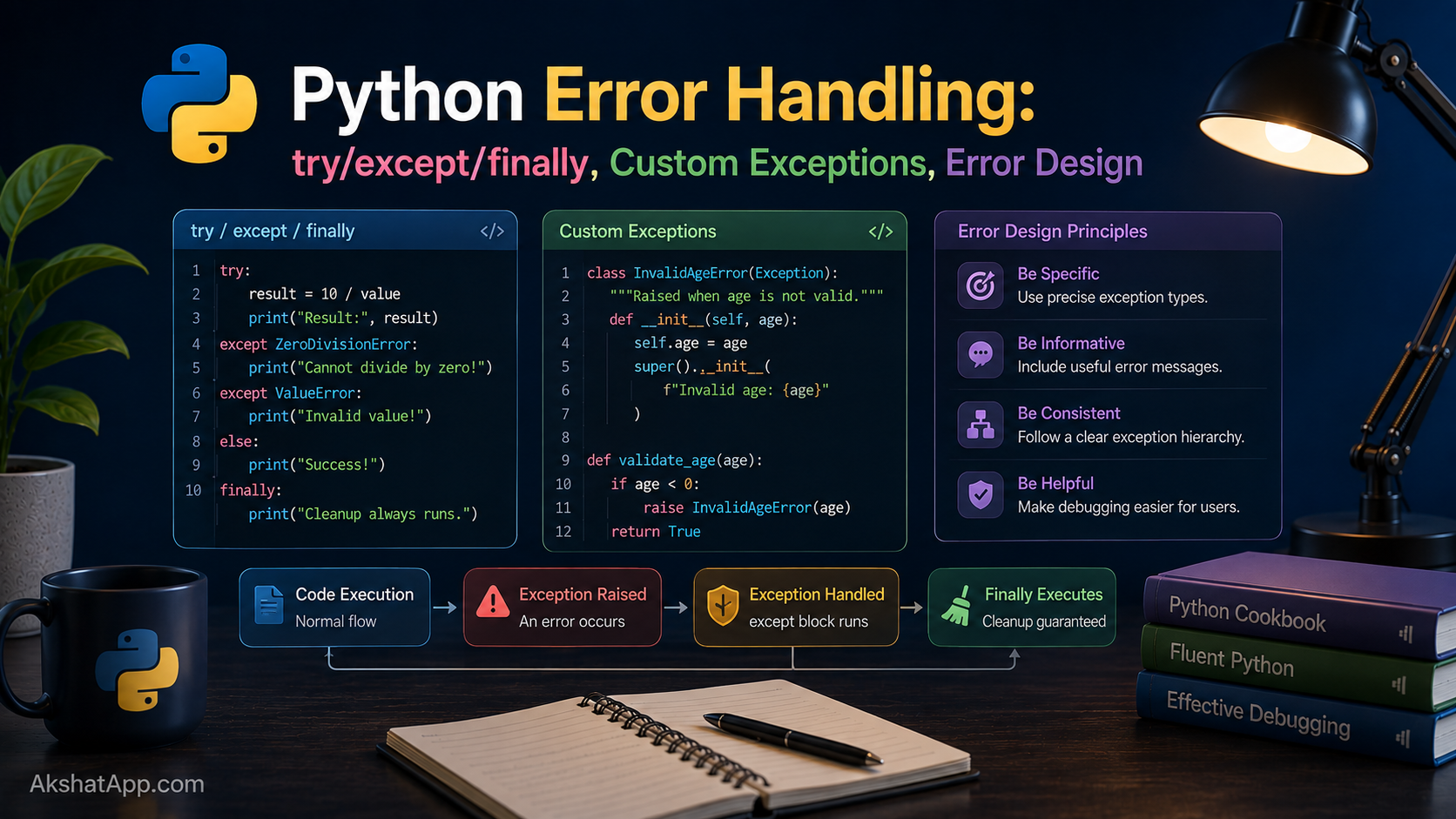
Post #6 left the BankAccount.withdraw() exercise with a real, unaddressed problem: printing “insufficient funds” and then… doing what, exactly? The balance still needs to not go negative, whatever code called withdraw() needs some way to know the operation did not actually happen, and a print() statement buried inside a method gives the caller nothing to check. It works, in the sense that it runs without crashing — but it does not actually stop bad data from proceeding through your program.
Go back even further, to Post #1’s Exercise 4: what actually happens in the unit converter when someone types “abc” where a number was expected? Run it and find out — the program crashes with a ValueError and a traceback, ungracefully, the moment float("abc") is attempted.
Both of these are the same underlying problem: things go wrong in ways your code cannot always prevent in advance, and Python needs a real mechanism for handling that — not print statements standing in for actual control flow, and not silent crashes. That mechanism is exception handling, and it is one of the most important structural tools in the entire language.
The Mental Model: Exceptions Are Not Just “Errors”
The word “exception” suggests something has gone catastrophically wrong, but that framing undersells what exceptions actually are in Python: a structured way to signal “something unexpected happened here” and hand control to code specifically designed to deal with it — rather than letting the entire program crash, or silently continuing with bad data as if nothing happened.
Python has a distinctive cultural preference here, often summarized as EAFP — “Easier to Ask Forgiveness than Permission” — versus LBYL — “Look Before You Leap.”
# LBYL — check conditions before acting
if key in my_dict:
    value = my_dict[key]
else:
    value = default_value

# EAFP — attempt the operation, handle failure if it happens
try:
    value = my_dict[key]
except KeyError:
    value = default_value
Both produce the identical result here. Python’s standard library and idiomatic code generally lean EAFP — attempt the operation and handle failure — partly because it avoids a subtle class of bugs where conditions change between the check and the action (imagine another process removing the key between your if key in my_dict check and your access), and partly because it keeps the “normal path” code uncluttered by defensive checks for every possible failure.
Basic try/except
try:
    value = float(input("Enter a number: "))
    print(f"You entered: {value}")
except ValueError:
    print("That's not a valid number.")
Python attempts everything inside try:. If an exception occurs, execution immediately jumps to the matching except block — skipping any remaining lines inside try: — and continues from there. If no exception occurs, the except block never runs at all.
Catching the Right Exception Type
try:
    result = 10 / int(input("Enter a divisor: "))
    print(result)
except ValueError:
    print("Please enter a valid whole number.")
except ZeroDivisionError:
    print("Cannot divide by zero.")
Multiple except clauses let you handle different failure types differently — an invalid number and a division by zero are genuinely different problems deserving genuinely different messages. Python checks each except clause in order and runs the first one that matches the exception that actually occurred.
Getting the Exception Object Itself
try:
    value = int("not a number")
except ValueError as e:
    print(f"Conversion failed: {e}")
    # Conversion failed: invalid literal for int() with base 10: 'not a number'
as e binds the actual exception object to a name, giving you access to its message and any additional data it carries — useful for logging the specific failure reason rather than a generic “something went wrong.”
Catching Multiple Types With One Handler
try:
    ...
except (ValueError, TypeError) as e:
    print(f"Bad input: {e}")
A tuple of exception types in one except clause handles them identically, when that is genuinely appropriate — use this when multiple exception types warrant the exact same response, not as a shortcut to avoid thinking about which exceptions are actually possible.
else and finally
try:
    value = int(input("Enter a number: "))
except ValueError:
    print("Invalid input.")
else:
    print(f"Successfully parsed: {value}")
finally:
    print("Done processing this input.")
else runs only if no exception occurred in the try block — useful for code that should run after a successful attempt but that you specifically do not want wrapped inside the try itself (where an exception in that follow-up code might get miscategorized as part of the original operation’s failure).
finally runs always — whether an exception occurred or not, whether it was caught or not. This is the standard tool for cleanup that absolutely must happen regardless of outcome: closing a file, releasing a lock, disconnecting from a network resource.
file = None
try:
    file = open("data.txt")
    contents = file.read()
except FileNotFoundError:
    print("File not found.")
finally:
    if file is not None:
        file.close()  # runs whether the read succeeded or failed
A preview worth knowing now: Post #9 introduces the with statement, which handles exactly this open-then-guarantee-close pattern more cleanly than a manual try/finally for file and resource handling specifically. finally remains the right general-purpose tool for cleanup logic that is not specifically about resource handles.
raise: Signaling Your Own Errors
def withdraw(balance: float, amount: float) -> float:
    if amount > balance:
        raise ValueError("Insufficient funds for this withdrawal")
    return balance - amount

new_balance = withdraw(100, 150)
# ValueError: Insufficient funds for this withdrawal
raise triggers an exception deliberately — this is how your own code signals “something is wrong here” using the exact same mechanism built-in operations use. This immediately stops normal execution and propagates the exception upward until something catches it with a matching except, or the program terminates with a traceback if nothing does.
def calculate_bmi(weight_kg: float, height_m: float) -> float:
    if weight_kg <= 0:
        raise ValueError("Weight must be positive")
    if height_m <= 0:
        raise ValueError("Height must be positive")
    return weight_kg / (height_m ** 2)
Raising a clear, specific exception the moment invalid data is detected — rather than letting bad data silently propagate deeper into your program and fail confusingly somewhere else entirely — is one of the most valuable habits this post teaches.
Custom Exceptions: Designing Your Own Error Types
Built-in exceptions like ValueError are general-purpose. For your own domain-specific failures, defining a custom exception class communicates intent far more precisely than reusing a generic built-in one.
class InsufficientFundsError(Exception):
    """Raised when a withdrawal would result in a negative balance."""

    def __init__(self, balance: float, amount: float):
        self.balance = balance
        self.amount = amount
        super().__init__(
            f"Cannot withdraw {amount:.2f}: balance is only {balance:.2f}"
        )


class BankAccount:
    def __init__(self, balance: float = 0):
        self.balance = balance

    def deposit(self, amount: float) -> None:
        if amount <= 0:
            raise ValueError("Deposit amount must be positive")
        self.balance += amount

    def withdraw(self, amount: float) -> None:
        if amount <= 0:
            raise ValueError("Withdrawal amount must be positive")
        if amount > self.balance:
            raise InsufficientFundsError(self.balance, amount)
        self.balance -= amount
account = BankAccount(100)
try:
account.withdraw(150)
except InsufficientFundsError as e:
print(f"Transaction declined: {e}")
print(f"Attempted: {e.amount}, Available: {e.balance}")This is the proper resolution to Post #6’s exercise. withdraw() no longer prints a message and silently continues — it genuinely stops the operation by raising InsufficientFundsError, forcing whatever code called it to explicitly acknowledge and handle the failure (or let it propagate further, which is itself a meaningful, deliberate choice, not an accident). The custom exception also carries structured data (e.balance, e.amount) that a caller can use programmatically — something a plain printed string never could.
A custom exception inherits from Python’s built-in Exception class (or a more specific built-in exception, when your error genuinely is a specialized case of one). This is inheritance, directly from Post #6, applied to error design specifically.
Building a Small Exception Hierarchy
class BankAccountError(Exception):
    """Base class for all BankAccount-related errors."""


class InsufficientFundsError(BankAccountError):
    def __init__(self, balance: float, amount: float):
        self.balance = balance
        self.amount = amount
        super().__init__(f"Cannot withdraw {amount:.2f}: balance is {balance:.2f}")


class InvalidAmountError(BankAccountError):
    def __init__(self, amount: float):
        self.amount = amount
        super().__init__(f"Amount must be positive, got {amount}")
Defining a base BankAccountError that specific errors inherit from lets calling code choose its level of precision: catch InsufficientFundsError specifically to handle that exact case, or catch BankAccountError generally to handle any account-related problem the same way, without needing to list every specific subtype.
try:
    account.withdraw(-50)
except InvalidAmountError as e:
    print(f"Invalid amount: {e}")
except InsufficientFundsError as e:
    print(f"Insufficient funds: {e}")
except BankAccountError as e:
    print(f"Account error: {e}")  # catches any future subtype too
Fixing the Unit Converter’s Long-Standing Bug
Post #1’s Exercise 4 identified the problem; here is the actual fix, combining the while loop from Post #3, the function pattern from Post #4, and exception handling from this post:
def get_float(prompt: str) -> float:
    """Keep asking until the user provides a valid number."""
    while True:
        try:
            return float(input(prompt))
        except ValueError:
            print("Please enter a valid number.")


# Replaces the old direct call:
# value = float(input("Enter the value to convert: "))

value = get_float("Enter the value to convert: ")
Entering “abc” no longer crashes the program with an unhandled ValueError and a traceback — it prints a clear message and asks again, looping until valid input arrives. This single function can now replace every raw float(input(...)) call anywhere in the program, fixing the same latent bug everywhere at once.
Exception Chaining: Preserving Context
When you catch one exception and raise a different, more meaningful one in its place, use raise ... from to preserve the original cause rather than losing it:
def load_config(path: str) -> dict:
    try:
        with open(path) as f:
            return json.load(f)
    except FileNotFoundError as e:
        raise RuntimeError(f"Configuration file missing: {path}") from e
Without from e, the traceback would show only the new RuntimeError, hiding the fact that a FileNotFoundError was the actual root cause. With it, Python’s traceback shows both — the original error and the one you deliberately raised in response — which is invaluable when debugging a failure days or weeks after it happened.
Real-World Use Cases
Input validation everywhere user or external data enters your program: Every form, CLI prompt, file upload, and API request is an opportunity for unexpected data — exception handling is the standard tool for responding cleanly rather than crashing.
API and network calls: Post #10 covers making HTTP requests directly; every network call can fail in ways entirely outside your control (timeout, connection refused, malformed response), and proper exception handling is what separates a robust integration from one that crashes the moment the network hiccups.
File and resource operations: Opening files that might not exist, parsing data that might be malformed, connecting to databases that might be temporarily unavailable — all standard exception-handling territory, expanded on directly in Post #9.
Domain-specific business rules: InsufficientFundsError, InvalidOrderStateError, PermissionDeniedError — custom exceptions that name a specific business rule violation communicate far more to the next developer (including future you) than a generic ValueError ever could.
Common Mistakes and Gotchas
⚠️ Mistake 1: The bare except:
try:
    risky_operation()
except:  # catches literally everything, including Ctrl+C and system exit signals
    print("Something went wrong")
A bare except: with no exception type catches every possible exception — including KeyboardInterrupt (the user pressing Ctrl+C) and SystemExit, neither of which you almost ever actually want to silently swallow. Always specify at least except Exception: if you genuinely need a catch-all, and prefer catching the specific exception types you actually expect whenever possible.
⚠️ Mistake 2: Silently swallowing exceptions
try:
    process_important_data()
except Exception:
    pass  # the error vanishes with no trace
Catching an exception and doing nothing at all hides real bugs, sometimes for months, until they surface as a much harder mystery somewhere downstream. At minimum, log the error (Post #12 covers logging properly); ideally, handle it meaningfully or let it propagate.
⚠️ Mistake 3: Catching exceptions too broadly
try:
    value = int(user_input)
    result = 100 / value
    save_to_database(result)
except Exception as e:
    print("Something failed")  # which of the three lines failed? No idea.
Wrapping many unrelated operations in one broad try block makes it impossible to know which specific line actually failed or respond appropriately to each distinct failure mode. Keep try blocks narrowly scoped to the specific operation that might fail, with exception types specific enough to distinguish between genuinely different problems.
⚠️ Mistake 4: Using exceptions for ordinary control flow where a simple check is clearer
# Overkill for something a simple check handles clearly
try:
    x = my_list[10]
except IndexError:
    x = None

# Often clearer, when the check itself is cheap and obvious
x = my_list[10] if len(my_list) > 10 else None
EAFP is idiomatic Python for many situations, but it is not a universal rule — when a straightforward upfront check is at least as clear and no more expensive, prefer it. Judgment matters more than dogmatically picking one style.
⚠️ Mistake 5: Raising a generic Exception directly instead of a specific or custom type
raise Exception("Something went wrong") # too vague to catch specificallyThis forces any caller wanting to handle your error specifically to catch the broadest possible exception type, which then also inadvertently catches every other kind of unrelated failure. Raise ValueError, TypeError, or a custom exception class specific to the actual problem.
Performance Note
Setting up a try block in Python has negligible cost when no exception occurs — CPython is optimized specifically for the “happy path” where nothing goes wrong. The cost is concentrated in the moment an exception is actually raised and handled, which is measurably more expensive than a simple conditional check. This is one more reason EAFP is best applied where exceptions are genuinely the exceptional case (rare) rather than the routine outcome (common) — using exceptions to handle a condition that occurs on every single iteration of a hot loop is a legitimate performance concern, covered with real measurements in Post #17.
Quick Reference
# Basic structure
try:
    risky_operation()
except SpecificError:
    handle_it()
except (TypeA, TypeB) as e:
    handle_multiple(e)
else:
    only_runs_if_no_exception()
finally:
    always_runs()

# Raising exceptions
raise ValueError("message")
raise CustomError("message") from original_exception

# Custom exception
class MyError(Exception):
    def __init__(self, data):
        self.data = data
        super().__init__(f"Something about {data}")

# Common built-in exceptions
ValueError       # right type, wrong value (int("abc"))
TypeError         # wrong type entirely (1 + "a")
KeyError          # missing dictionary key
IndexError        # list index out of range
ZeroDivisionError # division by zero
FileNotFoundError # file doesn't exist
AttributeError    # object has no such attribute/method
Exercises
Exercise 1 — Direct application
Write a function safe_divide(a: float, b: float) -> float | None that returns the result of a / b, or None if b is zero — using try/except rather than checking if b == 0 beforehand.
Exercise 2 — Slight variation
Extend BankAccount from this post with a transfer(other_account, amount) method that withdraws from self and deposits into other_account. Make sure that if the withdrawal fails, the deposit never happens — no money should ever be “created” or “destroyed” due to a partial failure.
Exercise 3 — Real-world combination
Write a function load_user_age(user_input: str) -> int that converts a string to an integer age, raising a custom InvalidAgeError (your own exception class) if the value is not a valid integer, or if it is negative, or if it is over 150.
Exercise 4 — Open-ended challenge
Look back at Post #5’s word_frequency exercise. What happens if it is called with something that is not a string at all, like a list or a number? Add appropriate exception handling — or a deliberate raise TypeError(...) at the top of the function — to fail clearly and immediately rather than crashing confusingly partway through.
FAQ
Q: What is the difference between an error and an exception?
A: In everyday conversation they are used interchangeably. Technically, “exception” is the general term for the mechanism itself (the Exception class and everything that inherits from it); “error” more specifically refers to certain severe exception subtypes in some contexts, though this distinction rarely matters in day-to-day Python code.
Q: Should I use exceptions or return values (like None) to signal failure?
A: Both are legitimate, and the right choice depends on context. Use a return value like None when “no result” is a normal, expected, non-exceptional outcome the caller should routinely check for. Use an exception when something has genuinely gone wrong in a way that should interrupt normal execution unless explicitly handled — an insufficient funds withdrawal is a good exception candidate; a search function finding no matches is often better served by returning an empty list or None.
Q: Can I catch an exception and then re-raise it?
A: Yes — a bare raise inside an except block re-raises the exception currently being handled, preserving its original traceback. This is useful when you want to log or react to an exception without actually suppressing it from propagating further.
Q: What happens if an exception is raised inside a finally block?
A: It replaces whatever exception (if any) was being handled — a subtlety worth knowing but rarely relevant in practice, since finally blocks should generally contain simple, reliable cleanup code unlikely to raise anything themselves.
Q: How many custom exception classes should a project have?
A: As many as there are genuinely distinct, meaningful failure categories in your domain — no more, no less. A small project might need two or three; a larger application often organizes them into a small hierarchy, as shown with BankAccountError above, so callers can catch at whatever level of specificity they actually need.
Summary and Next Steps
You can now catch specific exceptions with try/except, run cleanup code reliably with finally, raise your own exceptions with raise, and design custom exception classes — including small hierarchies — that communicate domain-specific failures precisely. The BankAccount class from Post #6 now genuinely refuses invalid withdrawals instead of merely printing a message, and the unit converter’s long-standing crash on invalid input is finally fixed.
Your next step: Complete Exercise 2 — the transfer() method — and pay close attention to the order of operations: withdrawing before depositing, and specifically verifying that a failed withdrawal genuinely prevents the deposit from happening at all. This exact “make sure a partial failure cannot corrupt data” concern is a preview of exactly the kind of thinking real financial and transactional systems require.
Code tested with Python 3.13. Last updated: June 2026.
Share This Post

Join our newsletter!
Get the latest developer guides, tutorials, and tips delivered straight to your inbox.



