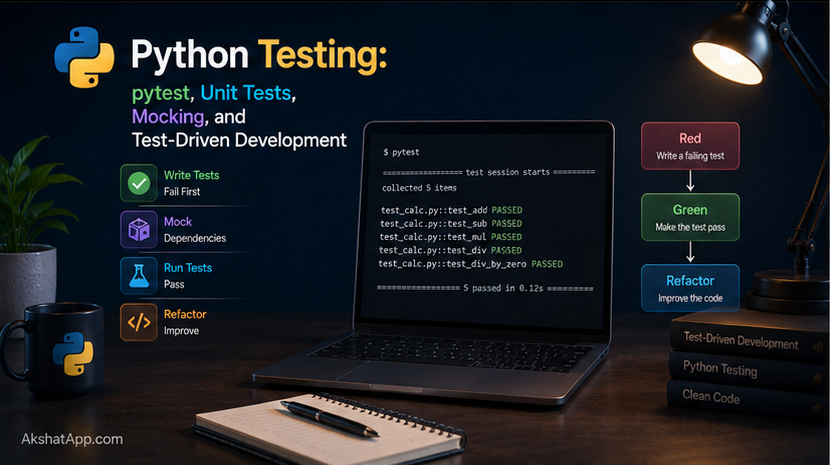
Every function built across this ten-post journey — miles_to_km, is_prime, word_frequency, get_exchange_rate — has been verified the same way: run it, look at the printed output, decide by eye whether it looks right. That works for a single function checked once. It falls apart completely the moment a project has fifty functions and someone changes one of them — how do you know the other forty-nine still work correctly, without manually re-checking every single one by hand, every single time?
Automated tests are the answer. A test is code that checks other code — calling a function with known inputs and verifying the output matches what you expect, entirely without a human watching and judging by eye. Run the whole test suite in seconds, get an immediate, unambiguous answer: everything still works, or here is exactly what broke.
This post covers pytest, the standard testing tool in the Python ecosystem, from your first test through mocking — testing code that depends on external services like the currency API from Post #10, without actually calling the internet every time your test suite runs.
The Mental Model: Tests Are Code That Checks Code
A test is, structurally, nothing more than: call a function with a specific input, and assert that the result matches what you expect. If it matches, the test passes silently. If it does not, the test fails loudly, telling you exactly what was expected versus what actually happened — no manual comparison, no eyeballing required.
The value compounds as a codebase grows. One test, run once, is barely more useful than a manual check. Fifty tests, run automatically every time any code changes, catch the exact moment a change to one function accidentally breaks another — something that would otherwise surface as a confusing bug report days or weeks later, disconnected from the change that actually caused it.
Installing and Setting Up pytest
uv add --dev pytest--dev marks pytest as a development dependency — needed to work on the project, not needed to actually run the finished program. This distinction matters once a project is deployed: production environments generally do not need testing tools installed at all.
Project Structure
unit-converter/
├── conversions.py
├── main.py
└── test_conversions.py
pytest automatically discovers test files following a naming convention: any file starting with test_ or ending in _test.py. Inside those files, it discovers any function starting with test_ as an individual test.
Your First Test
# test_conversions.py
from conversions import miles_to_km, km_to_miles, fahrenheit_to_celsius, celsius_to_fahrenheit


def test_miles_to_km():
    result = miles_to_km(10)
    assert result == 16.0934


def test_km_to_miles():
    result = km_to_miles(16.0934)
    assert abs(result - 10) < 0.0001  # float comparison, from Post #2
Run it:
uv run pytest========================== test session starts ===========================
collected 2 items
test_conversions.py .. [100%]
=========================== 2 passed in 0.02s ============================assert is the core mechanism — a plain Python statement that does nothing if the condition is True, and raises an AssertionError with a detailed message if it is False. pytest runs every discovered test function, catches any AssertionError (or other exception) each one raises, and reports a clear pass/fail summary for the entire suite.
Watching a Test Actually Fail
def test_miles_to_km_wrong():
    result = miles_to_km(10)
    assert result == 20  # deliberately wrong, to see what a failure looks like
______________________________ test_miles_to_km_wrong ______________________________
def test_miles_to_km_wrong():
result = miles_to_km(10)
> assert result == 20
E assert 16.0934 == 20
test_conversions.py:8: AssertionErrorpytest shows you exactly what value was produced versus what the assertion expected — no manual print-and-compare required. This detailed failure output, generated automatically from a plain assert statement, is one of pytest’s most valuable features compared to older, more verbose testing approaches.
Testing Multiple Cases: Parametrize
Writing a separate test function for every input case gets repetitive fast. pytest.mark.parametrize runs the same test logic against a whole table of inputs and expected outputs:
import pytest
from conversions import fahrenheit_to_celsius


@pytest.mark.parametrize("fahrenheit, expected_celsius", [
    (32, 0),
    (212, 100),
    (98.6, 37.0),
    (-40, -40),  # the famous point where both scales agree
])
def test_fahrenheit_to_celsius(fahrenheit, expected_celsius):
    result = fahrenheit_to_celsius(fahrenheit)
    assert abs(result - expected_celsius) < 0.01
pytest runs this single test function four separate times, once per tuple in the list, reporting each as its own pass or fail. This is dramatically more maintainable than four nearly-identical, hand-written test functions — adding a fifth test case is one more line in the list, not a new function.
Testing for Expected Exceptions
Post #7’s InsufficientFundsError should genuinely be raised under the right conditions — that behavior deserves its own test, just as much as a correct calculation does:
import pytest
from bank_account import BankAccount, InsufficientFundsError


def test_withdraw_insufficient_funds_raises():
    account = BankAccount(100)
    with pytest.raises(InsufficientFundsError):
        account.withdraw(150)


def test_withdraw_success():
    account = BankAccount(100)
    account.withdraw(30)
    assert account.balance == 70


def test_deposit_negative_amount_raises():
    account = BankAccount(100)
    with pytest.raises(ValueError):
        account.deposit(-50)
pytest.raises(ExceptionType) is a context manager (the with statement, from Post #9, applied here to a completely different purpose) that passes the test if the enclosed code raises exactly that exception type, and fails the test if it raises nothing, or raises a different exception entirely. Testing that invalid operations correctly fail is just as important as testing that valid operations correctly succeed.
Fixtures: Reusable Test Setup
Several tests above each create a fresh BankAccount(100) — repeated setup that a fixture can factor out:
import pytest
from bank_account import BankAccount, InsufficientFundsError


@pytest.fixture
def account():
    """Provides a fresh BankAccount with a starting balance for each test."""
    return BankAccount(100)


def test_withdraw_success(account):
    account.withdraw(30)
    assert account.balance == 70


def test_withdraw_insufficient_funds_raises(account):
    with pytest.raises(InsufficientFundsError):
        account.withdraw(150)


def test_deposit_increases_balance(account):
    account.deposit(50)
    assert account.balance == 150
A function decorated with @pytest.fixture becomes available as a parameter to any test function in the same file — pytest calls it fresh for every single test that requests it, guaranteeing each test starts from the exact same clean state, with zero risk of one test’s leftover changes accidentally affecting another.
Mocking: Testing Code That Depends on the Outside World
Post #10’s get_exchange_rate() calls a real API over the network. Testing it directly has real problems: it requires an internet connection, it is slow compared to everything else in a test suite, it could fail due to the external service being temporarily down (a problem with the test, not with your code), and the actual exchange rate changes daily — making assert result == 0.92 a test that passes today and fails tomorrow for reasons entirely unrelated to your code’s correctness.
Mocking replaces the real external call with a fake, controlled stand-in during the test — verifying your code’s logic without actually depending on the real network call succeeding.
from unittest.mock import patch, Mock
from currency import convert_currency


def test_convert_currency():
    mock_response = Mock()
    mock_response.status_code = 200
    mock_response.json.return_value = {"rates": {"EUR": 0.92}}
    mock_response.raise_for_status = Mock()  # does nothing, simulating success

    with patch("currency.requests.get", return_value=mock_response):
        result = convert_currency(100, "USD", "EUR")
        assert result == 92.0
patch("currency.requests.get", ...) temporarily replaces the real requests.get function, specifically within the currency module, with a controllable fake for the duration of the with block. Mock() creates an object that can stand in for anything — here, configured to behave like a successful requests response, with a specific fake exchange rate baked in. The test now runs instantly, requires no internet connection, and produces the exact same result every single time it runs, regardless of what the real exchange rate happens to be today.
def test_convert_currency_handles_network_failure():
    with patch("currency.requests.get", side_effect=requests.exceptions.Timeout):
        with pytest.raises(RuntimeError):
            convert_currency(100, "USD", "EUR")
side_effect lets a mock raise an exception instead of returning a value — this test verifies that convert_currency() correctly catches a network timeout and converts it into the clean RuntimeError designed back in Post #10, without ever needing an actual network failure to occur.
Test-Driven Development: A Brief Introduction
Test-Driven Development (TDD) inverts the usual order: write the test first, watch it fail (because the code it is testing does not exist yet), then write the minimum code needed to make it pass.
# Step 1: Write the test first, for a function that doesn't exist yet
def test_is_valid_email():
    assert is_valid_email("alex@example.com") == True
    assert is_valid_email("not-an-email") == False

# Step 2: Run it — it fails immediately, because is_valid_email doesn't exist
# NameError: name 'is_valid_email' is not defined

# Step 3: Write the minimum code to make the test pass
def is_valid_email(email: str) -> bool:
    return "@" in email and "." in email.split("@")[-1]

# Step 4: Run the test again — it passes
TDD is not universally practiced by every Python developer for every task — some prefer writing code first and tests immediately after, which achieves most of the same value. What TDD does force, valuably, even for developers who do not follow it strictly: thinking clearly about exactly what a function should do, and what “correct” actually means for it, before getting absorbed in how to implement it.
Testing the Unit Converter’s Full Stack
Bringing everything together — parametrized tests for the pure conversion functions, and a mocked test for the network-dependent currency feature:
# test_conversions.py
import pytest
from unittest.mock import patch, Mock
from conversions import miles_to_km, km_to_miles, fahrenheit_to_celsius, celsius_to_fahrenheit
from currency import convert_currency


@pytest.mark.parametrize("miles, expected_km", [
    (0, 0),
    (1, 1.60934),
    (10, 16.0934),
    (100, 160.934),
])
def test_miles_to_km(miles, expected_km):
    assert abs(miles_to_km(miles) - expected_km) < 0.001


@pytest.mark.parametrize("fahrenheit, expected_celsius", [
    (32, 0),
    (212, 100),
    (-40, -40),
])
def test_fahrenheit_to_celsius(fahrenheit, expected_celsius):
    assert abs(fahrenheit_to_celsius(fahrenheit) - expected_celsius) < 0.01


def test_round_trip_temperature():
    """Converting F to C and back should return (approximately) the original value."""
    original = 98.6
    celsius = fahrenheit_to_celsius(original)
    back_to_fahrenheit = celsius_to_fahrenheit(celsius)
    assert abs(back_to_fahrenheit - original) < 0.01


def test_convert_currency_with_mock():
    mock_response = Mock()
    mock_response.raise_for_status = Mock()
    mock_response.json.return_value = {"rates": {"EUR": 0.92}}

    with patch("currency.requests.get", return_value=mock_response):
        result = convert_currency(100, "USD", "EUR")
        assert result == 92.0
test_round_trip_temperature demonstrates a genuinely useful testing pattern worth internalizing: converting a value forward and then back should return (approximately) the original — a strong correctness check that does not require hardcoding the “right” answer separately, because the two functions’ own consistency with each other is exactly what is being verified.
Real-World Use Cases
Catching regressions: The single most valuable use of a test suite — running it after any code change immediately reveals whether something that used to work has broken, before a user or a production incident discovers it first.
Documenting expected behavior: A well-written test suite doubles as executable documentation — reading test_withdraw_insufficient_funds_raises tells a new developer exactly what withdraw() is supposed to do in that situation, more reliably than a comment that can silently go stale.
Enabling confident refactoring: Post #17 and Post #18 both involve restructuring existing code for performance or design reasons — a solid test suite is what makes that kind of change safe, by immediately flagging if a “pure refactor” accidentally changed behavior.
Continuous integration: Post #19 on production deployment covers running the test suite automatically on every code change before it can be deployed — the standard practice at essentially every professional software team, built directly on the tests covered in this post.
Common Mistakes and Gotchas
⚠️ Mistake 1: Testing implementation details instead of behavior
# Fragile — breaks if the internal variable name ever changes,
# even if the actual behavior is still correct
def test_bad():
    account = BankAccount(100)
    assert account._internal_balance_tracker == 100  # testing an implementation detail

# Robust — tests the actual observable behavior
def test_good():
    account = BankAccount(100)
    assert account.balance == 100
Tests should verify what a piece of code does, not how it does it internally — testing internal details makes tests brittle, breaking on legitimate refactors that changed nothing about actual behavior.
⚠️ Mistake 2: Tests that depend on each other’s order or shared state Each test should be fully independent — able to run alone, in any order, and produce the same result. Fixtures (covered above) are precisely how you avoid one test’s leftover state accidentally affecting another.
⚠️ Mistake 3: Not testing failure cases, only the “happy path”
Testing only that withdraw(30) succeeds, while never testing that withdraw(150) on an insufficient balance correctly raises an exception, leaves an entire category of important behavior completely unverified.
⚠️ Mistake 4: Forgetting to mock external dependencies A test suite that makes real network calls, real database writes, or real file system changes every time it runs is slow, flaky (failing for reasons unrelated to actual bugs), and sometimes has real side effects — genuinely modifying data every time the tests run. Mock anything that reaches outside the code actually being tested.
⚠️ Mistake 5: Writing tests only after code is finished, as an afterthought Tests written well after the code, under time pressure, tend to be shallow — verifying that the code does what it currently does, rather than what it is actually supposed to do, which quietly bakes in existing bugs as if they were correct behavior.
Performance Note
A fast test suite gets run constantly; a slow one gets run rarely, or gets skipped under deadline pressure — directly undermining the entire value of having tests at all. Mocking external dependencies, as covered above, is one of the most direct ways to keep a test suite fast: a test hitting a real network API might take hundreds of milliseconds or more per call and depends on external factors outside your control; the equivalent mocked test runs in microseconds and produces identical results every single time, regardless of network conditions.
Quick Reference
uv add --dev pytest
uv run pytest                  # run all tests
uv run pytest test_file.py      # run one file
uv run pytest -k "currency"     # run tests matching a name pattern
uv run pytest -v                # verbose output
# Basic test
def test_something():
assert function_under_test(input) == expected_output
# Parametrized test
import pytest
@pytest.mark.parametrize("input, expected", [(1, 2), (2, 4)])
def test_doubling(input, expected):
assert double(input) == expected
# Testing exceptions
def test_raises():
with pytest.raises(ValueError):
function_that_should_fail()
# Fixtures
@pytest.fixture
def sample_data():
return {"key": "value"}
def test_with_fixture(sample_data):
assert sample_data["key"] == "value"
# Mocking
from unittest.mock import patch, Mock
def test_with_mock():
mock_obj = Mock()
mock_obj.some_method.return_value = "fake result"
with patch("module.dependency", return_value=mock_obj):
...Exercises
Exercise 1 — Direct application
Write a full test suite for the is_prime() function from Post #4, using pytest.mark.parametrize to cover: known primes, known non-primes, the edge cases of 0 and 1, and a negative number.
Exercise 2 — Slight variation
Write tests for the word_frequency() function from Post #5, including a test for empty input and a test verifying that word counting is case-insensitive (or case-sensitive, whichever you decided in that post’s exercise — write the test to match your actual decision, and let it document that choice).
Exercise 3 — Real-world combination
Write a fixture that provides a UnitConverter instance with a temporary, pre-populated history file (using pathlib from Post #9 to create a test-specific file), and use it to test that show_history() correctly reflects previously saved conversions.
Exercise 4 — Open-ended challenge
Using TDD, write the test first for a function is_leap_year(year: int) -> bool — covering the actual rule (divisible by 4, except centuries, unless divisible by 400) with several parametrized cases — then implement the function afterward to make your tests pass.
FAQ
Q: Do I need to test every single function I write? A: In principle, yes, for anything with real logic worth verifying. In practice, trivial one-line functions with no branching logic offer diminishing returns from dedicated tests. The functions most worth testing are exactly the ones with conditions, edge cases, and failure modes — precisely the functions covered throughout this series.
Q: What’s the difference between unittest (Python’s built-in testing module) and pytest?
A: unittest ships with Python’s standard library and uses a more verbose, class-based style. pytest, a third-party package, uses plain functions and plain assert statements, with dramatically less boilerplate — and it can run unittest-style tests too. pytest has become the de facto standard across the Python ecosystem for new projects.
Q: How do I know how much of my code my tests actually cover?
A: The pytest-cov plugin (uv add --dev pytest-cov, then uv run pytest --cov) measures exactly this — what percentage of your code’s lines were actually executed during the test run. High coverage numbers are a useful signal but not a guarantee of correctness; a test can execute a line without meaningfully verifying its behavior.
Q: Is mocking “cheating” — am I really testing anything if I’m replacing the real dependency with a fake? A: You are testing your code’s logic — how it handles a successful response, how it handles a failure, what it does with the data it receives — independent of whether the actual external service happens to be working at the exact moment your tests run. Testing the real integration occasionally (in a separate, deliberately slower “integration test” suite) still has value; mocking is what keeps your everyday, frequently-run test suite fast and reliable.
Summary and Next Steps
You can now write pytest tests with plain assert statements, cover multiple cases efficiently with parametrize, verify that invalid operations correctly raise exceptions, share setup cleanly with fixtures, and — critically — mock external dependencies like network calls so your test suite runs fast and reliably regardless of the outside world’s cooperation. Every pure function built across this series now has a real, automated way to verify it stays correct as the code around it continues to change.
Your next step: Complete Exercise 1 — the full is_prime() test suite — and notice how writing the parametrized edge cases (0, 1, negative numbers) forces you to think precisely about what “prime” actually means at the boundaries, in a way that simply running the function once and eyeballing the output never would.
The next post addresses what happens when a test — or your program in general — fails in a way that is not immediately obvious why: systematic debugging, using Python’s actual debugging tools rather than scattering print() statements everywhere and hoping.
Code tested with Python 3.13, pytest 8.x. Last updated: June 2026.
Share This Post

Join our newsletter!
Get the latest developer guides, tutorials, and tips delivered straight to your inbox.



